Pioneer DVR-720H-s DVD Recorder
21. Copy Menu (Disc Backup)
Review Pages
1. Introduction
2. Packaging & Interior Look
3. Control Menu
4. The Tuner menu
5. The Video In/Out Menu
6. The Audio Out menu
7. The Language menu
8. The Recording menu
9. The Playback menu
10. Reading Tests
11. Compressed Audio (data CD/DVD)
12. Making a recording (DVD)
13. Making a recording (HDD)
14. Recording Options
15. Chase Play Feature
16. Timer Recording & Disc Navigator (DVD)
17. Editing and Finalizing a DVD-Video Disc
18. Disc Navigator (HDD)
19. Copy Menu (HDD -> DVD)
20. Copy Menu (DVD -> HDD)
21. Copy Menu (Disc Backup)
22. The Photoviewer
23. Writing Quality Tests
24. Error Correction Tests
25. Conclusion
2. Packaging & Interior Look
3. Control Menu
4. The Tuner menu
5. The Video In/Out Menu
6. The Audio Out menu
7. The Language menu
8. The Recording menu
9. The Playback menu
10. Reading Tests
11. Compressed Audio (data CD/DVD)
12. Making a recording (DVD)
13. Making a recording (HDD)
14. Recording Options
15. Chase Play Feature
16. Timer Recording & Disc Navigator (DVD)
17. Editing and Finalizing a DVD-Video Disc
18. Disc Navigator (HDD)
19. Copy Menu (HDD -> DVD)
20. Copy Menu (DVD -> HDD)
21. Copy Menu (Disc Backup)
22. The Photoviewer
23. Writing Quality Tests
24. Error Correction Tests
25. Conclusion
Pioneer DVR-720H-s DVD Recorder
Copy Menu (Disc Backup)

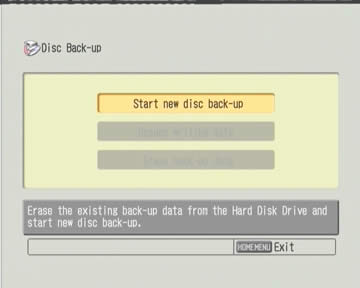
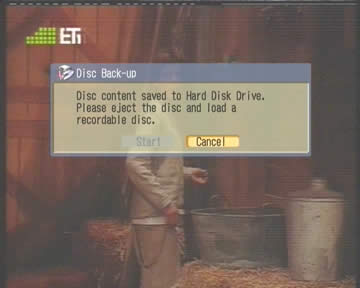
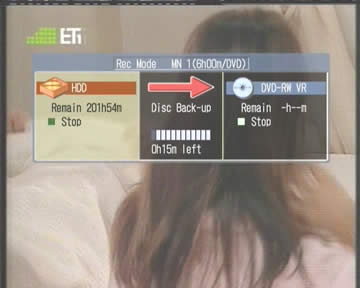
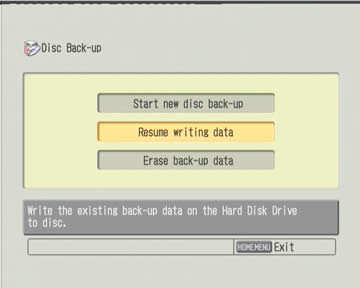
The Disc Back-up menu can be used to back up a copy of a finalized Video mode disc. The data is copied first to the hard drive, then on to another recordable DVD disc. The DVR-720H-s will not allow DVD-Video discs with CSS and Macrovision protection to be backed up. Discs that are region free can be backed up though. The data is retained on the hard drive if multiple copies are required, but again it becomes invisible to the user. This means that you cannot play back the video from the hard drive.



Review Pages
1. Introduction
2. Packaging & Interior Look
3. Control Menu
4. The Tuner menu
5. The Video In/Out Menu
6. The Audio Out menu
7. The Language menu
8. The Recording menu
9. The Playback menu
10. Reading Tests
11. Compressed Audio (data CD/DVD)
12. Making a recording (DVD)
13. Making a recording (HDD)
14. Recording Options
15. Chase Play Feature
16. Timer Recording & Disc Navigator (DVD)
17. Editing and Finalizing a DVD-Video Disc
18. Disc Navigator (HDD)
19. Copy Menu (HDD -> DVD)
20. Copy Menu (DVD -> HDD)
21. Copy Menu (Disc Backup)
22. The Photoviewer
23. Writing Quality Tests
24. Error Correction Tests
25. Conclusion
2. Packaging & Interior Look
3. Control Menu
4. The Tuner menu
5. The Video In/Out Menu
6. The Audio Out menu
7. The Language menu
8. The Recording menu
9. The Playback menu
10. Reading Tests
11. Compressed Audio (data CD/DVD)
12. Making a recording (DVD)
13. Making a recording (HDD)
14. Recording Options
15. Chase Play Feature
16. Timer Recording & Disc Navigator (DVD)
17. Editing and Finalizing a DVD-Video Disc
18. Disc Navigator (HDD)
19. Copy Menu (HDD -> DVD)
20. Copy Menu (DVD -> HDD)
21. Copy Menu (Disc Backup)
22. The Photoviewer
23. Writing Quality Tests
24. Error Correction Tests
25. Conclusion