Breaking News

ASRock Introduces Its First Taichi Flagship Monitor Lineup RICOH announces GR IV 30th Anniversary Edition Kit Samsung Begins Official Rollout of One UI 9 Canon announces EOS R8 Mark II Razer Unleashes the Kraken V4 X Sensa HD Haptics

logo

  • Share Us
    • Facebook
    • Twitter
  • Home
  • Home
  • News
  • Reviews
  • Essays
  • About
    • Submit News

    • Contact Us
    • Privacy

    • Promotion
    • Advertise

    • RSS Feed

Search form

Vantec PSU

Jul 18,2006 0

3. Installation


Review Pages

1. Introduction
2. Connectors
3. Installation
4. Benchmarks
5. Conclusion


The installation of the ION 2 Power supply unit was easy and the time needed from putting in the first screw to pressing the power button was only a few minutes.

First of all, we removed the old PSU from our test PC and put the ION 2 in its place...
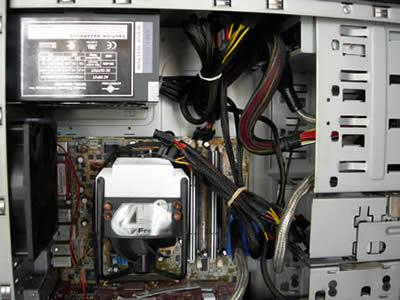
No difficulties until now, as only some screwing and unscrewing was needed. Ensure that the PSU seated correctly and installed firmly in the case (this may vary depending on the case).
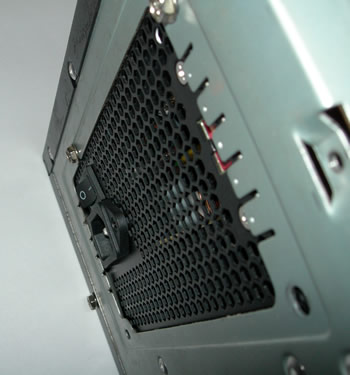
When installed in our PC case, the PSU fan is located on the bottom of the PSU, facing the motherboard. The fan draws air from the case, blows it across the PSU components and out the perforations at the rear.
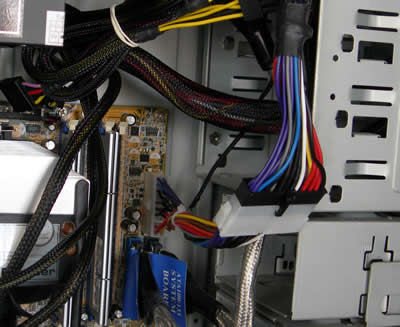
We then installed the Universal adaptor, in order for the 24 pin cable to plug into our motherboard which has a 20-pin connector. This adds a few cm of extra cable inside the case though.
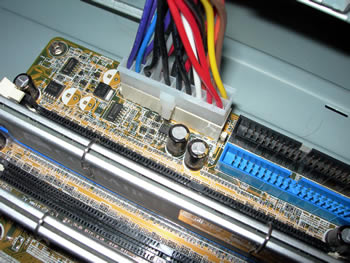
The connector firmly placed on the motherboard...

Next step was to plug the 4-pin power cable onto the motherboard.

And finally, we plug in the molex cables to each device. We installed the cables from top to bottom, starting with the DVD drive...

..moving on to the HDD drives, and finally the GPU card.

As one may notice here, the cables cause a bit of a clutter, due to the nature of the the layout of components in the case. The test machine was an AMD 3500+ CPU with an ASUS A8N deluxe (AGP 8x) motherboard, an ATI X800 graphics card, two hard drives and an optical drive.

The case used was a HEROICHI MIDI TOWER PRO. The pre-sleeved cables do make a difference though, and airflow is not restricted as much as it would be with standard cabling (no sleeves).


Review Pages

1. Introduction
2. Connectors
3. Installation
4. Benchmarks
5. Conclusion


Pages

  • « first
  • ‹ previous
  • 1
  • 2
  • 3
  • 4
  • 5
  • next ›
  • last »

Vantec

Tags: Vantec
Previous Post
Seagate ST380811AS
Next Post
Logitech G5

Related Posts

  • Vantec iCEBERQ6

  • Vantec NST-530U2 External Enclosure

  • New NexStar DX for DVD Burners

  • Vantec NexStar 3 eSATA

  • Vantec AVOX Jukebox Review

  • Vantec AVOX Jukebox

  • Vantec NexStar 3

  • Vantec ICEBERQ 5

Latest Reviews

Fanxiang MP83 M.2 NVMe SSD Enclosure
Enterprise & IT

Fanxiang MP83 M.2 NVMe SSD Enclosure

Ugreen CM642 USB4.0 Enclosure
PC components

Ugreen CM642 USB4.0 Enclosure

be quiet! Dark Power 14 IO
PC components

be quiet! Dark Power 14 IO

SanDisk High Endurance 512GB microSDXC
Cameras

SanDisk High Endurance 512GB microSDXC

Samsung PRO Ultimate 512GB microSDXC
Cameras

Samsung PRO Ultimate 512GB microSDXC

Popular News

CORSAIR announces Vanguard Pro 96 and Vanguard 96 Gaming Keyboards

CORSAIR announces Vanguard Pro 96 and Vanguard 96 Gaming Keyboards

MSI Launches FORGE GK600 TKL WIRELESS Special Edition Compact Mechanical Keyboard

MSI Launches FORGE GK600 TKL WIRELESS Special Edition Compact Mechanical Keyboard

MSI’s Latest AMD X870E MAX & EVO Series Motherboards

MSI’s Latest AMD X870E MAX & EVO Series Motherboards

Panasonic Introduces the First Ultra-Telephoto Zoom Lens in the LUMIX S Series

Panasonic Introduces the First Ultra-Telephoto Zoom Lens in the LUMIX S Series

COLORFUL Launches iGame B850M ULTRA Series Micro-ATX Motherboards

COLORFUL Launches iGame B850M ULTRA Series Micro-ATX Motherboards

COLORFUL Presents Limited Edition Chitu MAG-60 Magnetic Keyboard Inspired by the Year of the Horse

COLORFUL Presents Limited Edition Chitu MAG-60 Magnetic Keyboard Inspired by the Year of the Horse

COLORFUL Presents iGame Z890 ULTRA-S W and iGame Z890M ULTRA Z Motherboards

COLORFUL Presents iGame Z890 ULTRA-S W and iGame Z890M ULTRA Z Motherboards

LIAN LI Launches 8.8” Universal Screen with Flexible Mounting Solution

LIAN LI Launches 8.8” Universal Screen with Flexible Mounting Solution

Main menu

  • Home
  • News
  • Reviews
  • Essays
  • About
    • Submit News

    • Contact Us
    • Privacy

    • Promotion
    • Advertise

    • RSS Feed
  • About
  • Privacy
  • Contact Us
  • Promotional Opportunities @ CdrInfo.com
  • Advertise on out site
  • Submit your News to our site
  • RSS Feed