Breaking News

ADATA Launches URBAN TAPSAFE External SSD Sony Expands Gaming Gear Range with INZONE H6 Air and INZONE M10S II Transcend Launches RDE3 microSD Express Card Reader for Next-Generation High-Speed Performance PlayStation Plus Game Catalog for April 2026 Samsung Sets a New Standard of Color with Micro RGB TV Lineup

logo

  • Share Us
    • Facebook
    • Twitter
  • Home
  • Home
  • News
  • Reviews
  • Essays
  • Forum
  • Legacy
  • About
    • Submit News

    • Contact Us
    • Privacy

    • Promotion
    • Advertise

    • RSS Feed
    • Site Map

Search form

Shuttle SD32G2

May 9,2007 0

4. Opening the case


Review Pages

1. Introduction
2. Full specifications
3. The Package
4. Opening the case
5. BIOS
6. Installation
7. Everest Ultimate Edition 2006 - SiSoft Sandra
8. PCMARK - 3DMARK
9. Science Mark - PovRay - Nero Digital
10. CINEBENCH -SuperPI
11. Overclocking
12. Installing a VGA card
13. Conclusion


After opening the case (very easy), we can finally access the interior. Every seems well packaged and secured at their place. This is the left side of the box. We can see the two PCI/PCI-e and memory slots.

Zooming can give us more details. You can see that one SATA cable is already pre-installed. There is another SATA slot available and of course an IDE channel (cable also pre-installed). We do believe that such case should had at least 4 SATA connectors, most optical drives are now SATA also... The 945G Express chipset is cooled by an air blower, while the 950G graphics card by a passive heatshink.

Moving to the left side, we can see the CPU area and the PCI, PCI-e slots. There is also a tiny Clear CMOS button, which can be accessed from the outside, so in case of a bad setting, you don't have to open the box, very handy!

The box can handle two (2) 3.5" devices (2x HDD or 1x HDD, 1x floppy) and a 5.25" optical device.

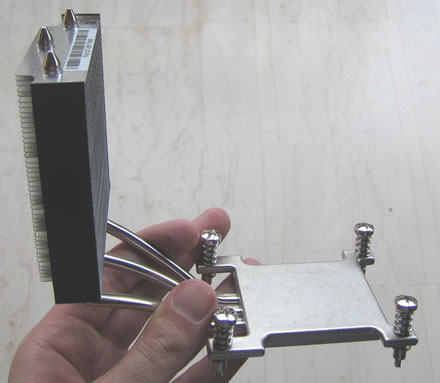
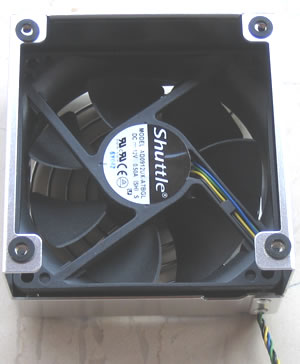
Removing the storage bay, we can see clearly the interior. The CPU cooler is what Shuttle proposes for silent use. Its made out of aluminum with three heat pipes going to a big aluminum heatshink. In top there is a 92mm fan that blows out the heat out of the box.

Here is the CPU cooler uncovered
While the rotating fan is "made" from Shuttle:
At the right side, we can see the "big" PSU, its rated at 250W
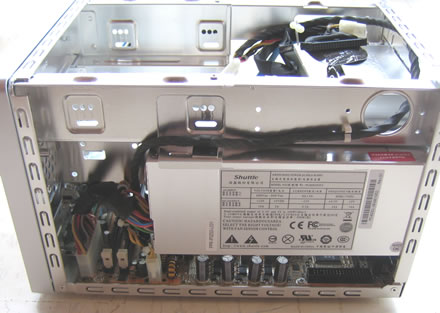
with the following output values, they should be enough to power, two HDD, one optical recorder an a PCI-E card, but we will find out later if it does :-)

For our tests, we installed a 3.5" HDD drive. We used the pre-installed SATA and power cables, so everying is tidy and there is lot of room space under the storage bay and the CPU area.

In case you install more HDD and optical devices, space room would be smaller, but efficient for low CPU temperatures:


Review Pages

1. Introduction
2. Full specifications
3. The Package
4. Opening the case
5. BIOS
6. Installation
7. Everest Ultimate Edition 2006 - SiSoft Sandra
8. PCMARK - 3DMARK
9. Science Mark - PovRay - Nero Digital
10. CINEBENCH -SuperPI
11. Overclocking
12. Installing a VGA card
13. Conclusion


Pages

  • « first
  • ‹ previous
  • 1
  • 2
  • 3
  • 4
  • 5
  • 6
  • 7
  • 8
  • 9
  • …
  • next ›
  • last »

SFF

Shuttle

Intel

Tags: SFF Shuttle Intel
Previous Post
Piel Frama Pearl case
Next Post
OCZ PC2-9200 FlexXLC

Related Posts

  • ASRock Unveils Intel Arc Pro B70 Graphics Cards, Redefining Professional Workspaces

  • G.SKILL DDR5 Memory Kits Confirmed as Intel XMP 3.0 'Ready' for Intel Core Ultra 200S Plus Series Processors

  • Shuttle Launches the XZ890G2

  • Intel Launches New Core Ultra 200HX Plus Series Mobile Processors

  • Intel Announces New Intel Core Ultra 200S Plus Series Desktop Processors

  • Intel Launches Core Series 2 Processor with Real-Time Performance and Expands Edge AI Portfolio

  • Intel Launches new Intel Xeon 600 Processors for Workstation

  • Intel Core Ultra Series 3 Debut at CES 2026

Latest Reviews

In the Age of AI Phishing, the Best User Experience Might Be the One That Feels Safest
Enterprise & IT

In the Age of AI Phishing, the Best User Experience Might Be the One That Feels Safest

SoundPeats C30
Consumer Electronics

SoundPeats C30

Why Streaming Live Casino Games Demands Smarter Tech
Enterprise & IT

Why Streaming Live Casino Games Demands Smarter Tech

Kioxia Exceria Plus G3 512GB microSD
Cameras

Kioxia Exceria Plus G3 512GB microSD

SoundPeats Cove Pro
Consumer Electronics

SoundPeats Cove Pro

Popular News

TEAMGROUP Launches EXPERT P34F Find My External SSD

TEAMGROUP Launches EXPERT P34F Find My External SSD

Samsung announces Galaxy Tab S11 and Galaxy S25 FE series

Samsung announces Galaxy Tab S11 and Galaxy S25 FE series

Viltrox Showcases Upcoming Lens Lineup and New TTL Flash at IBC 2025

Viltrox Showcases Upcoming Lens Lineup and New TTL Flash at IBC 2025

CORSAIR announces Vanguard Pro 96 and Vanguard 96 Gaming Keyboards

CORSAIR announces Vanguard Pro 96 and Vanguard 96 Gaming Keyboards

Panasonic Introduces the First Ultra-Telephoto Zoom Lens in the LUMIX S Series

Panasonic Introduces the First Ultra-Telephoto Zoom Lens in the LUMIX S Series

MSI Launches DATAMAG 40Gbps Magnetic Portable SSD

MSI Launches DATAMAG 40Gbps Magnetic Portable SSD

MSI Launches FORGE GK600 TKL WIRELESS Special Edition Compact Mechanical Keyboard

MSI Launches FORGE GK600 TKL WIRELESS Special Edition Compact Mechanical Keyboard

Viltrox Joins the L-Mount Alliance, Expanding Creative Possibilities

Viltrox Joins the L-Mount Alliance, Expanding Creative Possibilities

Main menu

  • Home
  • News
  • Reviews
  • Essays
  • Forum
  • Legacy
  • About
    • Submit News

    • Contact Us
    • Privacy

    • Promotion
    • Advertise

    • RSS Feed
    • Site Map
  • About
  • Privacy
  • Contact Us
  • Promotional Opportunities @ CdrInfo.com
  • Advertise on out site
  • Submit your News to our site
  • RSS Feed