Breaking News

ASUS Announces WiFi 8 Router DJI Launches Osmo 360 II Razer introduces Clio X Wireless Speaker Head Cushion That Delivers THX Spatial Audio LiberNovo Showcases Ergonomic Innovation at IFA 2026 with Maxis Series for Big And Tall Users TIMEKETTLE UNVEILS NEW W4 PLUS AI INTERPRETER EARBUDS EXPANDING REAL-TIME TRANSLATION ACROSS CALLS, MEETINGS AND MULTIMEDIA CONTENT

logo

  • Share Us
    • Facebook
    • Twitter
  • Home
  • Home
  • News
  • Reviews
  • Essays
  • About
    • Submit News

    • Contact Us
    • Privacy

    • Promotion
    • Advertise

    • RSS Feed

Search form

Shuttle SD32G2

May 9,2007 0

11. Overclocking


Review Pages

1. Introduction
2. Full specifications
3. The Package
4. Opening the case
5. BIOS
6. Installation
7. Everest Ultimate Edition 2006 - SiSoft Sandra
8. PCMARK - 3DMARK
9. Science Mark - PovRay - Nero Digital
10. CINEBENCH -SuperPI
11. Overclocking
12. Installing a VGA card
13. Conclusion


Shuttle doesn't exactly advertise the SD32G2 as an overclocking champion. Despite this, we still had to try. As we saw earlier, the BIOS doesn't offer many options that could help us get a higher FSB frequency:

  1. You cannot set the internal CPU multiplier from the BIOS. This means limited overclocking attempts, especially with CPUs like the E6600 and higher. That shouldn't be a big problem for E6300 CPUs however
  2. Not many FSB:RAM dividers, but this isn't a major overclocking factor anyway
  3. Not many options for memory/core voltages

For our overclocking attempts, we used Shuttle's XPC Tools

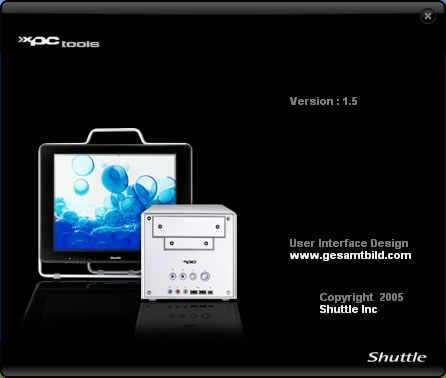
The installation process is easy, just follow the wizard. After installation is finished, we can now see how this software works.

The latest and our installed version is 1.50
The main screen offers critical information about the temperatures and system voltages:
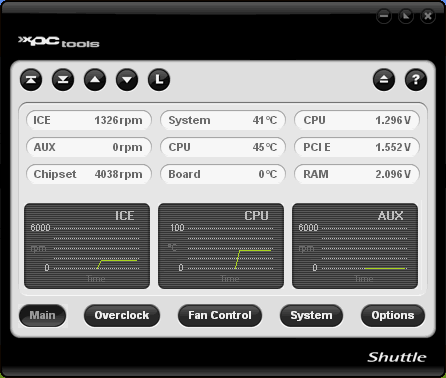
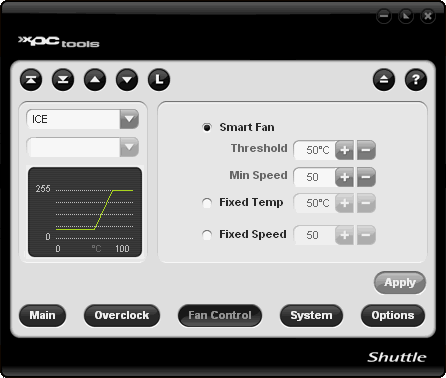
While with the Fan Control button, we can set the Fan functions:
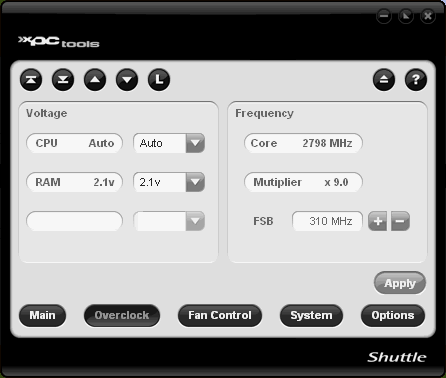
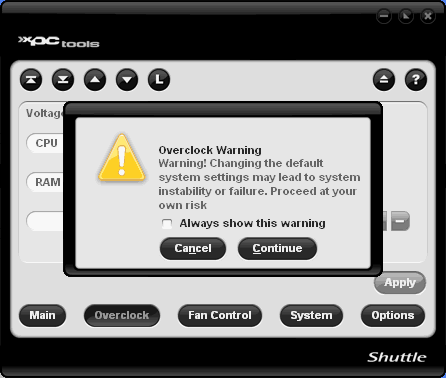
Time has come to attempt to overclock our E6600. There aren't many options to play with, just the basic. Let's raise the FSB:

Without modifying the core voltages we pumped up the FSB to 310MHz and our E6600 reached 2.80GHz
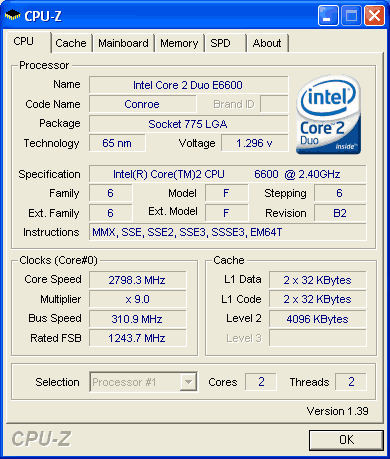
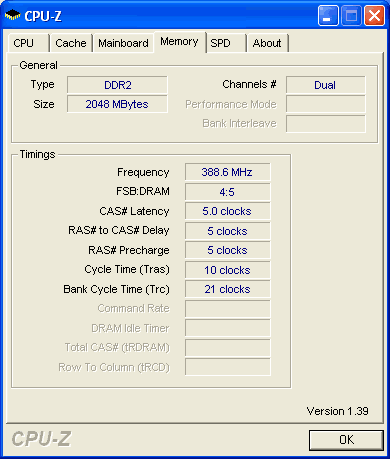
The system's stability was confirmed after running Orthos stability software for many hours. We didn't have any problems. There was an increase in CPU temperatures (around 52°C in idle and 63°C under full load). Perhaps with such a small box it is not the best choice to attempt extreme overclocking. While this system can be overclocked, we don't recommend it.


Review Pages

1. Introduction
2. Full specifications
3. The Package
4. Opening the case
5. BIOS
6. Installation
7. Everest Ultimate Edition 2006 - SiSoft Sandra
8. PCMARK - 3DMARK
9. Science Mark - PovRay - Nero Digital
10. CINEBENCH -SuperPI
11. Overclocking
12. Installing a VGA card
13. Conclusion


Pages

  • « first
  • ‹ previous
  • …
  • 5
  • 6
  • 7
  • 8
  • 9
  • 10
  • 11
  • 12
  • 13
  • next ›
  • last »

SFF

Shuttle

Intel

Tags: SFF Shuttle Intel
Previous Post
Piel Frama Pearl case
Next Post
OCZ PC2-9200 FlexXLC

Related Posts

  • Intel Gamer Days 2026 Kicking Off with AAA Gaming Bundle - Partnerships

  • Intel Arc G-Series Processors Set a New Standard for Handheld PC Gaming

  • Intel at Computex 2026

  • Intel Launches Intel Core Series 3 Processors

  • ASRock Unveils Intel Arc Pro B70 Graphics Cards, Redefining Professional Workspaces

  • G.SKILL DDR5 Memory Kits Confirmed as Intel XMP 3.0 'Ready' for Intel Core Ultra 200S Plus Series Processors

  • Shuttle Launches the XZ890G2

  • Intel Launches New Core Ultra 200HX Plus Series Mobile Processors

Latest Reviews

be quiet! Dark Power 14 IO
PC components

be quiet! Dark Power 14 IO

SanDisk High Endurance 512GB microSDXC
Cameras

SanDisk High Endurance 512GB microSDXC

Samsung PRO Ultimate 512GB microSDXC
Cameras

Samsung PRO Ultimate 512GB microSDXC

be quiet! Light Mount TKL
Consumer Electronics

be quiet! Light Mount TKL

be quiet! Light Loop IO LCD
Cooling Systems

be quiet! Light Loop IO LCD

Popular News

CORSAIR announces Vanguard Pro 96 and Vanguard 96 Gaming Keyboards

CORSAIR announces Vanguard Pro 96 and Vanguard 96 Gaming Keyboards

MSI Launches FORGE GK600 TKL WIRELESS Special Edition Compact Mechanical Keyboard

MSI Launches FORGE GK600 TKL WIRELESS Special Edition Compact Mechanical Keyboard

Viltrox Showcases Upcoming Lens Lineup and New TTL Flash at IBC 2025

Viltrox Showcases Upcoming Lens Lineup and New TTL Flash at IBC 2025

Panasonic Introduces the First Ultra-Telephoto Zoom Lens in the LUMIX S Series

Panasonic Introduces the First Ultra-Telephoto Zoom Lens in the LUMIX S Series

MSI Launches DATAMAG 40Gbps Magnetic Portable SSD

MSI Launches DATAMAG 40Gbps Magnetic Portable SSD

MSI’s Latest AMD X870E MAX & EVO Series Motherboards

MSI’s Latest AMD X870E MAX & EVO Series Motherboards

COLORFUL Launches iGame B850M ULTRA Series Micro-ATX Motherboards

COLORFUL Launches iGame B850M ULTRA Series Micro-ATX Motherboards

COLORFUL Presents Limited Edition Chitu MAG-60 Magnetic Keyboard Inspired by the Year of the Horse

COLORFUL Presents Limited Edition Chitu MAG-60 Magnetic Keyboard Inspired by the Year of the Horse

Main menu

  • Home
  • News
  • Reviews
  • Essays
  • About
    • Submit News

    • Contact Us
    • Privacy

    • Promotion
    • Advertise

    • RSS Feed
  • About
  • Privacy
  • Contact Us
  • Promotional Opportunities @ CdrInfo.com
  • Advertise on out site
  • Submit your News to our site
  • RSS Feed