Breaking News

HighPoint and Graid Technology Announce Breakthrough Gen5 Parity Storage Benchmark Why has G.SKILL DRAM memory prices increased so much recently (since 2025 Q4) Samsung Expands Premium Micro RGB TV Lineup for 2026 with New Sizes and Advanced Features Viltrox AF 35mm F1.2 LAB Z Launch Ends Year With a Milestone Arctic announces MX-7 – ULTIMATE Performance Thermal Paste

logo

  • Share Us
    • Facebook
    • Twitter
  • Home
  • Home
  • News
  • Reviews
  • Essays
  • Forum
  • Legacy
  • About
    • Submit News

    • Contact Us
    • Privacy

    • Promotion
    • Advertise

    • RSS Feed
    • Site Map

Search form

Pioneer DVR-320-s DVD Recorder

Sep 29,2004 0

19. Conclusion


Review Pages

1. Introduction
2. Packaging & Interior Look
3. Control Menu
4. The Tuner menu
5. The Video In/Out Menu
6. The Audio Out menu
7. The Language menu
8. The Recording menu
9. The Playback menu
10. Reading Tests
11. Compressed Audio Performance
12. Making a recording
13. Recording Options
14. Advanced Features - Page 1
15. Advanced Features - Page 2
16. Editing and Finalizing a DVD-Video Disc
17. Writing Quality Tests
18. Error Correction Tests
19. Conclusion


Pioneer DVR-320-S DVD Recorder

Conclusion

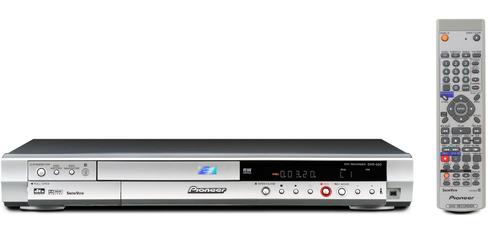
The Pioneer DVR-320-S is an excellent player feature-wise. It is simple to use, although it will take a small amount of time to get aquainted with the large remote control and all the buttons and their functions. The good thing is that the included manual describes all the unit's functions in simple words. Recording and playback was flawless, and without any surprises (device crashing, discs written being unreadable etc). As a word of caution at this point, be careful when using the VR format for recording. It seems that this format's compatibility is manufacturer dependent, chances are that discs written in this format are not playable in other standalone DVD players.

The DVR-320-S offers a set of impressive features as well, like the chase play feature, that let's you watch what you have recorded previously on a disc, while recording on the same disc. Its set of inputs is sufficient even for the most demanding user, especially for a device of its kind. The only thing missing is composite video output, but there are many other DVD players out there that do not offer this feature as well.

Even if is not explicitly stated in the specs, the DVR-320-s can playback DVD+R/RW discs. The results were mixed though, some discs had no playback problems at all, while others would not be recognized by the DVR-320-s

Also, its lack of support for DVD+R DL discs maybe another decisive factor for potential buyers. Although DL disc prices are high right now, they are expected to drop in the near future. So people that want to plan ahead, may get discouraged from the DVD-320-S not being able to read DVD+R DL discs. The Pioneer DVR-320-S's street price in North America is approximately $350, and around €400 in Europe.


The Good

- Slim Design
- Easy to setup/use
- DV IN/OUT
- Advanced features like chase play, DVD-Video menu editing.
- Good error correction
- Good writing quality
- Explanatory manual
- Remote control can be programmed to control TV as well

The Bad

- Supports only DVD-R/DVD-RW for recording
- Does not support playback of DVD+R DL discs
- Does not support DVD discs with compressed audio/image files


Review Pages

1. Introduction
2. Packaging & Interior Look
3. Control Menu
4. The Tuner menu
5. The Video In/Out Menu
6. The Audio Out menu
7. The Language menu
8. The Recording menu
9. The Playback menu
10. Reading Tests
11. Compressed Audio Performance
12. Making a recording
13. Recording Options
14. Advanced Features - Page 1
15. Advanced Features - Page 2
16. Editing and Finalizing a DVD-Video Disc
17. Writing Quality Tests
18. Error Correction Tests
19. Conclusion
 

Pages

  • « first
  • ‹ previous
  • …
  • 11
  • 12
  • 13
  • 14
  • 15
  • 16
  • 17
  • 18
  • 19

Pioneer

Tags: Pioneer
Previous Post
Doom 3
Next Post
Rocket Division Software Grab&Burn

Related Posts

  • Pioneer Japan announces BDR-WX01DM for US market

  • Pioneer Japan announces new optical storage drives for JIS X6257 archive format

  • Pioneer Japan updates its CD-DVD Software utility

  • Pioneer Japan announces new BDR-X13J-X external BD Writer and BDR-WX01DM for archiving

  • Pioneer Japan releases new firmware updates for external Blu-Ray Recorders

  • Pioneer BDR-XD08UMB-S External Blu-Ray Recorder

  • Pioneer Japan updates firmware for their X13 lineup (30-01-2023)

  • Pioneer BDR-X13U-S

Latest Reviews

Noctua NP-DM3 desk mat
Gaming

Noctua NP-DM3 desk mat

Crucial P510 2TB NMVE
PC components

Crucial P510 2TB NMVE

The Quiet Technology Behind the Spin
Enterprise & IT

The Quiet Technology Behind the Spin

Crucial DDR5 Pro 6400 CL32
PC components

Crucial DDR5 Pro 6400 CL32

SOUNDPEATS Clip1
Consumer Electronics

SOUNDPEATS Clip1

Popular News

COLORFUL Introduces CVN B850I GAMING FROZEN Motherboard

COLORFUL Introduces CVN B850I GAMING FROZEN Motherboard

COLORFUL Presents CVN X870 ARK FROZEN Motherboard for AMD Ryzen 9000 CPUs

COLORFUL Presents CVN X870 ARK FROZEN Motherboard for AMD Ryzen 9000 CPUs

COLORFUL Presents the B860 Series Motherboards

COLORFUL Presents the B860 Series Motherboards

Intel-AMD new motherboards announced

Intel-AMD new motherboards announced

TEAMGROUP Launches EXPERT P34F Find My External SSD

TEAMGROUP Launches EXPERT P34F Find My External SSD

ASRock AM5 Motherboards Now Fully Support AMD Ryzen 9 9950X3D & 9900X3D Processors

ASRock AM5 Motherboards Now Fully Support AMD Ryzen 9 9950X3D & 9900X3D Processors

Samsung announces Galaxy Tab S11 and Galaxy S25 FE series

Samsung announces Galaxy Tab S11 and Galaxy S25 FE series

Viltrox Showcases Upcoming Lens Lineup and New TTL Flash at IBC 2025

Viltrox Showcases Upcoming Lens Lineup and New TTL Flash at IBC 2025

Main menu

  • Home
  • News
  • Reviews
  • Essays
  • Forum
  • Legacy
  • About
    • Submit News

    • Contact Us
    • Privacy

    • Promotion
    • Advertise

    • RSS Feed
    • Site Map
  • About
  • Privacy
  • Contact Us
  • Promotional Opportunities @ CdrInfo.com
  • Advertise on out site
  • Submit your News to our site
  • RSS Feed