Breaking News

ASUS ProArt RTX Spark Windows PCs Available for Immediate Pre-Order Kioxia Introduces E1.L QLC-based SSDs for Hyperscale Data Centers CORSAIR Launches the HS80 v2 MAX WIRELESS Gaming Headset Sony Announces the World's First Eclipsa Audio Certified Microphone1 for Smartphones Razer Unveils the Basilisk V4 Line

logo

  • Share Us
    • Facebook
    • Twitter
  • Home
  • Home
  • News
  • Reviews
  • Essays
  • About
    • Submit News

    • Contact Us
    • Privacy

    • Promotion
    • Advertise

    • RSS Feed

Search form

ASUS A6Ja

Jun 22,2006 0

10. Battery - Noise Tests


Review Pages

1. Features
2. Unpackaging
3. Bios
4. HDD - Monitor
5. CPU - Memory Tests
6. GPU Tests
7. Overclocking
8. HDD Tests
9. ODD Tests
10. Battery - Noise Tests
11. Final Words


ASUS A6JA - Page 10

- Battery Tests

In order to test the battery performance, I used a freeware utility called "Battery Eater Pro". This utility can perform a series of CPU load, GPU rendering and HDD activities to simulate scenarios. Two modes were tested as defined by ASUS Power4Gear, "Super Performance" and "Battery Saving", with screensave disabled. The reported times are probably the worst times you will get, since reducing brightness leads to better battery times.
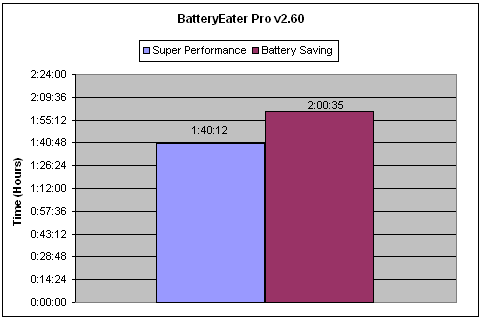
When the CPU runs at full speed, the best scenario gives 1.40 hours of autonomy, which is not very good. In the case of several power save modes (like CPU dropping speed), you will gain 20 more minutes. Again, not satisfactory. I don't know if the 8 cell battery pack that ASUS offers can increase battery autonomy or not.

- Heat and Noise

The ASUS A6JA gets quite hot when in operation. At the start, the CPU/HDD temperatures are quite low (58°C/38°C), but during normal operation it climbs higher (as reported by the notebook's sensors):

The "worst" values I saw, when using "Super Performance" mode, were high:

The fan doesn't kick-in at all times to cool down the CPU/GPU, so in general, the A6JA is noiseless. Of course, when things get hot, you will hear the fan rotating, but only for few seconds. Again, it depends on CPU/GPU use. In general, we can say that the A6JA produces little noise during its operation.


Review Pages

1. Features
2. Unpackaging
3. Bios
4. HDD - Monitor
5. CPU - Memory Tests
6. GPU Tests
7. Overclocking
8. HDD Tests
9. ODD Tests
10. Battery - Noise Tests
11. Final Words


Pages

  • « first
  • ‹ previous
  • …
  • 3
  • 4
  • 5
  • 6
  • 7
  • 8
  • 9
  • 10
  • 11
  • next ›
  • last »

ASUS

Tags: ASUS
Previous Post
Polstar igeo-plus pbt-248
Next Post
Teac Headsets

Related Posts

  • ASUS ProArt RTX Spark Windows PCs Available for Immediate Pre-Order

  • ASUS Announces New 64GB Configuration of ASUS Ascent GX10

  • Announcing the New ASUS Googlebook 14

  • ASUS Announces Ascent QN10 Mini PC

  • ASUS Announces WiFi 8 Router

  • Asus announces ExpertBook B3 G2 and ExpertBook P3 G2

  • ASUS Announces Prime AP304 PC Case

  • ASUS Announces ProArt Display OLED PA279CDV and PA329CDV

Latest Reviews

Fanxiang MP83 M.2 NVMe SSD Enclosure
Enterprise & IT

Fanxiang MP83 M.2 NVMe SSD Enclosure

Ugreen CM642 USB4.0 Enclosure
PC components

Ugreen CM642 USB4.0 Enclosure

be quiet! Dark Power 14 IO
PC components

be quiet! Dark Power 14 IO

SanDisk High Endurance 512GB microSDXC
Cameras

SanDisk High Endurance 512GB microSDXC

Samsung PRO Ultimate 512GB microSDXC
Cameras

Samsung PRO Ultimate 512GB microSDXC

Popular News

MSI’s Latest AMD X870E MAX & EVO Series Motherboards

MSI’s Latest AMD X870E MAX & EVO Series Motherboards

COLORFUL Launches iGame B850M ULTRA Series Micro-ATX Motherboards

COLORFUL Launches iGame B850M ULTRA Series Micro-ATX Motherboards

COLORFUL Presents Limited Edition Chitu MAG-60 Magnetic Keyboard Inspired by the Year of the Horse

COLORFUL Presents Limited Edition Chitu MAG-60 Magnetic Keyboard Inspired by the Year of the Horse

COLORFUL Launches iGame B850I MINI OC V14 Motherboard

COLORFUL Launches iGame B850I MINI OC V14 Motherboard

COLORFUL Presents iGame Z890 ULTRA-S W and iGame Z890M ULTRA Z Motherboards

COLORFUL Presents iGame Z890 ULTRA-S W and iGame Z890M ULTRA Z Motherboards

COLORFUL Launches the iGame X870E VULCAN W OC Motherboard

COLORFUL Launches the iGame X870E VULCAN W OC Motherboard

COLORFUL Expands B850 Motherboard Lineup with New CVN, Battle-Ax, and MEOW Models

COLORFUL Expands B850 Motherboard Lineup with New CVN, Battle-Ax, and MEOW Models

ASRock Adds Support for One Sub-Channel DRAM Module on Intel DDR5 Motherboards

ASRock Adds Support for One Sub-Channel DRAM Module on Intel DDR5 Motherboards

Main menu

  • Home
  • News
  • Reviews
  • Essays
  • About
    • Submit News

    • Contact Us
    • Privacy

    • Promotion
    • Advertise

    • RSS Feed
  • About
  • Privacy
  • Contact Us
  • Promotional Opportunities @ CdrInfo.com
  • Advertise on out site
  • Submit your News to our site
  • RSS Feed