Breaking News

ASUS Announces ProArt Router PRT-BE5000 and ProArt Switch PQG-U1080 CORSAIR Expands the Popular FRAME Series Case Lineup DeepCool Launches the LT360 VISION ARGB Noctua and Asetek Announce Flagship AIO Liquid Coolers Toshiba Begins Sampling of 30-34 TB SMR Nearline Hard Disk Drives

logo

  • Share Us
    • Facebook
    • Twitter
  • Home
  • Home
  • News
  • Reviews
  • Essays
  • Forum
  • Legacy
  • About
    • Submit News

    • Contact Us
    • Privacy

    • Promotion
    • Advertise

    • RSS Feed
    • Site Map

Search form

ASUS A6Ja

Jun 22,2006 0

3. Bios


Review Pages

1. Features
2. Unpackaging
3. Bios
4. HDD - Monitor
5. CPU - Memory Tests
6. GPU Tests
7. Overclocking
8. HDD Tests
9. ODD Tests
10. Battery - Noise Tests
11. Final Words


ASUS A6JA - Page 3

- Bios

After powering up the ASUS A6JA, you get the ASUS logo and within a few minutes, you are asked to complete the Windows XP Home SP2 installation (language, time zone, passwords). I checked the ASUS web site and found a new BIOS (207) that was available for this notebook, which I installed before performing any tests.

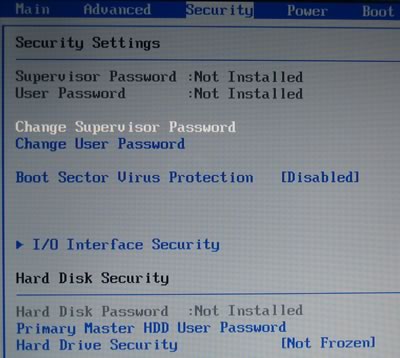
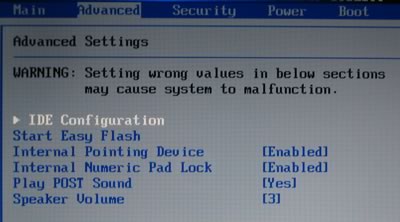
By pressing tab and del during the boot process, you enter the BIOS where several options are available. There is no option to overclock either the CPU or GPU:

- Installed software

ASUS has pre-installed several applications, which fortunately are not spyware or shareware related, unlike several other manufacturers:

  • ASUS DVD XP 6.0 (PowerDVD 6.0 OEM version)
  • ASUS Live Update
  • ASUS ChkMail
  • ASUS Hotkey
  • ASUS Power4 Gear+
  • Symantec Norton™ Internet Security 2005
  • Adobe Acrobat Reader 7.0
  • NERO Express V6.3.1.25

Two more applications can be installed from the included CDs:

  • Power Director V3.0 DE
  • Medi@Show V2.0 SE

I'm not too keen on Symantec's Norton Internet Security, so I un-installed it. There are many freeware solutions available, that can cover you from malicious attacks.

For most users, the fact that the notebook comes fully equipped with an array of applications like:

  • DVD/Media Player (ASUS DVD XP 6.0)
  • Antivirus/Firewall protection (Symantec Norton Internet Security)
  • Recording application (Nero Express)

means they don't have to pay extra money or search around for similar solutions in order to get the most from their notebook.

 

Review Pages

1. Features
2. Unpackaging
3. Bios
4. HDD - Monitor
5. CPU - Memory Tests
6. GPU Tests
7. Overclocking
8. HDD Tests
9. ODD Tests
10. Battery - Noise Tests
11. Final Words


Pages

  • « first
  • ‹ previous
  • 1
  • 2
  • 3
  • 4
  • 5
  • 6
  • 7
  • 8
  • 9
  • …
  • next ›
  • last »

ASUS

Tags: ASUS
Previous Post
Polstar igeo-plus pbt-248
Next Post
Teac Headsets

Related Posts

  • ASUS Announces ProArt Router PRT-BE5000 and ProArt Switch PQG-U1080

  • ASUS Announces Intel Core Ultra 200S Plus Series Support on W880, Z890, Q870, B860 and H810 Motherboards

  • ASUS Unveils Complete Portfolio Support for Intel Core 200S Series

  • ASUS Announces 2026 TUF Gaming Laptop Lineup

  • ASUS Announces New-Gen NUC 16 Pro Mini PC

  • ASUS Unveils ExpertBook B3 G2

  • Announcing ASUS ExpertBook B5 G2

  • ASUS Unveils Mac-Friendly Features on ProArt Displays to Enhance Workflows

Latest Reviews

In the Age of AI Phishing, the Best User Experience Might Be the One That Feels Safest
Enterprise & IT

In the Age of AI Phishing, the Best User Experience Might Be the One That Feels Safest

SoundPeats C30
Consumer Electronics

SoundPeats C30

Why Streaming Live Casino Games Demands Smarter Tech
Enterprise & IT

Why Streaming Live Casino Games Demands Smarter Tech

Kioxia Exceria Plus G3 512GB microSD
Cameras

Kioxia Exceria Plus G3 512GB microSD

SoundPeats Cove Pro
Consumer Electronics

SoundPeats Cove Pro

Popular News

TEAMGROUP Launches EXPERT P34F Find My External SSD

TEAMGROUP Launches EXPERT P34F Find My External SSD

Samsung announces Galaxy Tab S11 and Galaxy S25 FE series

Samsung announces Galaxy Tab S11 and Galaxy S25 FE series

Viltrox Showcases Upcoming Lens Lineup and New TTL Flash at IBC 2025

Viltrox Showcases Upcoming Lens Lineup and New TTL Flash at IBC 2025

CORSAIR announces Vanguard Pro 96 and Vanguard 96 Gaming Keyboards

CORSAIR announces Vanguard Pro 96 and Vanguard 96 Gaming Keyboards

Panasonic Introduces the First Ultra-Telephoto Zoom Lens in the LUMIX S Series

Panasonic Introduces the First Ultra-Telephoto Zoom Lens in the LUMIX S Series

MSI Launches DATAMAG 40Gbps Magnetic Portable SSD

MSI Launches DATAMAG 40Gbps Magnetic Portable SSD

MSI Launches FORGE GK600 TKL WIRELESS Special Edition Compact Mechanical Keyboard

MSI Launches FORGE GK600 TKL WIRELESS Special Edition Compact Mechanical Keyboard

Viltrox Joins the L-Mount Alliance, Expanding Creative Possibilities

Viltrox Joins the L-Mount Alliance, Expanding Creative Possibilities

Main menu

  • Home
  • News
  • Reviews
  • Essays
  • Forum
  • Legacy
  • About
    • Submit News

    • Contact Us
    • Privacy

    • Promotion
    • Advertise

    • RSS Feed
    • Site Map
  • About
  • Privacy
  • Contact Us
  • Promotional Opportunities @ CdrInfo.com
  • Advertise on out site
  • Submit your News to our site
  • RSS Feed