Breaking News

Arctic announces MX-7 – ULTIMATE Performance Thermal Paste Akasa introduces Euler TX3 Fanless Thin Mini‑ITX Case KIOXIA expands EXCERIA line with new EXCERIA G3 SSD series TerraMaster TOS 7 Beta Now Open Worldwide CORSAIR announces XENEON EDGE 14.5" LCD Touchscreen

logo

  • Share Us
    • Facebook
    • Twitter
  • Home
  • Home
  • News
  • Reviews
  • Essays
  • Forum
  • Legacy
  • About
    • Submit News

    • Contact Us
    • Privacy

    • Promotion
    • Advertise

    • RSS Feed
    • Site Map

Search form

ASUS A6Ja

Jun 22,2006 0

4. HDD - Monitor


Review Pages

1. Features
2. Unpackaging
3. Bios
4. HDD - Monitor
5. CPU - Memory Tests
6. GPU Tests
7. Overclocking
8. HDD Tests
9. ODD Tests
10. Battery - Noise Tests
11. Final Words


ASUS A6JA - Page 4

- HDD

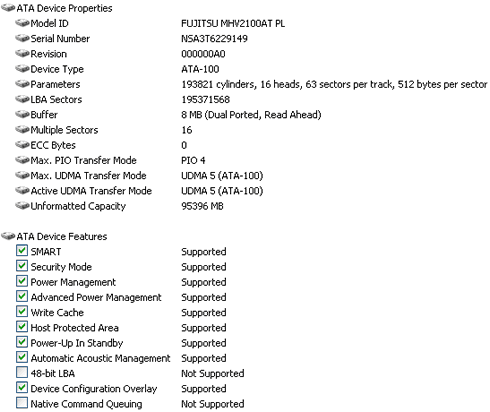
The Fujitsu 100GB 4200rpm HDD, is split in two partitions (drives C and D) with (55GB/36GB) using the FAT32 file system. There is a batch file that allows you to convert both partitions to NTFS, which is suggested for higher security and better performance. There is a hidden FAT32 partition that includes the Windows XP Home SP2 installation, in case of an emergency recovery. This is not however, very convenient since it takes space and you don't have a retail Windows XP CD for a clean installation:

The Fujitsu HDD, doesn't support Native Command Queuing, but has low operating noise:
- TFT Monitor

The TFT monitor comes from AU Optronics with the following specs:

After checking the AU Optronics web site, I was able to get more information on the type of technology used and response times:

Resolution (pixel)
WXGA (1280 x 800)
Aspect Ratio
16 : 10
Active Area (mm)
331.2 x 207.0
Pixel Pitch (mm)
0.259
Mode
TN
Number of Colors
262K
Color Saturation (NTSC%)
50
View Angle (H/V)
80 / 40
Brightness (cd/m²) (5 points average)
180
Contrast Ratio
300 : 1
Response Time (ms) (at 25°C)
16
Power Consumption (W)
6.5
Interface
1ch LVDS
Supply Voltage (V)
3.3
Backlight
1 CCFL
Outline Dimensions (mm)
344.0 x 222.0 x 6.2
Weight (g)
575

TN technology offers low response times but reduced Number of colors (262K). This means other colors are displayed with interpolation, which leads to not true colors. If you are planning to work with Photoshop or similar graphics related programs, another notebook would be more appropriate for you.

Our screen didn't have any broken/stuck pixels as several monitor tests confirmed. The reflective nature of the screen may be a problem in cases where you work with dark or black backgrounds or in very bright conditions such as outdoors in the daylight. Of course this is the price you pay for more natural and brighter colours. ASUS unfortunately doesn't offer an option of a non-glossy screen.

At night, in a totally dark environment with a| black background, I was able to see any potential backlight leakage, a common notebook screen problem. The ASUS A6JA has a small amount of backlight leakage at the edges, which didn't enthuse me, but it is very common.


Review Pages

1. Features
2. Unpackaging
3. Bios
4. HDD - Monitor
5. CPU - Memory Tests
6. GPU Tests
7. Overclocking
8. HDD Tests
9. ODD Tests
10. Battery - Noise Tests
11. Final Words


Pages

  • « first
  • ‹ previous
  • 1
  • 2
  • 3
  • 4
  • 5
  • 6
  • 7
  • 8
  • 9
  • …
  • next ›
  • last »

ASUS

Tags: ASUS
Previous Post
Polstar igeo-plus pbt-248
Next Post
Teac Headsets

Related Posts

  • ASUS Announces Prime AP303 Compact Mid-Tower ATX Case

  • ASUS TUF Gaming Unveils Call of Duty Black Ops 7 Edition AMD Radeon RX 9070 XT

  • ASUS Announces October Availability of ProArt Display 8K PA32KCX

  • ASUS Unveils ProArt PA401, PA602 Wood Edition PC Cases with Retro Colors

  • ASUS Announces ExpertCenter PN54-S1 Mini PC

  • ASUS Announces ExpertCenter P600 AiO

  • ASUS Announces Turbo Radeon AI Pro R9700 32GB Graphics Card

  • ASUS Unveils ProArt Displays, PC Solutions, and More at IBC 2025

Latest Reviews

Noctua NP-DM3 desk mat
Gaming

Noctua NP-DM3 desk mat

Crucial P510 2TB NMVE
PC components

Crucial P510 2TB NMVE

The Quiet Technology Behind the Spin
Enterprise & IT

The Quiet Technology Behind the Spin

Crucial DDR5 Pro 6400 CL32
PC components

Crucial DDR5 Pro 6400 CL32

SOUNDPEATS Clip1
Consumer Electronics

SOUNDPEATS Clip1

Popular News

COLORFUL Introduces CVN B850I GAMING FROZEN Motherboard

COLORFUL Introduces CVN B850I GAMING FROZEN Motherboard

COLORFUL Presents CVN X870 ARK FROZEN Motherboard for AMD Ryzen 9000 CPUs

COLORFUL Presents CVN X870 ARK FROZEN Motherboard for AMD Ryzen 9000 CPUs

COLORFUL Presents the B860 Series Motherboards

COLORFUL Presents the B860 Series Motherboards

Intel-AMD new motherboards announced

Intel-AMD new motherboards announced

TEAMGROUP Launches EXPERT P34F Find My External SSD

TEAMGROUP Launches EXPERT P34F Find My External SSD

ASRock AM5 Motherboards Now Fully Support AMD Ryzen 9 9950X3D & 9900X3D Processors

ASRock AM5 Motherboards Now Fully Support AMD Ryzen 9 9950X3D & 9900X3D Processors

Samsung announces Galaxy Tab S11 and Galaxy S25 FE series

Samsung announces Galaxy Tab S11 and Galaxy S25 FE series

Viltrox Showcases Upcoming Lens Lineup and New TTL Flash at IBC 2025

Viltrox Showcases Upcoming Lens Lineup and New TTL Flash at IBC 2025

Main menu

  • Home
  • News
  • Reviews
  • Essays
  • Forum
  • Legacy
  • About
    • Submit News

    • Contact Us
    • Privacy

    • Promotion
    • Advertise

    • RSS Feed
    • Site Map
  • About
  • Privacy
  • Contact Us
  • Promotional Opportunities @ CdrInfo.com
  • Advertise on out site
  • Submit your News to our site
  • RSS Feed