Breaking News

Kioxia and Dell Technologies First to Deliver High-Density Server with 9.8 PB of Flash Storage ASUS Republic of Gamers Announces ROG NUC 16 Silicon Power Launches CreatePro Series Newtro Cooling Series and Next-Gen LCD Coolers at Computex 2026 Sony Announces the Launch of Xperia 1 VIII

logo

  • Share Us
    • Facebook
    • Twitter
  • Home
  • Home
  • News
  • Reviews
  • Essays
  • Forum
  • Legacy
  • About
    • Submit News

    • Contact Us
    • Privacy

    • Promotion
    • Advertise

    • RSS Feed
    • Site Map

Search form

Aopen MVP player

Sep 6,2004 0

8. Video Mode


Review Pages

1. Introduction - Retail Package
2. Inside the MVP Player
3. HDD Enclosure Installation
4. MVP Configuration
5. Video/Audio files analysis
6. File Mode
7. Photo Mode
8. Video Mode
9. Music Mode
10. Conclusions


AOpen MVP Player - Page 8

Video Mode

The MVP player supports almost all popular video formats. The video playback mode uses small thumbnails to preview a few seconds of every video file. Thumbnail images are moving pictures and not still images. Clicking on a thumbnail will start the selected movie.

During playback, you can always see information about the video file playing. This function is controlled through the remote control.

These pictures show video playback of DivX and XviD video formats. You will notice that the total playback time cannot be calculated for compressed video formats. Only playing time and file name are shown.
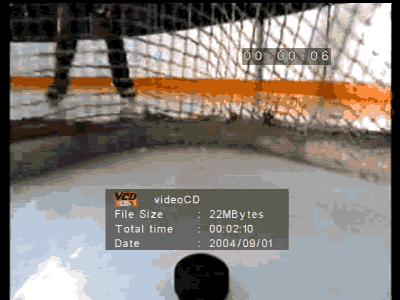
On the other hand, total playback time can be calculated by the MVP player when MPEG-1 and MPEG-2 files are used.

If you have too many video files stored, file mode might be more handy for handling video files. Using file mode makes it easier to find the file you want to view.

You can see a small preview of the video file that is highlighted, and you can also see some information about the file, like file size and file creation date.

In order to check the DivX/XviD subtitle support of the MVP player, we created a small DivX and small XviD file and used the same file name for the subtitle files. We converted the subtitle to MicroDVD format (.sub, .txt) and to SubRip format (.srt, .txt) which are the most popular subtitle formats. The following screenshot shows the video file along with the subtitle files in the same folder.
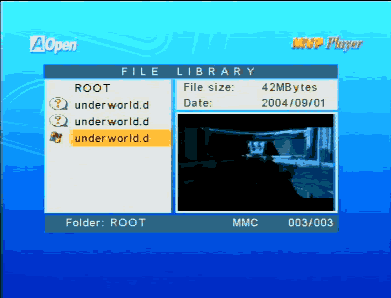
The question mark on the left side of the subtitles' filenames indicates that the MVP player does not support this filetype. However, when we tried to playback the movie, no subtitles were shown. So in general, the MPV player does not support DivX/XviD subtitles.

We also tried to playback compressed video files with Quarter Pixel flags to see if the MVP can handle files with the QPEL function enabled. In file mode, the following image was produced. The error message shown indicates that the MVP player cannot handle video streams with Quarter Pixel flags.

The following table indicates the video file formats that were tested and the results we observed.

AOpen MVP Player
Video Codec / Format
Compatibility
DivX 5.1.1
Playback is perfect
DivX 5.2
Playback is perfect
DivX 3.11 alpha version
Playback is perfect
DivX 2
Playback is perfect
DivX 3
Playback is perfect
3ivX 4.5.1
Playback is jerky
Cinepak 1.10.0.11
Playback is perfect
Indeo Video 4.5
Playback is perfect
Indeo Video 5.10
Playback is perfect
DivX 4.1
Video format is not supported
XviD 1.01
Playback is perfect
Microsoft Media 9
Video format is not supported
MPEG-1 VideoCD
Playback is perfect
Canopus Soft DVSD
Video format is not supported
DAT VideoCD
Playback is perfect
Super VideoCD MPEG
Playback is perfect
MPEG-2
Playback is perfect
VOB MPEG-2
Playback is perfect
DivX and Xvid with subtitles
Playback is perfect but no subtitle support

It should be noted that no DVD menu functions are supported. This means that if you have VOB and IFO files in a folder, you will be able to view movie files but IFO file information is not passed through the VOB file playback.

It should also be noted that the MVP only offers stereo outputs, and there is no support for 5.1 or Dolby Surround output. Unfortunately, video files that contain special 5.1 audio streams have to be downmixed to simple stereo / stereo wide audio streams.


 

Review Pages

1. Introduction - Retail Package
2. Inside the MVP Player
3. HDD Enclosure Installation
4. MVP Configuration
5. Video/Audio files analysis
6. File Mode
7. Photo Mode
8. Video Mode
9. Music Mode
10. Conclusions


Pages

  • « first
  • ‹ previous
  • …
  • 2
  • 3
  • 4
  • 5
  • 6
  • 7
  • 8
  • 9
  • 10
  • next ›
  • last »

Aopen

Tags: Aopen
Previous Post
BenQ DW1620A
Next Post
Optorite DD1205

Related Posts

  • AOPEN Introduces AMD-based Multi-Screen 4K Video Wall Solutions

  • SAMSUNG and AOpen To Jointly Promote Their Digital Signage Systems

  • AOpen Launched The XC mini MP45-BDR with Blu-ray Capabilities

  • AOpen's First Blu-ray Disc Drive BDR0412SA Released

  • AOpen Unveils 20X SATA DVD Burner

  • AOpen's DSW2012P 20X DVD burner

  • AOpen DSW1812P 18x DVD Burner Launched in the U.S.

  • Aopen Cube goes dual core

Latest Reviews

How Online Casinos Use Encryption, Verification, and Risk Controls to Build User Trust
Enterprise & IT

How Online Casinos Use Encryption, Verification, and Risk Controls to Build User Trust

Why Low-Latency Infrastructure Matters More Than Raw Specs
Enterprise & IT

Why Low-Latency Infrastructure Matters More Than Raw Specs

In the Age of AI Phishing, the Best User Experience Might Be the One That Feels Safest
Enterprise & IT

In the Age of AI Phishing, the Best User Experience Might Be the One That Feels Safest

SoundPeats C30
Consumer Electronics

SoundPeats C30

Why Streaming Live Casino Games Demands Smarter Tech
Enterprise & IT

Why Streaming Live Casino Games Demands Smarter Tech

Popular News

TEAMGROUP Launches EXPERT P34F Find My External SSD

TEAMGROUP Launches EXPERT P34F Find My External SSD

CORSAIR announces Vanguard Pro 96 and Vanguard 96 Gaming Keyboards

CORSAIR announces Vanguard Pro 96 and Vanguard 96 Gaming Keyboards

Samsung announces Galaxy Tab S11 and Galaxy S25 FE series

Samsung announces Galaxy Tab S11 and Galaxy S25 FE series

Viltrox Showcases Upcoming Lens Lineup and New TTL Flash at IBC 2025

Viltrox Showcases Upcoming Lens Lineup and New TTL Flash at IBC 2025

MSI Launches FORGE GK600 TKL WIRELESS Special Edition Compact Mechanical Keyboard

MSI Launches FORGE GK600 TKL WIRELESS Special Edition Compact Mechanical Keyboard

Panasonic Introduces the First Ultra-Telephoto Zoom Lens in the LUMIX S Series

Panasonic Introduces the First Ultra-Telephoto Zoom Lens in the LUMIX S Series

MSI Launches DATAMAG 40Gbps Magnetic Portable SSD

MSI Launches DATAMAG 40Gbps Magnetic Portable SSD

Viltrox Joins the L-Mount Alliance, Expanding Creative Possibilities

Viltrox Joins the L-Mount Alliance, Expanding Creative Possibilities

Main menu

  • Home
  • News
  • Reviews
  • Essays
  • Forum
  • Legacy
  • About
    • Submit News

    • Contact Us
    • Privacy

    • Promotion
    • Advertise

    • RSS Feed
    • Site Map
  • About
  • Privacy
  • Contact Us
  • Promotional Opportunities @ CdrInfo.com
  • Advertise on out site
  • Submit your News to our site
  • RSS Feed