Zidoo X6 Pro Media Player review
3. User interface, 4K video and HD audio tests
Review Pages
2. Unboxing
3. User interface, 4K video and HD audio tests
4. Benchmarks, read/write tests
5. Final words
TheX6 Pro player has its own GUI called ZIUI and it's based on the Android Lollipop 5.1.1. Everything you need is here, easily accessible through large windows and a good overall hierarchy of he player's features, apps and functions. If this is not enough for you, you can even add your own familial GUI.
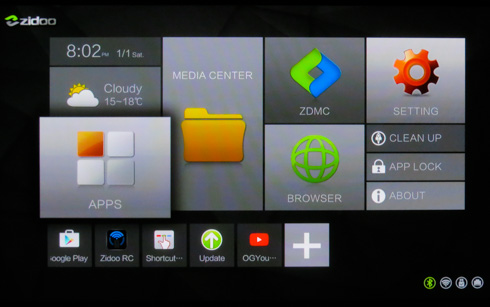
Through the Explorer app, you can quickly access local or network files. The player has no Root functionality but this can be added later, although have in mind that you would lose the F.O.T.A. function.
The player reached our labs with 1.0.34 firmware installed , which was soon updated to the latest 1.0.36 using the USB OTA function.
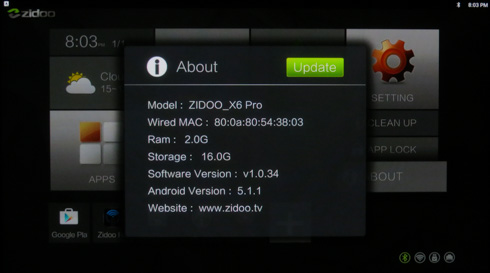
Through the options menu you can set the player's properties. We chose to just set the Audio to HDMI in order to get the Audio passthrough functionality. The Zidoo X6 has a built in frame rate detection so it will automatically switch to the correct output signal to suit the source video. You cannot set this manually and it's automatically triggered by the video material. Note that this also stands for the KODI software, which also requires no user interference. The player of course comes with a renamed version of KODI called ZDMC, which is based at the KODI 16.0 build and works very well, as you will see later on our test section::
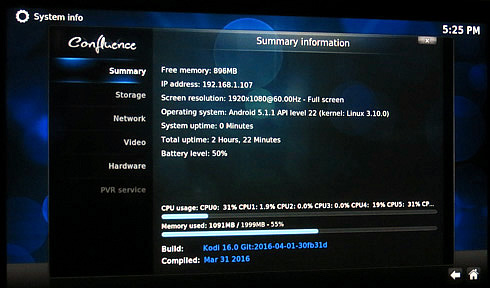
This is how the Zidoo X6 is seen by CPU-Z utility:
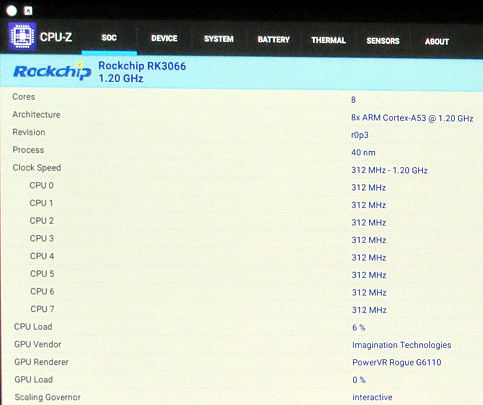
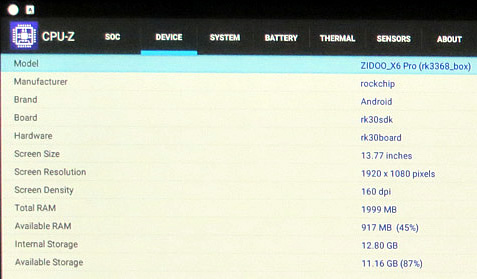
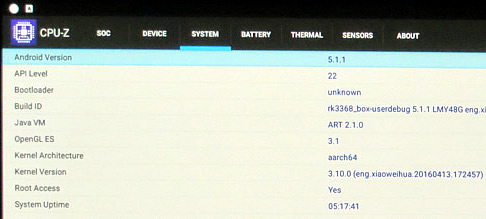
We are ready to start the audio/video tests. Here is out system setup:
- TV: Panasonic 50S20 (1080p)
- A/V Receiver: Yamaha RX-V775 (7.2 capable) with the latest firmware installed
- Wifi Router: TP-Link VR200 (802a,b,g,n) with the latest firmware installed
- Test files
HD Audio Tests (Audio Output set to HDMI Passthrough)
| v1.0.36 Firmware | ||
|---|---|---|
| HD Audio | default video player | ZDMC (Kodi 16.0) |
LPCM 5.1
|
PCM | PCM |
LPCM 7.1
|
PCM | PCM |
AAC 5.1
|
PCM | PCM |
AAC 7.1
|
PCM | PCM |
Dolby Digital
Plus 5.1 |
Yes | Yes |
Dolby Digital
Plus 7.1 |
Yes | Yes |
Dolby True HD 5.1
|
Yes | Yes |
Dolby True HD 7.1
|
Yes | Yes |
Dolby True HD 7.1 Atmos
|
Yes | Yes |
DTS-HD HRA 5.1 |
DTS 5.1 At A/V Receiver |
|
DTS-HD HRA 7.1 |
DTS 5.1 At A/V Receiver |
|
DTS-HD MA 5.1 |
DTS-HD MSTR 5.1 on receiver | |
DTS-HD MA 7.1 |
DTS-HD MSTR 5.1 on receiver | |
DTS:X 7.1 |
PCM | |
The default video player supports 7.1-channel sound, with an exception for the the DTS-HD HRA 7.1 files, which were downsampled to 5.1. The ZDMC fully supports up to 7.1 passthrough playback
Video Bitrate Tests
We used H.264 and H.265/HEVC encoded .mkv video clips (up to 400Mbps bitrate) in order to test the local/network streaming and playback performance of the player.
The Zidoo X6 Pro limits the playback of video files to 100Mbps. Using stock video player, if you try to playback any higher encoded files, you will get the "Capacity Set Limit" error message.
The ZDMC will just playback only the sound part of each file and no video will be displayed.
| Playable Files using the stock video player | ||||
|---|---|---|---|---|
| USB | LAN (1Gbit) | Wifi (802ac) | Wifi (802n) | |
| Jellyfish H264 files | Up to 100Mbps | Up to 70Mbps | Up to 40Mbps | |
| Jellyfish H265 files | Up to 60Mbps | Up to 30Mbps | ||
The 1Gbit LAN connection of the player allows it to playback up to 100MBps video files. Using the Wifi 802.11ac connection will result to a good performance, and the Wifi 802.11n will also give acceptable results.
4K Tests x264 (AVC)
| Firmware 1.0.36 Playback 4K H264 Files | ||
|---|---|---|
| Test Clips | default video player | ZDMC (Kodi 16.0 ) |
| 4K Coastguard_ProRes (ProRes, 422 HQ, 23.976fps) | Capacity Set Limit Message | Slow Playback |
| 4K-HD.Club-2013-Taipei 101 Fireworks Trailer (AVC, High@L5.1, 29.970fps, 2 Channels AAC, 100mbps bitrate) | Yes | Yes |
| 4k_QHD_RoastDuck_30p (AVC, High@L5.1, 29.970fps, 2 Channels AAC) | Yes | Yes |
| big_buck_bunny_4k_H264_30fps (AVC, High@L5.1, 30 FPS, 2 Channels Mp3) | Yes | Yes |
big_buck_bunny_4k_H264_60fps |
Video and Sound not in sync | |
| GODZILLA 4K Trailer (AVC, High@L5.1, 23.976 FPS, 2 Channels AAC) | Yes | Yes |
| NoiseRed-25fps-SlowMotion-120mbs (AVC, High@L5.1, variable FPS) | Capacity Set Limit Message | Only Sound no Video displayed |
| Sintel.2010.4k (AVC, High@L5.1, 24.000fps, AC3 5.1 @ 640 Kbps) | Yes | Yes |
The Autumn - Trailer 4K (AVC, High@L5.1, 30.000fps, AAC 2Channels) |
Yes | Yes |
| TimeScapes4K2560p (AVC, High@L5.1, 23.976fps, AAC 2Channels) | Yes | Yes |
Firmware 1.0.36 Playback HD H264 Files |
||
| Blu-ray 1080p AVC DTS-HD MA 7.1 x264 file (AVC, High@L4.1, 6 000 Kbps, DTS-HD MA 8 Channels) | Yes with DTS-HD MSTR at A/V receiver and perfect Greek subtitles | |
The first real playback tests showed that the Zidoo X6 perfectly supports 4K H264 files, provided that are encoded not higher than 100Mbps. As you see in the table above,the player returned the "Capacity Set Limit" error message in two cases.
The majority of you won't have this problem with your video files, but most demanding users may find that message disturbing. A pleasant surprise was the performance of the stock player, which managed to output DTS-HD MSTR sound to our Yamaha A/V Receiver, and it also perfectly displayed external Greek SRT subtitles.
4K Tests x265 (HEVC)
| Firmware 1.0.36 Playback 4K H265 Files | ||
|---|---|---|
| Test Clips | Stock Video Player | ZDMC (Kodi 16.0) |
| Astra-10994_H_22000-Astra H265 Tests 53.3 Mbps bitrate (10Bit HEVC) | No | Only Sound |
| Astra_11023_H_23500 Test2 H265 51.2 Mbps bitrate (10Bit HEVC) | No | Only Sound |
Astra-11112_H_22000-Fashion TV UHD Demo 42.6 Mbps bitrate (8Bit HEVC) |
Yes | Yes |
| Astra-11479_V_22000-Canal+ UHD Demo 42.6 Mbps bitrate (10Bit HEVC) | No | Only Sound |
| Astra_12343_H_30000-Insight UHD Pearl TV 4K UHD 59.4 Mbps bitrate (10Bit HEVC) | No | Only Sound |
| Beauty_3840x2160_120fps_420_8bit_HEVC_MP4 | Yes | Yes |
| DivX-HEVC-UHD-4k_QHD_RoastDuck_30p | Yes | Yes |
Fifa_WorldCup2014_Uruguay-Colombia (8Bit HEVC) |
Yes | Yes |
| Hispasat-10730_V_30000-Hispasat 4K HEVC 65.3 Mbps bitrate (8Bit HEVC) | Yes | Yes |
| Samsung_UHD_7Wonders_of_the_World_Italy (H265 10bit, 50-60fps) | No | Only Sound |
| Samsung_UHD_Dubai-10bit-HEVC | No | Only Sound |
| Sintel_4k_27qp_24fps_1aud_9subs (8Bit HEVC) | Yes | Yes |
| 4K 2160p Web x265 HEVC 10bit AAC 7.1 | No | Only Sound |
The Zidoo X6 v1.0.36 didn't have problems during the playback of H265 (HEVC) videos, as long as they were 8bit encoded. The stock player kept crashing with 10bit encoded files, while the ZDMC (Kodi 16.0) could only playback sound. We found this behavior rather strange and probably this is the biggest flaw of the player since most H265 files video file are 10bit encoded.
Review Pages
2. Unboxing
3. User interface, 4K video and HD audio tests
4. Benchmarks, read/write tests
5. Final words