Vantec NexStar 3 eSATA
4. Performance Test v5.0
Review Pages
 Passmark PerformanceTest is an award winning PC hardware benchmark utility that allows everybody to quickly assess the performance of their computer and compare it to a number of standard 'baseline' computer systems.
Twenty seven standard benchmark tests are available in seven test suites plus there are five advanced testing windows for custom benchmarking. CPU Tests, 2D Graphics Tests, 3D Graphics Tests, Disk Tests, Memory Tests and CD/DVD Tests. In our case we selected the Disk Tests suite.
Passmark Disk Test
This suite contains a number of tests that exercise the mass storage units (hard disk or otherwise) connected to the computer. By default drive C: is used but this can be changed from the Preferences Dialog.
For each test a file is created in the root directory of the selected disk. The file size needs to be large in order to get an accurate measurement. In the case where a slow drive is used on a computer with a large amount of RAM this test can take some minutes to complete.
There are a few issues to aware of when interpreting the results of the disk test. These are covered in the precautions section.
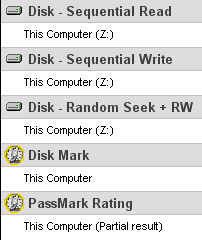
- Disk Sequential Cached Read
A large test file is created on the disk under test. The size of this test file is proportional to the amount of RAM available, which stops the entire file from being cached in RAM. The file is read sequentially from start to end. The amount of data read in each individual read operation is always 16KB
- Disk Sequential Cached Write
A large file is written to the disk under test. The size of this test file is proportional to the amount of RAM available. This stops the entire file being cached in RAM. The file is written sequentially from start to end. The amount of data written in each individual operation is always 16KB
- Disk Random cached Seek RW
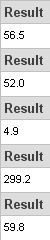
A large test file is created on the disk under test. The size of this test file is proportional to the amount of RAM available, this stops the entire file being cached in RAM. The file is read randomly; a seek is performed to move the file pointer to a random position in the file, a 16KB block is read or written then another seek is performed. The amount of data actually transferred is highly dependent on the disk seek time.
| Tests | NexStar 3 on eSATA | HD on SATA |
 |
 |
 |
- Reading Test
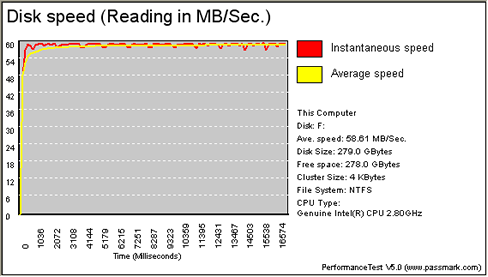 |
| HDD on NexStar 3 (eSATA) |
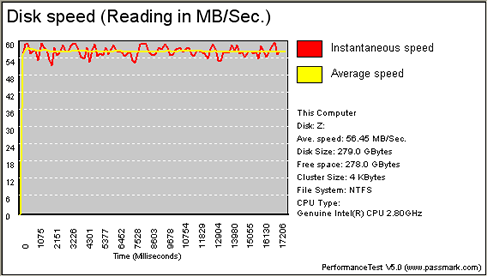 |
| HDD on SATA |
- Writing Test
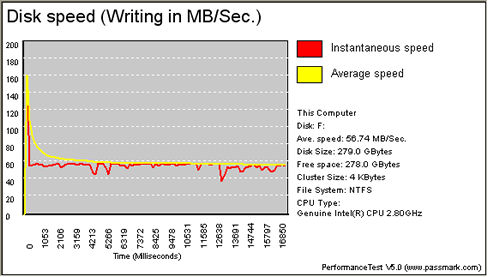 |
| HDD on NexStar 3 (eSATA) |
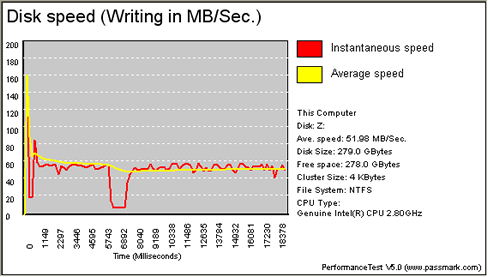 |
| HDD on SATA |
It is obvious from the graphs, that there aren't any significant differences in the average speed, either in reading or in writing. Whereas the instantaneous speed seems to be more stable when the HDD is installed in the NexStar 3.
Review Pages