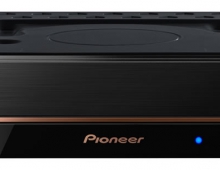
Pioneer DVR-116D
8. Optimal Writing Speed Technology
Review Pages
2. CD/DVD reading
3. CD error correction
4. DVD error correction
5. CD-R burning - Memorex 48x
6. CD-R burning - Verbatim 48x
7. CD-RW burning - Verbatim 24x
8. Optimal Writing Speed Technology
9. DVD-R burning - CMCMAG AM3 18x
10. DVD-R burning - DAXON 016S 16x
11. DVD-R burning - MCC 03RG20 20x
12. DVD-R burning - RITEK F1 18x
13. DVD-R burning - TTH02 20x
14. DVD-R burning - TYG03 20x
15. DVD+R burning - DAXON AZ3 20x
16. DVD+R burning - MCC 004 16x
17. DVD+R burning - OPTODISC R16 16x
18. DVD+R burning - PRODISC R05 20x
19. DVD+R burning - RICOHJPN R03 18x
20. DVD+R burning - YUDEN T03 20x
21. DVD-R DL burning - MKM 03RD30 10x
22. DVD-R DL burning - MKM04RD30 12x
23. DVD+R DL burning - MKM 003 10x
24. DVD+R DL burning - RITEK S06 12x
25. DVD-RW burning - MKM01RW6X01 6x
26. DVD+RW burning - MKM A03 3.3x
27. Summary of DVD burning tests, Bitsetting, overburning
28. Conclusion
The effect of the writing speed on the quality of a burn is an issue that has been discussed many times in the past. As the writing speed increases, it is more difficult for a drive to make perfect burns. That's why Pioneer introduced the Optimal Writing Speed Technology. Its main purpose is to change the writing speed of every burn to the highest level at which the drive is able burn with decent quality.
In detail, the OWS technology, supported by the Pioneer DVR-116D drive, is based on a lookup table residing on the firmware of the drive which contains information about every MID and its corresponding Optimal Writing Speed with the selected drive.
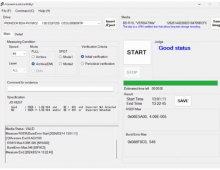
To enable the OWS for a burn, we have to run the OWS utility, check the "ENABLE" radio button and click "Apply", without having any disc mounted on the drive.

We also have the option of storing the optimal writing speed for each disc on the drive's memory. This would allow the drive to burn at the Optimal Write Speed, without running the OWS utility before. This is done by checking "Saves optimal writing speed setting to drive" checkbox.
Also, if you click the button "Check setting", the utility will inform you of the current state of the OWS technology (whether it is on or off).

So, the Optimal Write Speed technology promises to offer good burns with the cost of low speed. Let's see in the following tests if it is going to help.
Review Pages
2. CD/DVD reading
3. CD error correction
4. DVD error correction
5. CD-R burning - Memorex 48x
6. CD-R burning - Verbatim 48x
7. CD-RW burning - Verbatim 24x
8. Optimal Writing Speed Technology
9. DVD-R burning - CMCMAG AM3 18x
10. DVD-R burning - DAXON 016S 16x
11. DVD-R burning - MCC 03RG20 20x
12. DVD-R burning - RITEK F1 18x
13. DVD-R burning - TTH02 20x
14. DVD-R burning - TYG03 20x
15. DVD+R burning - DAXON AZ3 20x
16. DVD+R burning - MCC 004 16x
17. DVD+R burning - OPTODISC R16 16x
18. DVD+R burning - PRODISC R05 20x
19. DVD+R burning - RICOHJPN R03 18x
20. DVD+R burning - YUDEN T03 20x
21. DVD-R DL burning - MKM 03RD30 10x
22. DVD-R DL burning - MKM04RD30 12x
23. DVD+R DL burning - MKM 003 10x
24. DVD+R DL burning - RITEK S06 12x
25. DVD-RW burning - MKM01RW6X01 6x
26. DVD+RW burning - MKM A03 3.3x
27. Summary of DVD burning tests, Bitsetting, overburning
28. Conclusion