Crucial M500 480GB SSD review
3. HDTachRW, HD Tune Pro
Review Pages
Here is our testbed:
- Motherboard: Foxconn Quantum Force Rattler P67 vP04 BIOS
- Processor: Intel Core i5-2500K
- Case: Open Air testbed
- Power Supply Unit: Club 3D CSP-X1000CB 1000 Watt
- Graphics card: Club3D Radeon HD 6790 CoolStream Edition
- Memory: OCZ Gold PC3-10600 4x2GB 1333@CL9
- HDD: WD 500GB 7200RPM
- Monitor: LG L246WH-BH 24"
- Windows 7 x64 SP1 with latest updates installed
For the tests, we used the following software:
- HDTachRW v3.0.1.0
- HD Tune v4.50 Pro
- Crystal DiskMark v3
- ATTO Disk Benchmark v2.46
- ASS SSD Benchmark 1.5xxx
- IOMeter v2006.07.27 with Xtreme Benchmark template
- PCMark Professional edition v1.04
- Anvil Storage Utilities 1.0.34. Beta 11
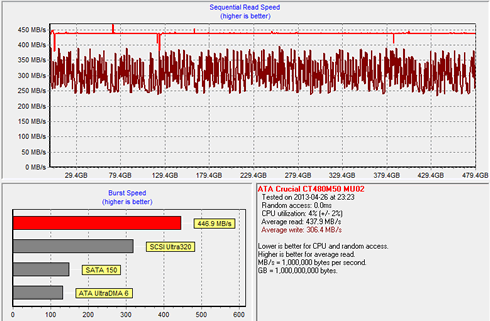
We start the tests with the HDTachRW software. It shows the potential read speed which you are likely to experience with the SSD. The software measures the sequential read speed, the random access speed and sequential write speed.
The reported average sequential writing speed was 306.4 MB/s and the average sequential reading of 437.9 MB/s /. Both figures are not exactly those quoted by Crucial.
We move on to the HD Tune Pro software, another utility we used to measure the drive's reading and writing performances. Although not necessarily representative of real-world workloads, HD Tune's targeted tests give us a glimpse of each drive's raw capabilities.
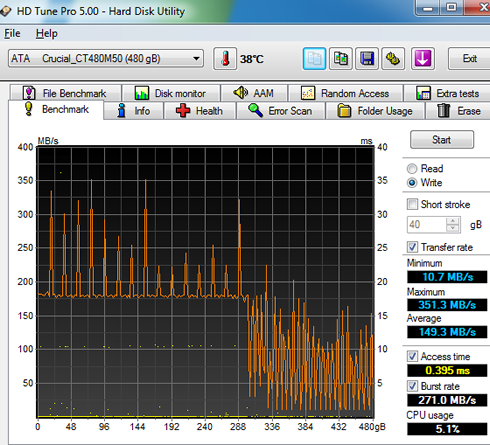
This time the sequential reading test showed a 207.5 MB/s average speed and the corresponding sequential writing test a 149.3 MB/s average, which are both lower than we expected:
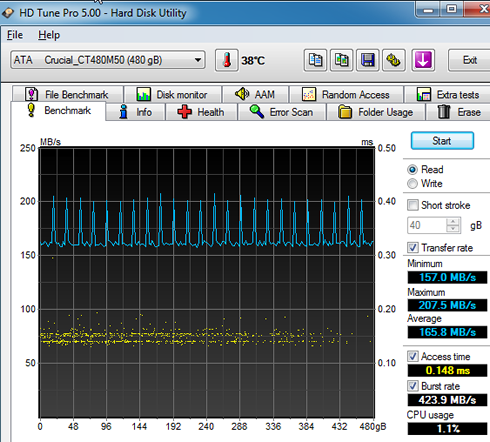
As you see in the screenshot below, writing was not stable across the data sequence and the reading speed was slow after the 300MB mark of the graph, resulting to a low overall average writing speed:
HD Tune's file benchmark consists of two parts: the transfer speed test and block size test. The transfer rate test measures three different parameters for both reading and writing:
- Sequential: the sequential speed is measured and shown on the graph. Ideally the transfer speed line should be straight and smooth.
- 4 KB random single: this test measures the performance of I/O operations of 4096 byte blocks - the most common I/O operation on a typical system. Especially the 4 KB write speed is an important indication of general system performance.
- 4 KB random multi: this test is similar to the 4 KB random single test except that multiple requests are sent simultaneously to the device. We set the number of operations to 32.
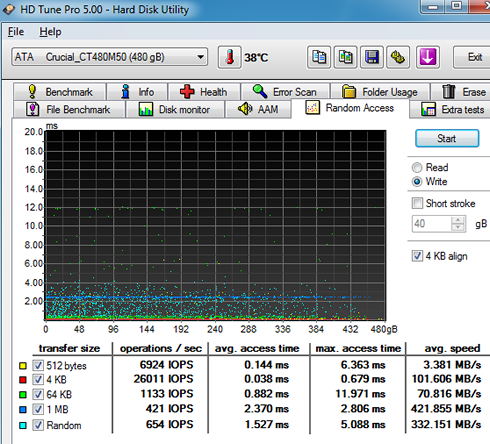
Below you see random reading test, where we got a 463.740 MB/s average reading speed for an 1MB transfer size and a 394.260 MB/s average reading for transferring files with random sizes.

Random writing of 1MB files was also fast at 421.855 MB/s, and slower at 332.151 MB/s with random files:
HD Tune's file benchmark also features three data patterns available that can be used during the write process: zero, random and mixed, which is a combination of zeroes and random data. Certain SSDs use a compression technique which improves performance when compressible data is used. For these devices the results will be highest when writing zeroes and lowest when writing random data.
Let's start with a sequential transfer speed of a 500MB file using zeros in the writing part:

The Crucial M500 drive read the 500MB file at an average speed of 484.04 MB/s and wrote the file at 420.65 MB/s - pretty fast in both cases. The 4K random single performance with 4096 byte blocks was 6610 IOPS for reading and 23571 IOPS for writing, which are also fast, especially in the writing part. When we enabled the 32 requests option, both figures were boosted at 82991 IOPS and 52327 IOPS, respectively.
Selecting the "Random" data pattern (zeroes and data) had not any serious impact to drive's sequential read performance, but writing was further boosted when we enabled the multiple requests (32).
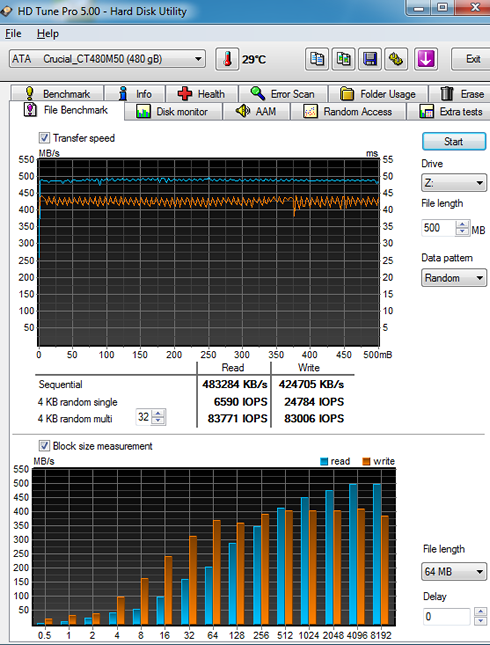
The reading result with a "mixed" data pattern was very high.
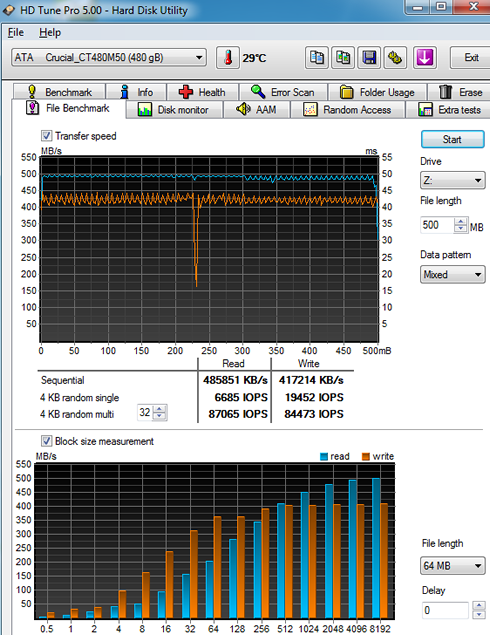
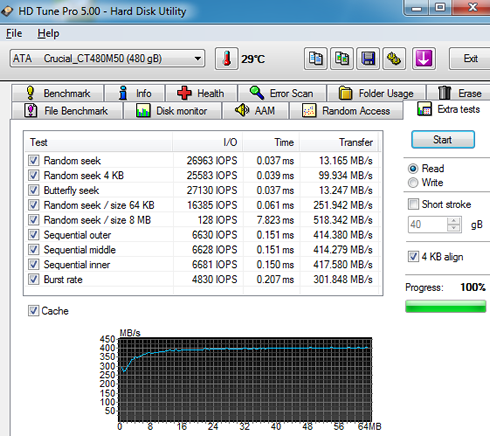
Below you see some additional sequential and random reading tests:
Review Pages