Breaking News

KINGMAX Launches DDR5 Horizon II Overclocking Memory Module, Tailored for High-Load Scenarios DeepCool Unveils SPARTACUS 360 AIO Liquid Cooler for High-End Performance and Customization KINGMAX Launches New DDR4 Blade X Gaming RAM, Delivering Powerful Performance for Intel/AMD Platforms Corsair announces FRAME 4000D LCD RS ARGB PC Case Samsung Launches One UI 8.5 Beta for Next-Level Ease of Use

logo

  • Share Us
    • Facebook
    • Twitter
  • Home
  • Home
  • News
  • Reviews
  • Essays
  • Forum
  • Legacy
  • About
    • Submit News

    • Contact Us
    • Privacy

    • Promotion
    • Advertise

    • RSS Feed
    • Site Map

Search form

Thermaltake PurePower PST520W

Oct 4,2005 0

2. A Closer Look


Review Pages

1. Introduction
2. A Closer Look
3. Installation
4. Performance
5. Conclusion


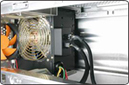
Thermaltake are in the habit of using 12cm fans for their power units, since they produce less noise and have similar air flow like the noisy 80cm ones. In this P.S.U., you can see a 12cm fan that lights up blue when the P.S.U. is powered.

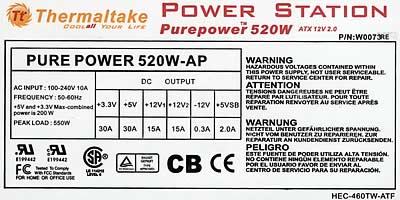
There is no extra fan in the back, since there is no need for one. The “Honeycomb” air ventilation will do the job the way it did with the PurePower 500W unit. However, there is no way to control the speed of this fan manually, as it is automatically done by a small temperature sensor that lies in the center of the fan.

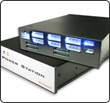
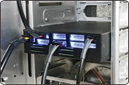
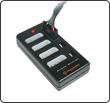
This is the famous P.S.T. that Thermaltake is so proud of. All peripherals, except the VGA cards, are powered by this unit. You can see small leds on the front panel of the P.S.T., indicating the safe operation of different voltage rails.

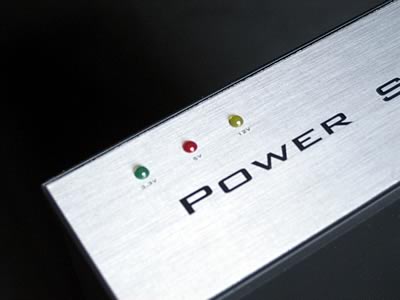
The small P.S.T. unit can be used to power up only low power consumption units; at least that’s what Thermatake suggests. However, we tried to power up two hard disks and a DVD burner, and we had no problem with doing so. But, in any case, if you want a 100% stable system, it would be wiser if you did not undertake such a task with your home PC.
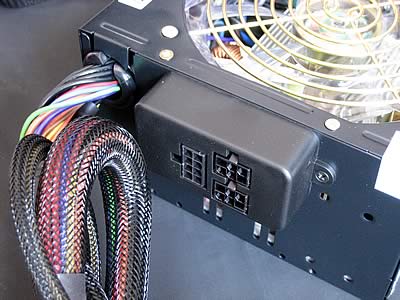
At the back of the P.S.U. you will only find the PCI-Express slots, the 24/20-pin connector, the 4-pin +12V connector and the P.S.T. connector. Power is transferred from the main P.S.U. to the P.S.T., and then all the other peripherals are powered by the 5 .25” P.S.T. This is a very clever way to get all these cables out of the way, leaving more space for the VGA cards and the CPU. Of course, you can use only the cables that you need, depending on the peripherals you have installed, and keep the other cables in a safe place out of the box, just in case you need them in the future.
 

Review Pages

1. Introduction
2. A Closer Look
3. Installation
4. Performance
5. Conclusion


Pages

  • « first
  • ‹ previous
  • 1
  • 2
  • 3
  • 4
  • 5
  • next ›
  • last »

Thermaltake

Tags: Thermaltake
Previous Post
AOpen Aeolus 7800GTX SLI
Next Post
Plextor PX-716SA

Related Posts

  • Thermaltake Launches AW360/420 AIO Liquid Cooler and WAir CPU Cooler for Workstations

  • Begin the Racing Journey with the Thermaltake GR300 Racing Simulator Cockpit

  • Thermaltake Unveils the Massive EXTREME with Cross-flow Fan

  • Thermaltake Releases the Toughpower TF3 1300W with Support for RTX50 Series GPUs

  • Thermaltake Unveils G6 Direct Drive Racing Wheel Bundle and GM5 3DOF Motion System

  • Thermaltake Launches the TT150 LED Bag in Different Sizes and New Colors

  • Thermaltake New TH V2 Ultra EX ARGB Sync AIO – Snow Edition is Now Available Worldwide

  • Thermaltake Coolers Support New-Gen Intel and AMD CPUs

Latest Reviews

Noctua NP-DM3 desk mat
Gaming

Noctua NP-DM3 desk mat

Crucial P510 2TB NMVE
PC components

Crucial P510 2TB NMVE

The Quiet Technology Behind the Spin
Enterprise & IT

The Quiet Technology Behind the Spin

Crucial DDR5 Pro 6400 CL32
PC components

Crucial DDR5 Pro 6400 CL32

SOUNDPEATS Clip1
Consumer Electronics

SOUNDPEATS Clip1

Popular News

COLORFUL Introduces CVN B850I GAMING FROZEN Motherboard

COLORFUL Introduces CVN B850I GAMING FROZEN Motherboard

COLORFUL Presents CVN X870 ARK FROZEN Motherboard for AMD Ryzen 9000 CPUs

COLORFUL Presents CVN X870 ARK FROZEN Motherboard for AMD Ryzen 9000 CPUs

COLORFUL Presents the B860 Series Motherboards

COLORFUL Presents the B860 Series Motherboards

Intel-AMD new motherboards announced

Intel-AMD new motherboards announced

TEAMGROUP Launches EXPERT P34F Find My External SSD

TEAMGROUP Launches EXPERT P34F Find My External SSD

ASRock AM5 Motherboards Now Fully Support AMD Ryzen 9 9950X3D & 9900X3D Processors

ASRock AM5 Motherboards Now Fully Support AMD Ryzen 9 9950X3D & 9900X3D Processors

Samsung announces Galaxy Tab S11 and Galaxy S25 FE series

Samsung announces Galaxy Tab S11 and Galaxy S25 FE series

Viltrox Showcases Upcoming Lens Lineup and New TTL Flash at IBC 2025

Viltrox Showcases Upcoming Lens Lineup and New TTL Flash at IBC 2025

Main menu

  • Home
  • News
  • Reviews
  • Essays
  • Forum
  • Legacy
  • About
    • Submit News

    • Contact Us
    • Privacy

    • Promotion
    • Advertise

    • RSS Feed
    • Site Map
  • About
  • Privacy
  • Contact Us
  • Promotional Opportunities @ CdrInfo.com
  • Advertise on out site
  • Submit your News to our site
  • RSS Feed