Breaking News

Kioxia and Dell Technologies First to Deliver High-Density Server with 9.8 PB of Flash Storage ASUS Republic of Gamers Announces ROG NUC 16 Silicon Power Launches CreatePro Series Newtro Cooling Series and Next-Gen LCD Coolers at Computex 2026 Sony Announces the Launch of Xperia 1 VIII

logo

  • Share Us
    • Facebook
    • Twitter
  • Home
  • Home
  • News
  • Reviews
  • Essays
  • Forum
  • Legacy
  • About
    • Submit News

    • Contact Us
    • Privacy

    • Promotion
    • Advertise

    • RSS Feed
    • Site Map

Search form

Shuttle SH55J2 review

Sep 6,2010 0

3. Internal


Review Pages

1. Features, specs
2. Opening the package
3. Internal
4. Installing the components
5. BIOS setings
6. Overclocking
7. Final words


Opening the case is very easy since just three thumbscrews are keeping the external aluminum case in position. Of course, a philips screwdriver is essential in order to install the rest of the components. The SH55J2 is offering enough free space inside, since the device is a little bit larger in size compared other Shuttle boxes we have tested in past.

There are two more screws left to access the internal by removing the drive bay:

Moving south, we can see that the SATA cables are pre-installed. There are also two SATA 2 3GB/sec ports available in case you need them:

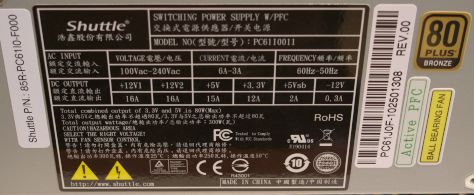
The installed power supply is rated at 300 Watt rated and carries the 80Plus bronze certification (efficiency). Two +12V rails with 16A are available. These are enough to power up three optical devices and a mid-range graphics card:

Below you can see the internal of the device with the drive bay removed:
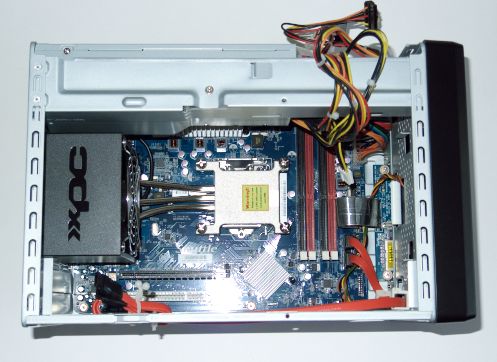
The motherboard has four memory banks where you can install 4 GB per DIMM, resulting to a total size of 16 GB of memory - more than enough for most users. The system supports DDR 800-1066 and 1333 memory speeds with an optional DDR3-1600 under overclocking mode, according to the specifications:

Four screws are keeping the installed thermal system in place. The thermal system is what we have seen in the past from Shuttle. A a copper base and three aluminum heatpipes transfer the produced heat to the rear side of the device, where a 92mm fan is responsible for cooling things down. The specific thermal system should be efficient enough for most users. Due to the design of the case, there are not many other aftermarket CPU coolers we could think of using after all.

Shuttle has included anti-vibration silicon at the fins to reduce the overall noise, and we must admit that it works pretty well.

Below you see a clear view of the rear side of the motherboard, with the cpu cooler removed:


Review Pages

1. Features, specs
2. Opening the package
3. Internal
4. Installing the components
5. BIOS setings
6. Overclocking
7. Final words


Pages

  • « first
  • ‹ previous
  • 1
  • 2
  • 3
  • 4
  • 5
  • 6
  • 7
  • next ›
  • last »

Shuttle

Tags: Shuttle
Previous Post
Samsung SH-B123L review
Next Post
LiteOn iHBS112 review

Related Posts

  • Shuttle Launches the XZ890G2

  • Shuttle Introduces SPCNV03 Ultra-Compact Edge AI Computer

  • Shuttle announces DN11H at InfoComm 2025

  • Shuttle announces NA10H - NT10H

  • Flat Mini-PC Barebones for the latest LGA1700 processors from Shuttle

  • Shuttle announces Xeon-compatible Mini-PC Barebone with 4x LAN and ECC RAM support

  • Shuttle announces Mini-PC Barebone in a 4.7-litre format for two PCI Express cards

  • Shuttle Announces DH32 Mini-PC

Latest Reviews

How Online Casinos Use Encryption, Verification, and Risk Controls to Build User Trust
Enterprise & IT

How Online Casinos Use Encryption, Verification, and Risk Controls to Build User Trust

Why Low-Latency Infrastructure Matters More Than Raw Specs
Enterprise & IT

Why Low-Latency Infrastructure Matters More Than Raw Specs

In the Age of AI Phishing, the Best User Experience Might Be the One That Feels Safest
Enterprise & IT

In the Age of AI Phishing, the Best User Experience Might Be the One That Feels Safest

SoundPeats C30
Consumer Electronics

SoundPeats C30

Why Streaming Live Casino Games Demands Smarter Tech
Enterprise & IT

Why Streaming Live Casino Games Demands Smarter Tech

Popular News

TEAMGROUP Launches EXPERT P34F Find My External SSD

TEAMGROUP Launches EXPERT P34F Find My External SSD

CORSAIR announces Vanguard Pro 96 and Vanguard 96 Gaming Keyboards

CORSAIR announces Vanguard Pro 96 and Vanguard 96 Gaming Keyboards

Samsung announces Galaxy Tab S11 and Galaxy S25 FE series

Samsung announces Galaxy Tab S11 and Galaxy S25 FE series

Viltrox Showcases Upcoming Lens Lineup and New TTL Flash at IBC 2025

Viltrox Showcases Upcoming Lens Lineup and New TTL Flash at IBC 2025

MSI Launches FORGE GK600 TKL WIRELESS Special Edition Compact Mechanical Keyboard

MSI Launches FORGE GK600 TKL WIRELESS Special Edition Compact Mechanical Keyboard

Panasonic Introduces the First Ultra-Telephoto Zoom Lens in the LUMIX S Series

Panasonic Introduces the First Ultra-Telephoto Zoom Lens in the LUMIX S Series

MSI Launches DATAMAG 40Gbps Magnetic Portable SSD

MSI Launches DATAMAG 40Gbps Magnetic Portable SSD

Viltrox Joins the L-Mount Alliance, Expanding Creative Possibilities

Viltrox Joins the L-Mount Alliance, Expanding Creative Possibilities

Main menu

  • Home
  • News
  • Reviews
  • Essays
  • Forum
  • Legacy
  • About
    • Submit News

    • Contact Us
    • Privacy

    • Promotion
    • Advertise

    • RSS Feed
    • Site Map
  • About
  • Privacy
  • Contact Us
  • Promotional Opportunities @ CdrInfo.com
  • Advertise on out site
  • Submit your News to our site
  • RSS Feed