Breaking News

Razer Unveils the Naga V3 Pro CORSAIR Expands Its Everyday Gaming Lineup with Versatile Keyboards and an Ergonomic Wireless Mouse New 3D flash memory technology from KIOXIA and Sandisk achieves industry's highest bit density for QLC NAND TerraMaster Rolls Out Official Storage Upgrade Program PlayStation Plus Game Catalog for August 2026

logo

  • Share Us
    • Facebook
    • Twitter
  • Home
  • Home
  • News
  • Reviews
  • Essays
  • About
    • Submit News

    • Contact Us
    • Privacy

    • Promotion
    • Advertise

    • RSS Feed

Search form

Shuttle SH55J2 review

Sep 6,2010 0

2. Opening the package


Review Pages

1. Features, specs
2. Opening the package
3. Internal
4. Installing the components
5. BIOS setings
6. Overclocking
7. Final words


The Shuttle SH55J2 barebone costs €268 according to the Shuttle's official price listing. At this price you will get the external box, the mini-atx motherboard and the 300 Watt power supply.

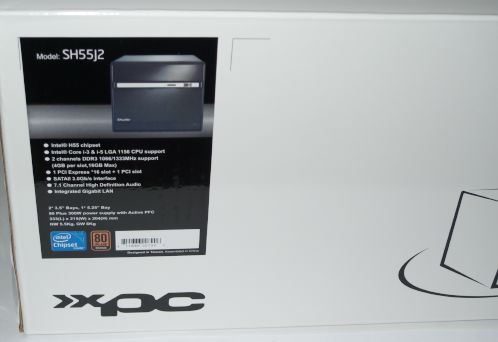
The device retails in a simple, white box with just a specification sticker placed on the left side of it:.
The contents are well organized and secured into protective packaging:
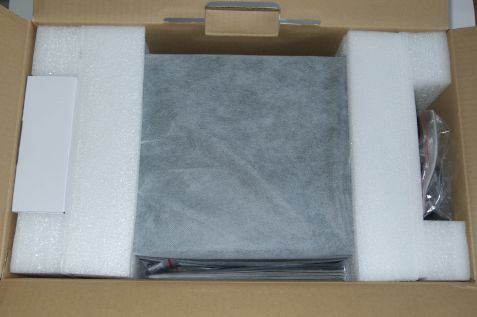
Here is what you will find in the box :

  • The SH55J2 XTC Barebone
  • Shuttle Manual & Quick Reference
  • Driver CD
  • IDE to SATA power cable;
  • Mounting screws
  • Thermal paste
  • Power cord

The Shuttle SH55J2 boasts a J2 design with a black chassis. The case is made of aluminum and the main body is made of steel, making the box a little bit heavy at 7.0kg (empty). It's overall dimensions are 33 x 21,5 x 19 cm (LxWxH). A full aluminum case would be great here but this would increase its retail price of the device.

The case offers enough space for 1x 5.25" and 2x 3.5" internal storage devices, but there is no option for a 2.5" SSD.
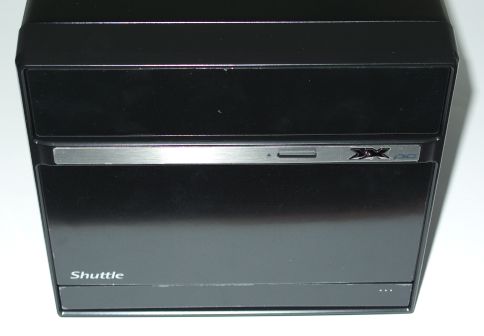
As you can see in the picture above, the front side of the device includes just the necessary buttons - the eject button for the optical storage drive and the power button, which is actually the "XX logo" you see on the right side of the front panel. Don't seek for a reset button or an HDD activity LED cause there aren't any.

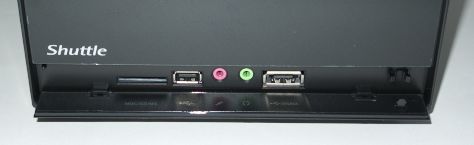
The front side also features some input ports. Just press the the bottom side front panel and the cover will open, unveiling a 4-1 card reader (SD, SDHC,MMC,MS Pro/Pro Duo/Pro-HG), a USB 2.0 port, microphone/headphone jacks and a e-SATA/USB combo port. We wouldn't mind having another USB port here..

The plastic cover is also a little clumpsy and we think that Shuttle could avoid using plastic here.
Ventilation holes are found in both sides or the device, allowing the hot air coming out of the device:

Below you can see the rear side of the device. There are two expansion slots for PCI and PCI-E cards and according to the device's specifications, you can also install two graphics cards.

All the screws found on the SH55J2 can be handled with hand, which is always very handy for users:

Zooming at the back panel area, we see:

  • 1x HDMI (digital video out with digital audio)
  • 1x D-Sub VGA (analog video out)
  • 4x USB 2.0
  • 1x GigaBit LAN (RJ45)
  • 8-ch Audio line-out (2x rear/front, bass/center, surround/back)
  • Audio Line-in
  • Digital Audio: optical S/PDIF output
  • A clear CMOS button

As happens with all "modern" cases, there is not any PS2 connector for mouse/keyboard. Once you use 2x USB ports for mouce and keyboard, only two USB ports will be left to connect your external devices. That's a problem since most currently sold devices are USB-based. On the bright side, the the motherboard has the option for 4x extra USB 2.0 ports. using an extra (not included) adapter.

Optional WLAN and a Serial port are also offered at the rear side of the device.


Review Pages
1. Features, specs
2. Opening the package
3. Internal
4. Installing the components
5. BIOS setings
6. Overclocking
7. Final words


Pages

  • « first
  • ‹ previous
  • 1
  • 2
  • 3
  • 4
  • 5
  • 6
  • 7
  • next ›
  • last »

Shuttle

Tags: Shuttle
Previous Post
Samsung SH-B123L review
Next Post
LiteOn iHBS112 review

Related Posts

  • Shuttle Launches the XZ890G2

  • Shuttle Introduces SPCNV03 Ultra-Compact Edge AI Computer

  • Shuttle announces DN11H at InfoComm 2025

  • Shuttle announces NA10H - NT10H

  • Flat Mini-PC Barebones for the latest LGA1700 processors from Shuttle

  • Shuttle announces Xeon-compatible Mini-PC Barebone with 4x LAN and ECC RAM support

  • Shuttle announces Mini-PC Barebone in a 4.7-litre format for two PCI Express cards

  • Shuttle Announces DH32 Mini-PC

Latest Reviews

be quiet! Light Loop IO LCD
Cooling Systems

be quiet! Light Loop IO LCD

KIOXIA Exceria Pro G2 NVME 2TB
PC components

KIOXIA Exceria Pro G2 NVME 2TB

Online Casino Games That Offer Something Different
Consumer Electronics

Online Casino Games That Offer Something Different

SOUNDPEATS Air6 HS
Consumer Electronics

SOUNDPEATS Air6 HS

Arctic MX-7
Cooling Systems

Arctic MX-7

Popular News

CORSAIR announces Vanguard Pro 96 and Vanguard 96 Gaming Keyboards

CORSAIR announces Vanguard Pro 96 and Vanguard 96 Gaming Keyboards

MSI Launches FORGE GK600 TKL WIRELESS Special Edition Compact Mechanical Keyboard

MSI Launches FORGE GK600 TKL WIRELESS Special Edition Compact Mechanical Keyboard

TEAMGROUP Launches EXPERT P34F Find My External SSD

TEAMGROUP Launches EXPERT P34F Find My External SSD

Samsung announces Galaxy Tab S11 and Galaxy S25 FE series

Samsung announces Galaxy Tab S11 and Galaxy S25 FE series

Viltrox Showcases Upcoming Lens Lineup and New TTL Flash at IBC 2025

Viltrox Showcases Upcoming Lens Lineup and New TTL Flash at IBC 2025

Panasonic Introduces the First Ultra-Telephoto Zoom Lens in the LUMIX S Series

Panasonic Introduces the First Ultra-Telephoto Zoom Lens in the LUMIX S Series

MSI Launches DATAMAG 40Gbps Magnetic Portable SSD

MSI Launches DATAMAG 40Gbps Magnetic Portable SSD

Viltrox Joins the L-Mount Alliance, Expanding Creative Possibilities

Viltrox Joins the L-Mount Alliance, Expanding Creative Possibilities

Main menu

  • Home
  • News
  • Reviews
  • Essays
  • About
    • Submit News

    • Contact Us
    • Privacy

    • Promotion
    • Advertise

    • RSS Feed
  • About
  • Privacy
  • Contact Us
  • Promotional Opportunities @ CdrInfo.com
  • Advertise on out site
  • Submit your News to our site
  • RSS Feed