Breaking News

WD Unifies its Professional Content Creator Storage Portfolio Under the G-DRIVE Brand Samsung Introduces the New Bixby in One UI 8.5 Razer Unveils the Huntsman Signature Edition CORSAIR Introduces Limited-Edition FRAME 4000D Nova and Galaxy cases with Color-Shift Finishes Sharkoon announces SKILLER SGM25W

logo

  • Share Us
    • Facebook
    • Twitter
  • Home
  • Home
  • News
  • Reviews
  • Essays
  • Forum
  • Legacy
  • About
    • Submit News

    • Contact Us
    • Privacy

    • Promotion
    • Advertise

    • RSS Feed
    • Site Map

Search form

Shuttle SG33G5M

Oct 26,2007 0

3. Looking Inside


Review Pages

1. Introduction
2. The Package
3. Looking Inside
4. The BIOS
5. CPU and Chipsets
6. Test Configuration
7. Everest Ultimate Edition 2007
8. SiSOFT Sandra
9. PCMARK - 3DMARK
10. Science Mark - PovRay - x264 Benchmark
11. Maxon Cinebench
12. SuperPi
13. SYSmark 2007 - WorldBench
14. Overclocking
15. Intel X3100
16. Using with VISTA
17. Conclusion


After opening the case (which was very easy), we can finally gain access to the interior. It seems very well organised and everything is well fastened.

Zooming in can give us a better look. The box can accommodate two (2) 3.5" devices (2x HDD or 1x HDD, 1x floppy) and a 5.25" optical device. You can see that one SATA/IDE cable is already pre-installed. We liked the fact that the SATA cables have a secure catch.
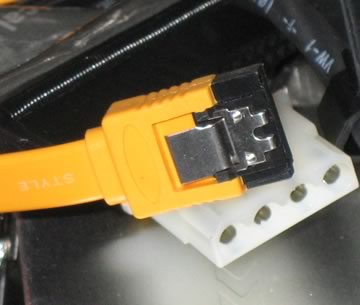
Here is what you can expect after removing the drive bay:

There are two more SATA slots available (remember there are no SATA cables included in the retail package). Passive cooling for the GMA3100 and G33 Intel chipsets, so don't expect high overclocking rates.
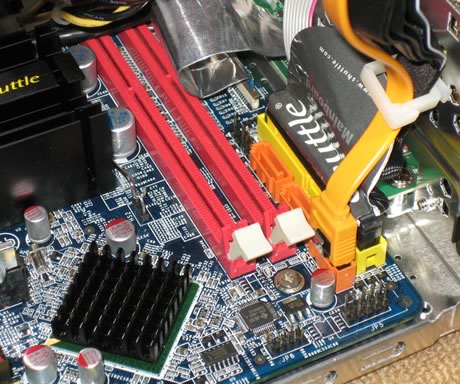
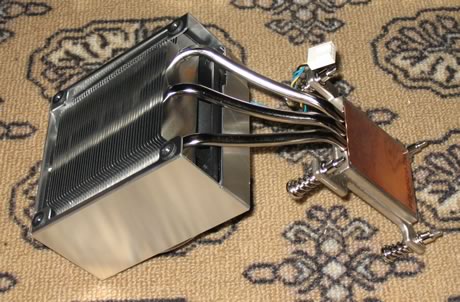
The next step is to examine the CPU cooler. It's the same on as that we found over the SD32G2, with a copper bottom. There are four mounting screws that secure the whole system to the main motherboard:

The main body is made of aluminum with three heat pipes going to the big aluminum heatsink with copper base. On top, there is a 92mm fan that blows the heat out of the box.
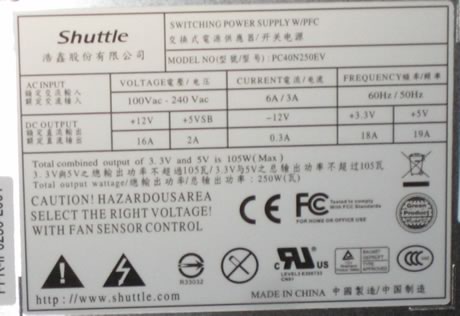
The supplied power supply is rated 250W (see information in photo below). Its should handle without any problems, two HDD, an ODD drive and maybe an extra PCI-e card:
For our tests, we installed a 3.5" HDD drive and an optical drive. We used the pre-installed SATA and power cables. Everything is nice and tidy and there is lots of room under the storage bay and the CPU area. But the first step is to install the memory modules

and CPU cooler:

The next step is to add the HDD, install power and SATA cable:

And finally the ODD drive - Blu-Ray capable ;-)

Flipping the box onto its side, we can see a lot of free space around the CPU area and especially around the HDD. Since the ODD drive is full height, there's no so much empty space around it.


Review Pages

1. Introduction
2. The Package
3. Looking Inside
4. The BIOS
5. CPU and Chipsets
6. Test Configuration
7. Everest Ultimate Edition 2007
8. SiSOFT Sandra
9. PCMARK - 3DMARK
10. Science Mark - PovRay - x264 Benchmark
11. Maxon Cinebench
12. SuperPi
13. SYSmark 2007 - WorldBench
14. Overclocking
15. Intel X3100
16. Using with VISTA
17. Conclusion


Pages

  • « first
  • ‹ previous
  • 1
  • 2
  • 3
  • 4
  • 5
  • 6
  • 7
  • 8
  • 9
  • …
  • next ›
  • last »

Shuttle

Intel

SFF

Tags: Shuttle Intel SFF
Previous Post
Corsair VX550 PSU
Next Post
OCZ ATV Turbo 4GB

Related Posts

  • Intel Launches new Intel Xeon 600 Processors for Workstation

  • Intel Core Ultra Series 3 Debut at CES 2026

  • Intel and NVIDIA to Jointly Develop AI Infrastructure and Personal Computing Products

  • Shuttle Introduces SPCNV03 Ultra-Compact Edge AI Computer

  • An Intel-HP Collaboration Delivers Next-Gen AI PCs

  • New Intel Xeon 6 CPUs to Maximize GPU-Accelerated AI Performance

  • Shuttle announces DN11H at InfoComm 2025

  • Intel Unveils New GPUs for AI and Workstations at Computex 2025

Latest Reviews

Kioxia Exceria Plus G3 512GB microSD
Cameras

Kioxia Exceria Plus G3 512GB microSD

SoundPeats Cove Pro
Consumer Electronics

SoundPeats Cove Pro

Asustor AS5404T 4-Bay NAS System
Enterprise & IT

Asustor AS5404T 4-Bay NAS System

be quiet! Pure Power 13M 1200W
PC components

be quiet! Pure Power 13M 1200W

Server-Side Gaming Why Canadian Online Casinos Are Abandoning Local Clients for HTML5 Clouds
Enterprise & IT

Server-Side Gaming Why Canadian Online Casinos Are Abandoning Local Clients for HTML5 Clouds

Popular News

COLORFUL Introduces CVN B850I GAMING FROZEN Motherboard

COLORFUL Introduces CVN B850I GAMING FROZEN Motherboard

COLORFUL Presents CVN X870 ARK FROZEN Motherboard for AMD Ryzen 9000 CPUs

COLORFUL Presents CVN X870 ARK FROZEN Motherboard for AMD Ryzen 9000 CPUs

TEAMGROUP Launches EXPERT P34F Find My External SSD

TEAMGROUP Launches EXPERT P34F Find My External SSD

Samsung announces Galaxy Tab S11 and Galaxy S25 FE series

Samsung announces Galaxy Tab S11 and Galaxy S25 FE series

Viltrox Showcases Upcoming Lens Lineup and New TTL Flash at IBC 2025

Viltrox Showcases Upcoming Lens Lineup and New TTL Flash at IBC 2025

CORSAIR announces Vanguard Pro 96 and Vanguard 96 Gaming Keyboards

CORSAIR announces Vanguard Pro 96 and Vanguard 96 Gaming Keyboards

Panasonic Introduces the First Ultra-Telephoto Zoom Lens in the LUMIX S Series

Panasonic Introduces the First Ultra-Telephoto Zoom Lens in the LUMIX S Series

MSI Launches DATAMAG 40Gbps Magnetic Portable SSD

MSI Launches DATAMAG 40Gbps Magnetic Portable SSD

Main menu

  • Home
  • News
  • Reviews
  • Essays
  • Forum
  • Legacy
  • About
    • Submit News

    • Contact Us
    • Privacy

    • Promotion
    • Advertise

    • RSS Feed
    • Site Map
  • About
  • Privacy
  • Contact Us
  • Promotional Opportunities @ CdrInfo.com
  • Advertise on out site
  • Submit your News to our site
  • RSS Feed