Breaking News

Nikon releases the Z5IIC full-frame mirrorless camera Announcing the New ASUS Googlebook 14 Razer Unveils Kiyo V2 Pro 4K Webcam Transcend Launches 64GB DDR5-6400 Embedded DRAM Modules for High-Speed Performance and Enhanced System Stability Hollyland Introduces LARK M3 Wireless Audio System

logo

  • Share Us
    • Facebook
    • Twitter
  • Home
  • Home
  • News
  • Reviews
  • Essays
  • About
    • Submit News

    • Contact Us
    • Privacy

    • Promotion
    • Advertise

    • RSS Feed

Search form

Shuttle SG33G5M

Oct 26,2007 0

16. Using with VISTA


Review Pages

1. Introduction
2. The Package
3. Looking Inside
4. The BIOS
5. CPU and Chipsets
6. Test Configuration
7. Everest Ultimate Edition 2007
8. SiSOFT Sandra
9. PCMARK - 3DMARK
10. Science Mark - PovRay - x264 Benchmark
11. Maxon Cinebench
12. SuperPi
13. SYSmark 2007 - WorldBench
14. Overclocking
15. Intel X3100
16. Using with VISTA
17. Conclusion


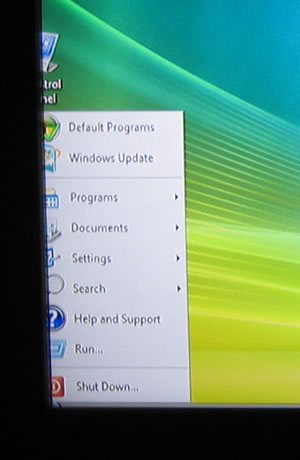
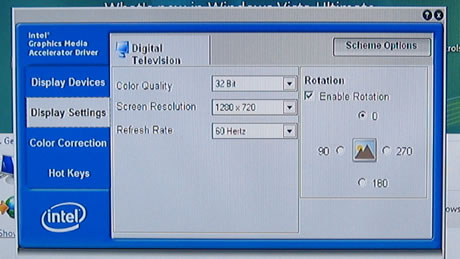
To fully use the capabilities of the Shuttle SG33G5M, you have to use either Windows XP Media Center Edition or VISTA Ultimate Edition. We used VISTA 32BIT Ultimate edition, and here are our test findings. After connecting the SG33G5M with a 32" Samsung TFT LCD screen and booting into Windows, we first noticed a rather nasty issue, that of improper scaling. The Intel GMA3100 doesn't properly scale the desktop to the whole area, despite the fact that it recognizes and sets the resolution to 1280x720p@50Mhz. Changing to 60Mhz didn't have any effect.
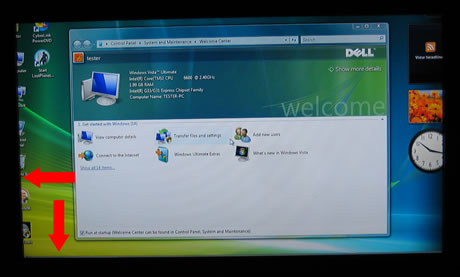
Let's zoom in and see that the Windows bar and left have been cropped off. This has a direct impact when viewing movies, since the content will not properly scale to the resolution of your TV.
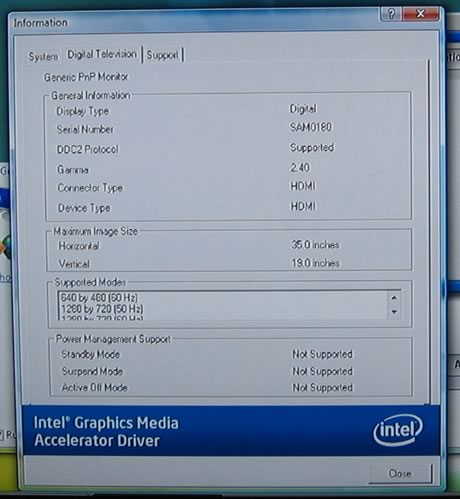
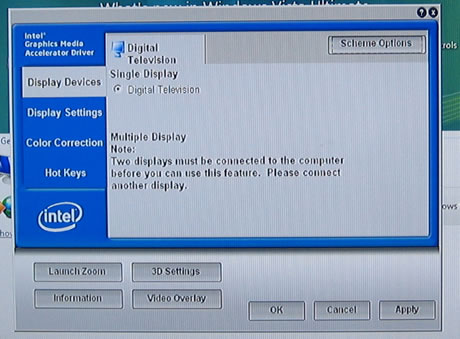
More display properties
The front VFD screen responds immediately to Media Center use and gives corresponding messages:
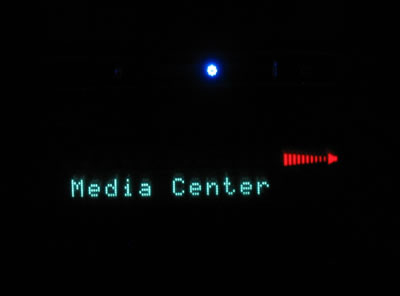
When you start playing content, there are several indications that light up:


Review Pages

1. Introduction
2. The Package
3. Looking Inside
4. The BIOS
5. CPU and Chipsets
6. Test Configuration
7. Everest Ultimate Edition 2007
8. SiSOFT Sandra
9. PCMARK - 3DMARK
10. Science Mark - PovRay - x264 Benchmark
11. Maxon Cinebench
12. SuperPi
13. SYSmark 2007 - WorldBench
14. Overclocking
15. Intel X3100
16. Using with VISTA
17. Conclusion


Pages

  • « first
  • ‹ previous
  • …
  • 9
  • 10
  • 11
  • 12
  • 13
  • 14
  • 15
  • 16
  • 17
  • next ›
  • last »

Shuttle

Intel

SFF

Tags: Shuttle Intel SFF
Previous Post
Corsair VX550 PSU
Next Post
OCZ ATV Turbo 4GB

Related Posts

  • Akasa Launches Newton N16, Compact Fanless Case for ASUS NUC 16 Pro

  • Intel Gamer Days 2026 Kicking Off with AAA Gaming Bundle - Partnerships

  • Intel Arc G-Series Processors Set a New Standard for Handheld PC Gaming

  • Intel at Computex 2026

  • Intel Launches Intel Core Series 3 Processors

  • ASRock Unveils Intel Arc Pro B70 Graphics Cards, Redefining Professional Workspaces

  • G.SKILL DDR5 Memory Kits Confirmed as Intel XMP 3.0 'Ready' for Intel Core Ultra 200S Plus Series Processors

  • Shuttle Launches the XZ890G2

Latest Reviews

Fanxiang MP83 M.2 NVMe SSD Enclosure
Enterprise & IT

Fanxiang MP83 M.2 NVMe SSD Enclosure

Ugreen CM642 USB4.0 Enclosure
PC components

Ugreen CM642 USB4.0 Enclosure

be quiet! Dark Power 14 IO
PC components

be quiet! Dark Power 14 IO

SanDisk High Endurance 512GB microSDXC
Cameras

SanDisk High Endurance 512GB microSDXC

Samsung PRO Ultimate 512GB microSDXC
Cameras

Samsung PRO Ultimate 512GB microSDXC

Popular News

MSI’s Latest AMD X870E MAX & EVO Series Motherboards

MSI’s Latest AMD X870E MAX & EVO Series Motherboards

COLORFUL Launches iGame B850M ULTRA Series Micro-ATX Motherboards

COLORFUL Launches iGame B850M ULTRA Series Micro-ATX Motherboards

COLORFUL Presents Limited Edition Chitu MAG-60 Magnetic Keyboard Inspired by the Year of the Horse

COLORFUL Presents Limited Edition Chitu MAG-60 Magnetic Keyboard Inspired by the Year of the Horse

COLORFUL Presents iGame Z890 ULTRA-S W and iGame Z890M ULTRA Z Motherboards

COLORFUL Presents iGame Z890 ULTRA-S W and iGame Z890M ULTRA Z Motherboards

COLORFUL Launches iGame B850I MINI OC V14 Motherboard

COLORFUL Launches iGame B850I MINI OC V14 Motherboard

COLORFUL Expands B850 Motherboard Lineup with New CVN, Battle-Ax, and MEOW Models

COLORFUL Expands B850 Motherboard Lineup with New CVN, Battle-Ax, and MEOW Models

ASRock Adds Support for One Sub-Channel DRAM Module on Intel DDR5 Motherboards

ASRock Adds Support for One Sub-Channel DRAM Module on Intel DDR5 Motherboards

Exceed the Infinite with New ASRock X870E Taichi White Motherboard

Exceed the Infinite with New ASRock X870E Taichi White Motherboard

Main menu

  • Home
  • News
  • Reviews
  • Essays
  • About
    • Submit News

    • Contact Us
    • Privacy

    • Promotion
    • Advertise

    • RSS Feed
  • About
  • Privacy
  • Contact Us
  • Promotional Opportunities @ CdrInfo.com
  • Advertise on out site
  • Submit your News to our site
  • RSS Feed