
Breaking News

WD Unifies its Professional Content Creator Storage Portfolio Under the G-DRIVE Brand Samsung Introduces the New Bixby in One UI 8.5 Razer Unveils the Huntsman Signature Edition CORSAIR Introduces Limited-Edition FRAME 4000D Nova and Galaxy cases with Color-Shift Finishes Sharkoon announces SKILLER SGM25W

logo

  • Share Us
    • Facebook
    • Twitter
  • Home
  • Home
  • News
  • Reviews
  • Essays
  • Forum
  • Legacy
  • About
    • Submit News

    • Contact Us
    • Privacy

    • Promotion
    • Advertise

    • RSS Feed
    • Site Map

Search form

Sansun SN-C001 the BAT

Oct 17,2005 0

3. The inside


Review Pages

1. Introduction
2. The Case
3. The inside
4. Installation
5. Conclusion


Taking a look at the interior of the BAT case after unpacking the case and loosening some screws. Notice that the case does not come with a power supply, hence one is needed. Now, lets point out the most important parts of the case.

The front panel holds on optional fan, that can be used to produce sufficient airflow to cool the HDD and FDD (depends on were the clips are screwed on).

The optional front fan clips ...

The HDD and FDD cages, as the Sansun group describes them, are removable, based on a sliding mechanism, so installation of HDD-FDD drives is rendered tool-less.
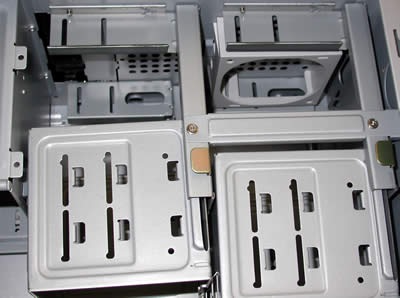
The HDD and FDD cages can be easily removed with the least amount of effort...

The expansion slots (used for PCI and such) are completely tool-less, thus, any future additions can be done easily and without any significant effort. Note that the plastic lock clips located above the expansion slots, are used to lock PCI devices for example, in place without the need for screws. Note also, that before any further installation, the plastic locks must be removed with some cards, especially large ones like 6800 and 7800, and then put back on.
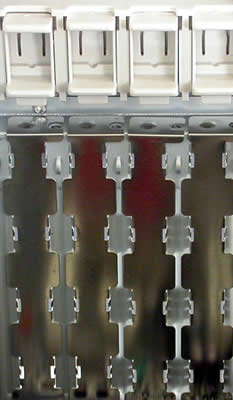
Screwless slots for easy assembling

Lets take a look at the I/O ports located on the top of the case...
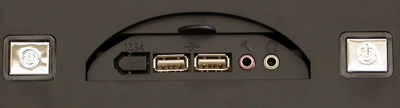
From left to right, we have : 1394 (Firewire), two USB 2.0 compatible ports, a mic port and a headphones port, all of them easily accessible as they are located on the top of the case and not near the bottom front panel were most cases have them.

Taking a look at the fan included in the BAT case, the side fan is an 80mm standard fan with an additional plastic "pipe" which helps air ventilation. When the left side is sealed off, the "pipe" hovers over the CPU cooler. Interesting addition.


You can add your own fan in this position. Maybe one with coloured leds would provide a different approach :-)
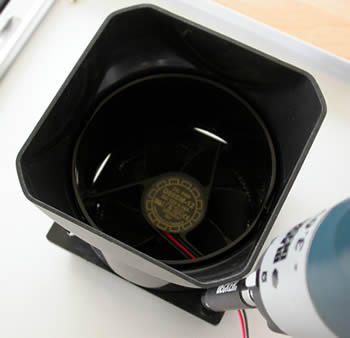
You'll have to remove the plastic pipe first, which is fairly easy, but afterwards there are nine more screws to take care of. The fan's screws are accessed from the outer side so you'll have to remove the plastic bat-cover from the side panel. A lot off work for nothing, better keep the stock fan :-)

Now that we've seen the most important parts of the BAT case, let us move on to the installation of the PC parts and complete this review with an overall conclusion...


Review Pages

1. Introduction
2. The Case
3. The inside
4. Installation
5. Conclusion


Pages

  • « first
  • ‹ previous
  • 1
  • 2
  • 3
  • 4
  • 5
  • next ›
  • last »

Sansun

Tags: Sansun
Previous Post
VoIP Essentials
Next Post
Plextor PX-130A

Related Posts

  • Sansun Arctic Power Supply

Latest Reviews

Kioxia Exceria Plus G3 512GB microSD
Cameras

Kioxia Exceria Plus G3 512GB microSD

SoundPeats Cove Pro
Consumer Electronics

SoundPeats Cove Pro

Asustor AS5404T 4-Bay NAS System
Enterprise & IT

Asustor AS5404T 4-Bay NAS System

be quiet! Pure Power 13M 1200W
PC components

be quiet! Pure Power 13M 1200W

Server-Side Gaming Why Canadian Online Casinos Are Abandoning Local Clients for HTML5 Clouds
Enterprise & IT

Server-Side Gaming Why Canadian Online Casinos Are Abandoning Local Clients for HTML5 Clouds

Popular News

COLORFUL Introduces CVN B850I GAMING FROZEN Motherboard

COLORFUL Introduces CVN B850I GAMING FROZEN Motherboard

COLORFUL Presents CVN X870 ARK FROZEN Motherboard for AMD Ryzen 9000 CPUs

COLORFUL Presents CVN X870 ARK FROZEN Motherboard for AMD Ryzen 9000 CPUs

TEAMGROUP Launches EXPERT P34F Find My External SSD

TEAMGROUP Launches EXPERT P34F Find My External SSD

Samsung announces Galaxy Tab S11 and Galaxy S25 FE series

Samsung announces Galaxy Tab S11 and Galaxy S25 FE series

Viltrox Showcases Upcoming Lens Lineup and New TTL Flash at IBC 2025

Viltrox Showcases Upcoming Lens Lineup and New TTL Flash at IBC 2025

CORSAIR announces Vanguard Pro 96 and Vanguard 96 Gaming Keyboards

CORSAIR announces Vanguard Pro 96 and Vanguard 96 Gaming Keyboards

Panasonic Introduces the First Ultra-Telephoto Zoom Lens in the LUMIX S Series

Panasonic Introduces the First Ultra-Telephoto Zoom Lens in the LUMIX S Series

MSI Launches DATAMAG 40Gbps Magnetic Portable SSD

MSI Launches DATAMAG 40Gbps Magnetic Portable SSD

Main menu

  • Home
  • News
  • Reviews
  • Essays
  • Forum
  • Legacy
  • About
    • Submit News

    • Contact Us
    • Privacy

    • Promotion
    • Advertise

    • RSS Feed
    • Site Map
  • About
  • Privacy
  • Contact Us
  • Promotional Opportunities @ CdrInfo.com
  • Advertise on out site
  • Submit your News to our site
  • RSS Feed
