
Breaking News

Samsung Brings Satellite Communication Support to Galaxy Smartphones Across the Globe vivo Announces MWC 2026 Attendance and sets to Showcase New Flagship X300 Ultra Razer Elevates Everyday Carry with the Laptop Sleeve 16” with Wireless Charging Samsung Unveils Galaxy S26 Series and Galaxy Buds4 Razer announces Kiyo V2 4K AI Webcamera

logo

  • Share Us
    • Facebook
    • Twitter
  • Home
  • Home
  • News
  • Reviews
  • Essays
  • Forum
  • Legacy
  • About
    • Submit News

    • Contact Us
    • Privacy

    • Promotion
    • Advertise

    • RSS Feed
    • Site Map

Search form

IOData AvelLink Player2

Mar 24,2005 0

10. AvelLink Server - Page 1


Review Pages

1. Introduction
2. Features
3. The package
4. Removing the screws
5. Setting up the player
6. The Players Menu - Page 1
7. The Players Menu - Page 2
8. Updating firmware - Page 1
9. Updating firmware - Page 2
10. AvelLink Server - Page 1
11. Online content
12. DVD Loader mod - Page 1
13. DVD Loader mod - Page 2
14. The Tests
15. Playback Tests - Page 1
16. Playback Tests - Page 2
17. Playback Tests - Page 3
18. Playback Tests - Page 4
19. Playback Tests - Page 5
20. Conclusion


IOData AvelLink Player2 - Page 10

- AvelLink Server - Page 1

I-O Data has created something very clever, a desktop DVD player in combination with a PC/MAC server that can unleash the player's playback functions, called AvelLink Server. What AvelLink Server does, is to give access to music/video content saved on the PC/MAC HDD over the local network! To use the network features of the player, you need to install the AvelLink Server on your computer and perform some simple tasks.
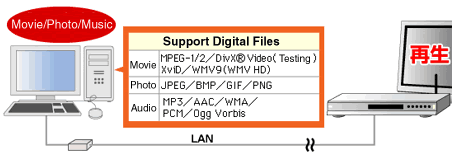
The AvelLink software for the PC/MAC comes on the included discs in the retail package, but for our tests we used a newer (beta) version, found on the I-O Data website. Installation is very simple:

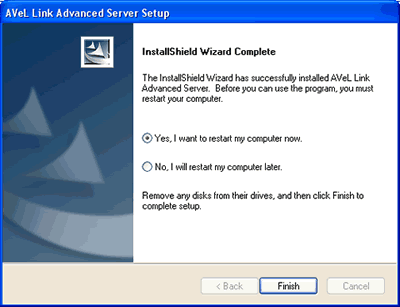
After rebooting, the AvelLink player can be started automatically or manually:
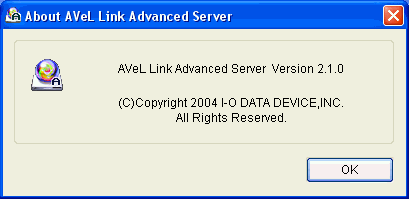
The software is very simple and users can create folders and add files under the corresponding categories (Video, Photo, Music), where the AvelLink player will be able to access them.

Under Server options, the user will find several interesting options:
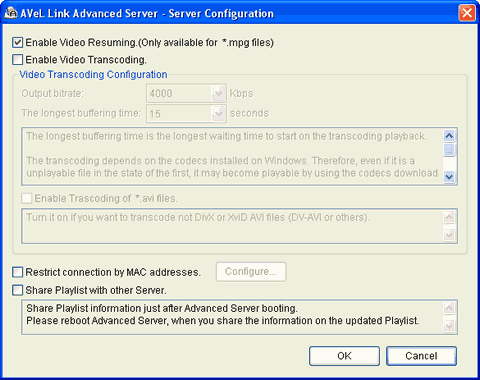
Enabling Video Transcoding will enable the dekstop AvelLink Player to playback almost all PC content, even if its not supported by its hardware! As the AvelLink Server states ".. The transcoding depends on the codecs installed on Windows. Therefore, even if it is an unplayable file in the state of the first, it may become playable by using the codecs download of Windows Media Player. Windows Media Player should be version 9 or later. Version 9 has better-tuning default modules for Windows Media Player, and much compatible with this transcoding feature..."

You can set several search options in the event the HDD collection becomes rather big and unwieldy...

Click To Enlarge!

Below is a screenshot after we added several new folders, under both the Video and Audio folders where the AvelLink player can access them over the network:

Click To Enlarge!


Review Pages

1. Introduction
2. Features
3. The package
4. Removing the screws
5. Setting up the player
6. The Players Menu - Page 1
7. The Players Menu - Page 2
8. Updating firmware - Page 1
9. Updating firmware - Page 2
10. AvelLink Server - Page 1
11. Online content
12. DVD Loader mod - Page 1
13. DVD Loader mod - Page 2
14. The Tests
15. Playback Tests - Page 1
16. Playback Tests - Page 2
17. Playback Tests - Page 3
18. Playback Tests - Page 4
19. Playback Tests - Page 5
20. Conclusion


 

Pages

  • « first
  • ‹ previous
  • …
  • 6
  • 7
  • 8
  • 9
  • 10
  • 11
  • 12
  • 13
  • 14
  • …
  • next ›
  • last »

i-o data

Tags: i-o data
Previous Post
Interview with DaTARIUS' James Steynor
Next Post
Thermaltake Big Typhoon

Related Posts

  • IO Data Releases New External UHD Blu-ray Burners

  • Apple to Install its iPhone Screen Repair machines to Third-party Repair Centers

  • IO Data Releases New 16x BD Burners

  • Buffalo And IO Data Release First 14x Blu-ray Disc Burners

  • I-O Data Introduces BDXL External Drive

  • I-O Data Releases Slim External 6x Blu-Ray Writer

  • I-O Data Ships The BRD-SH12B 12x Blu-ray Burner in Japan

  • I-O Data Signs Linux Software Patent Agreement With Microsoft

Latest Reviews

Kioxia Exceria Plus G3 512GB microSD
Cameras

Kioxia Exceria Plus G3 512GB microSD

SoundPeats Cove Pro
Consumer Electronics

SoundPeats Cove Pro

Asustor AS5404T 4-Bay NAS System
Enterprise & IT

Asustor AS5404T 4-Bay NAS System

be quiet! Pure Power 13M 1200W
PC components

be quiet! Pure Power 13M 1200W

Server-Side Gaming Why Canadian Online Casinos Are Abandoning Local Clients for HTML5 Clouds
Enterprise & IT

Server-Side Gaming Why Canadian Online Casinos Are Abandoning Local Clients for HTML5 Clouds

Popular News

COLORFUL Introduces CVN B850I GAMING FROZEN Motherboard

COLORFUL Introduces CVN B850I GAMING FROZEN Motherboard

COLORFUL Presents CVN X870 ARK FROZEN Motherboard for AMD Ryzen 9000 CPUs

COLORFUL Presents CVN X870 ARK FROZEN Motherboard for AMD Ryzen 9000 CPUs

TEAMGROUP Launches EXPERT P34F Find My External SSD

TEAMGROUP Launches EXPERT P34F Find My External SSD

Samsung announces Galaxy Tab S11 and Galaxy S25 FE series

Samsung announces Galaxy Tab S11 and Galaxy S25 FE series

Viltrox Showcases Upcoming Lens Lineup and New TTL Flash at IBC 2025

Viltrox Showcases Upcoming Lens Lineup and New TTL Flash at IBC 2025

CORSAIR announces Vanguard Pro 96 and Vanguard 96 Gaming Keyboards

CORSAIR announces Vanguard Pro 96 and Vanguard 96 Gaming Keyboards

Panasonic Introduces the First Ultra-Telephoto Zoom Lens in the LUMIX S Series

Panasonic Introduces the First Ultra-Telephoto Zoom Lens in the LUMIX S Series

MSI Launches DATAMAG 40Gbps Magnetic Portable SSD

MSI Launches DATAMAG 40Gbps Magnetic Portable SSD

Main menu

  • Home
  • News
  • Reviews
  • Essays
  • Forum
  • Legacy
  • About
    • Submit News

    • Contact Us
    • Privacy

    • Promotion
    • Advertise

    • RSS Feed
    • Site Map
  • About
  • Privacy
  • Contact Us
  • Promotional Opportunities @ CdrInfo.com
  • Advertise on out site
  • Submit your News to our site
  • RSS Feed




