
Breaking News

Nikon releases the Z5IIC full-frame mirrorless camera Announcing the New ASUS Googlebook 14 Razer Unveils Kiyo V2 Pro 4K Webcam Transcend Launches 64GB DDR5-6400 Embedded DRAM Modules for High-Speed Performance and Enhanced System Stability Hollyland Introduces LARK M3 Wireless Audio System

logo

  • Share Us
    • Facebook
    • Twitter
  • Home
  • Home
  • News
  • Reviews
  • Essays
  • About
    • Submit News

    • Contact Us
    • Privacy

    • Promotion
    • Advertise

    • RSS Feed

Search form

IOData AvelLink Player2

Mar 24,2005 0

15. Playback Tests - Page 1


Review Pages

1. Introduction
2. Features
3. The package
4. Removing the screws
5. Setting up the player
6. The Players Menu - Page 1
7. The Players Menu - Page 2
8. Updating firmware - Page 1
9. Updating firmware - Page 2
10. AvelLink Server - Page 1
11. Online content
12. DVD Loader mod - Page 1
13. DVD Loader mod - Page 2
14. The Tests
15. Playback Tests - Page 1
16. Playback Tests - Page 2
17. Playback Tests - Page 3
18. Playback Tests - Page 4
19. Playback Tests - Page 5
20. Conclusion


IOData AvelLink Player2 - Page 15

- The Tests

Disc compatibility

Format
Content
Booktype
Playback
DVD-R
DVD-Video
-
Yes
DVD-RW
-
DVD+R
DVD+R
DVD-ROM
DVD+RW
DVD+RW
DVD-ROM
DVD+R DL
DVD+R DL
No
DVD-ROM
Yes

The above tests were performed with the original, Epox CD/DVD loader. The only media that wasn't recognized was the +R9 media with DVD+R DL booktype.

Users can set the drive's speed from the Options selection, with available choices of, default, slow and very slow. Changing the speed allows smoother playback and less noise.

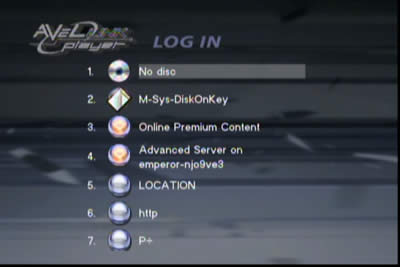
If the user inserts a USB device (stick, HDD), the AvelLink will recognize it and can access its contents. For some strange reason, the AvelLink player, added several other choices to the Login screen which could not be removed. We are not so sure if this is a bug but we will investigate it with I-O Data:
After the disc is recognized, the AvelLink player displays all the folders with the file formats that are currently supported, from the selected submenu (Video/Photo/Music)
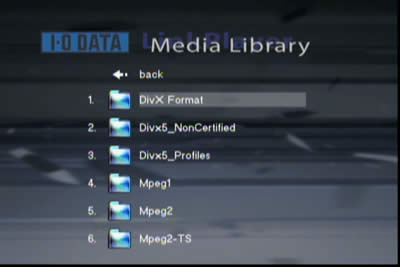
What we found was a little annoying is that if a disc has many folders, when you enter from a folder, say the fifth in the list, into a sub-folder and then exit out again, the menu display doesn't highlight the same folder, but instead highlights the top (1st folder). So if you want to go to the 10th, 11th and 12th folders to see their contents, you have to scroll all the way down each. I-O Data should fix this...

The AvelLink player doesn't offer a lot of playback information on the selected file, nor can you can see which file you are currently playing unless you use the >> or << buttons, when pressing next, the player will display the full name of the file:

During DVD playback, at last you see some details about the time/title/chapter and selected angle.

Greek subtitles are also available,

and display clearly...

 

Review Pages

1. Introduction
2. Features
3. The package
4. Removing the screws
5. Setting up the player
6. The Players Menu - Page 1
7. The Players Menu - Page 2
8. Updating firmware - Page 1
9. Updating firmware - Page 2
10. AvelLink Server - Page 1
11. Online content
12. DVD Loader mod - Page 1
13. DVD Loader mod - Page 2
14. The Tests
15. Playback Tests - Page 1
16. Playback Tests - Page 2
17. Playback Tests - Page 3
18. Playback Tests - Page 4
19. Playback Tests - Page 5
20. Conclusion


 

Pages

  • « first
  • ‹ previous
  • …
  • 11
  • 12
  • 13
  • 14
  • 15
  • 16
  • 17
  • 18
  • 19
  • next ›
  • last »

i-o data

Tags: i-o data
Previous Post
Interview with DaTARIUS' James Steynor
Next Post
Thermaltake Big Typhoon

Related Posts

  • IO Data Releases New External UHD Blu-ray Burners

  • Apple to Install its iPhone Screen Repair machines to Third-party Repair Centers

  • IO Data Releases New 16x BD Burners

  • Buffalo And IO Data Release First 14x Blu-ray Disc Burners

  • I-O Data Introduces BDXL External Drive

  • I-O Data Releases Slim External 6x Blu-Ray Writer

  • I-O Data Ships The BRD-SH12B 12x Blu-ray Burner in Japan

  • I-O Data Signs Linux Software Patent Agreement With Microsoft

Latest Reviews

Fanxiang MP83 M.2 NVMe SSD Enclosure
Enterprise & IT

Fanxiang MP83 M.2 NVMe SSD Enclosure

Ugreen CM642 USB4.0 Enclosure
PC components

Ugreen CM642 USB4.0 Enclosure

be quiet! Dark Power 14 IO
PC components

be quiet! Dark Power 14 IO

SanDisk High Endurance 512GB microSDXC
Cameras

SanDisk High Endurance 512GB microSDXC

Samsung PRO Ultimate 512GB microSDXC
Cameras

Samsung PRO Ultimate 512GB microSDXC

Popular News

MSI’s Latest AMD X870E MAX & EVO Series Motherboards

MSI’s Latest AMD X870E MAX & EVO Series Motherboards

COLORFUL Launches iGame B850M ULTRA Series Micro-ATX Motherboards

COLORFUL Launches iGame B850M ULTRA Series Micro-ATX Motherboards

COLORFUL Presents Limited Edition Chitu MAG-60 Magnetic Keyboard Inspired by the Year of the Horse

COLORFUL Presents Limited Edition Chitu MAG-60 Magnetic Keyboard Inspired by the Year of the Horse

COLORFUL Presents iGame Z890 ULTRA-S W and iGame Z890M ULTRA Z Motherboards

COLORFUL Presents iGame Z890 ULTRA-S W and iGame Z890M ULTRA Z Motherboards

COLORFUL Launches iGame B850I MINI OC V14 Motherboard

COLORFUL Launches iGame B850I MINI OC V14 Motherboard

COLORFUL Expands B850 Motherboard Lineup with New CVN, Battle-Ax, and MEOW Models

COLORFUL Expands B850 Motherboard Lineup with New CVN, Battle-Ax, and MEOW Models

ASRock Adds Support for One Sub-Channel DRAM Module on Intel DDR5 Motherboards

ASRock Adds Support for One Sub-Channel DRAM Module on Intel DDR5 Motherboards

Exceed the Infinite with New ASRock X870E Taichi White Motherboard

Exceed the Infinite with New ASRock X870E Taichi White Motherboard

Main menu

  • Home
  • News
  • Reviews
  • Essays
  • About
    • Submit News

    • Contact Us
    • Privacy

    • Promotion
    • Advertise

    • RSS Feed
  • About
  • Privacy
  • Contact Us
  • Promotional Opportunities @ CdrInfo.com
  • Advertise on out site
  • Submit your News to our site
  • RSS Feed




