
Breaking News

Flowtica Announces Commercial Availability of Upgraded Flowtica Scribe AI Recording Pen Toshiba Demonstrates Storage Infrastructure for Scientific AI and Research at ISC 2026 DZOFILM Announces Octopus II Multi-Mount Lens Adapter & Marlin 1.4x Extender TerraMaster Prime Day 2026 Sale Offers Up to 25% Off XPG Launches INFINITY Fans and MAESTRO Air Coolers

logo

  • Share Us
    • Facebook
    • Twitter
  • Home
  • Home
  • News
  • Reviews
  • Essays
  • Forum
  • Legacy
  • About
    • Submit News

    • Contact Us
    • Privacy

    • Promotion
    • Advertise

    • RSS Feed
    • Site Map

Search form

IOData AvelLink Player2

Mar 24,2005 0

12. DVD Loader mod - Page 1


Review Pages

1. Introduction
2. Features
3. The package
4. Removing the screws
5. Setting up the player
6. The Players Menu - Page 1
7. The Players Menu - Page 2
8. Updating firmware - Page 1
9. Updating firmware - Page 2
10. AvelLink Server - Page 1
11. Online content
12. DVD Loader mod - Page 1
13. DVD Loader mod - Page 2
14. The Tests
15. Playback Tests - Page 1
16. Playback Tests - Page 2
17. Playback Tests - Page 3
18. Playback Tests - Page 4
19. Playback Tests - Page 5
20. Conclusion


IOData AvelLink Player2 - Page 12

- Online content

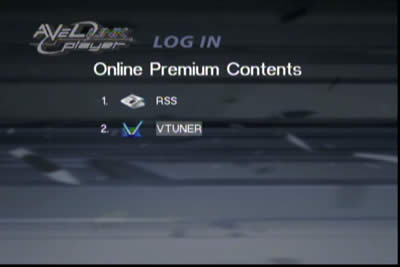
The AvelLink player supports access to online "Premium Content", which is an RSS feed and a VTuner (radio) channels. After selecting the online premium content, you can select either the RSS or Vtuner channels:
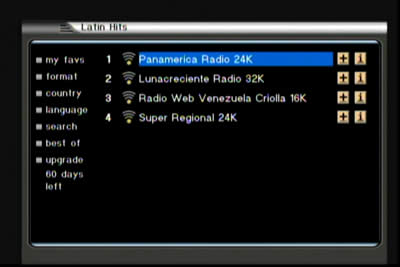
Lets select VTuner. Over a short time, the interface downloads from the Internet, a selection of online radio stations from which you can select from many different music categories. We selected the Latin Hits category and we came up with 4 stations:
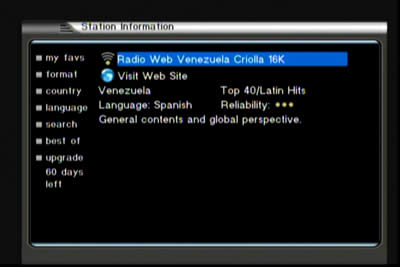
There is some additional information for each station.
By selecting the radio station, you will hear audio but not see anything other than a black screen with the selected radio station's name:

The VTuner service is free for 2 months and if you enjoy it, you can buy the service from www.iodataradio.com
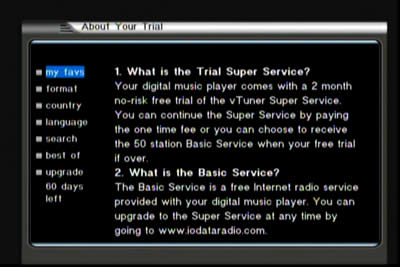
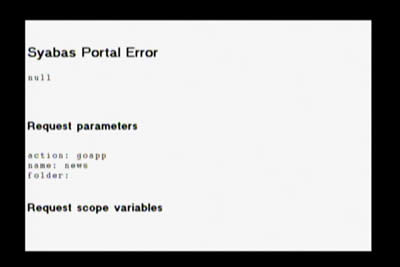
Unfortunately, we couldn't make the RSS feed work, since we got the following error message...
 

Review Pages

1. Introduction
2. Features
3. The package
4. Removing the screws
5. Setting up the player
6. The Players Menu - Page 1
7. The Players Menu - Page 2
8. Updating firmware - Page 1
9. Updating firmware - Page 2
10. AvelLink Server - Page 1
11. Online content
12. DVD Loader mod - Page 1
13. DVD Loader mod - Page 2
14. The Tests
15. Playback Tests - Page 1
16. Playback Tests - Page 2
17. Playback Tests - Page 3
18. Playback Tests - Page 4
19. Playback Tests - Page 5
20. Conclusion


 

Pages

  • « first
  • ‹ previous
  • …
  • 8
  • 9
  • 10
  • 11
  • 12
  • 13
  • 14
  • 15
  • 16
  • …
  • next ›
  • last »

i-o data

Tags: i-o data
Previous Post
Interview with DaTARIUS' James Steynor
Next Post
Thermaltake Big Typhoon

Related Posts

  • IO Data Releases New External UHD Blu-ray Burners

  • Apple to Install its iPhone Screen Repair machines to Third-party Repair Centers

  • IO Data Releases New 16x BD Burners

  • Buffalo And IO Data Release First 14x Blu-ray Disc Burners

  • I-O Data Introduces BDXL External Drive

  • I-O Data Releases Slim External 6x Blu-Ray Writer

  • I-O Data Ships The BRD-SH12B 12x Blu-ray Burner in Japan

  • I-O Data Signs Linux Software Patent Agreement With Microsoft

Latest Reviews

Swit NP-FZ100 Battery
Cameras

Swit NP-FZ100 Battery

The Technology Stack Behind Modern Digital Gaming Platforms
Consumer Electronics

The Technology Stack Behind Modern Digital Gaming Platforms

be quiet! Dark Rock Pro 6
Cooling Systems

be quiet! Dark Rock Pro 6

How Online Casinos Use Encryption, Verification, and Risk Controls to Build User Trust
Enterprise & IT

How Online Casinos Use Encryption, Verification, and Risk Controls to Build User Trust

Why Low-Latency Infrastructure Matters More Than Raw Specs
Enterprise & IT

Why Low-Latency Infrastructure Matters More Than Raw Specs

Popular News

CORSAIR announces Vanguard Pro 96 and Vanguard 96 Gaming Keyboards

CORSAIR announces Vanguard Pro 96 and Vanguard 96 Gaming Keyboards

TEAMGROUP Launches EXPERT P34F Find My External SSD

TEAMGROUP Launches EXPERT P34F Find My External SSD

MSI Launches FORGE GK600 TKL WIRELESS Special Edition Compact Mechanical Keyboard

MSI Launches FORGE GK600 TKL WIRELESS Special Edition Compact Mechanical Keyboard

Samsung announces Galaxy Tab S11 and Galaxy S25 FE series

Samsung announces Galaxy Tab S11 and Galaxy S25 FE series

Viltrox Showcases Upcoming Lens Lineup and New TTL Flash at IBC 2025

Viltrox Showcases Upcoming Lens Lineup and New TTL Flash at IBC 2025

Panasonic Introduces the First Ultra-Telephoto Zoom Lens in the LUMIX S Series

Panasonic Introduces the First Ultra-Telephoto Zoom Lens in the LUMIX S Series

MSI Launches DATAMAG 40Gbps Magnetic Portable SSD

MSI Launches DATAMAG 40Gbps Magnetic Portable SSD

Viltrox Joins the L-Mount Alliance, Expanding Creative Possibilities

Viltrox Joins the L-Mount Alliance, Expanding Creative Possibilities

Main menu

  • Home
  • News
  • Reviews
  • Essays
  • Forum
  • Legacy
  • About
    • Submit News

    • Contact Us
    • Privacy

    • Promotion
    • Advertise

    • RSS Feed
    • Site Map
  • About
  • Privacy
  • Contact Us
  • Promotional Opportunities @ CdrInfo.com
  • Advertise on out site
  • Submit your News to our site
  • RSS Feed




