Breaking News

LG Display launches 24.5-inch 720Hz Gaming OLED Panel Razer Unveils the Mako Desktop Gaming Speakers TerraMaster Launches 725 Series Xeon Rackmount NAS Viltrox Brings Its Full-Frame Air Series to L-Mount with Four Compact Prime Lenses CORSAIR Deploys the WARTHOG Airflow Mid-Tower PC Case

logo

  • Share Us
    • Facebook
    • Twitter
  • Home
  • Home
  • News
  • Reviews
  • Essays
  • About
    • Submit News

    • Contact Us
    • Privacy

    • Promotion
    • Advertise

    • RSS Feed

Search form

Zidoo X9 Media Player review

Mar 19,2015 0

2. Unboxing the player


Review Pages

1. Specifications
2. Unboxing the player
3. User Interface, settings
4. Benchmarks
5. Video/Audio playback tests - video player
6. KODI, HDMI recording
7. Summary


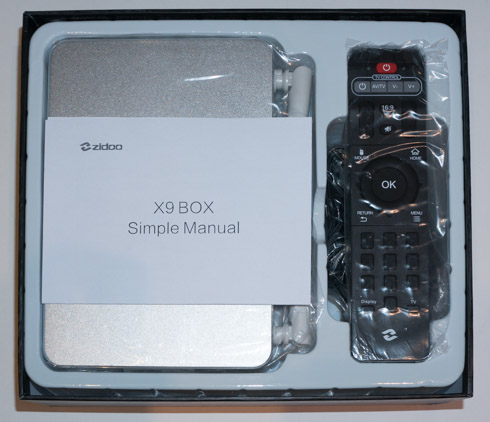
The Zidoo X9 can be purchased online at Geekbuying and Amazon for $139.99 and $129, respectively.. Below you see the retail box of the device:

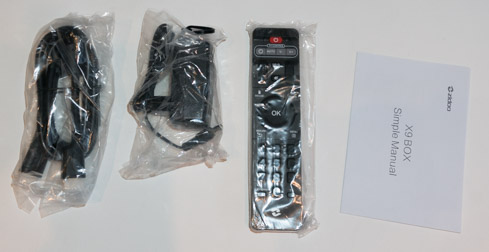
Zidoo have provided everything you need to get started. Inside the box,  you have:

  • 1 x Zidoo X9 box
  • 1 x Chinese / English instruction manual
  • 1 x IR remote
  • 1 x 12v 2A power adapter (110~240V 50cm )
  • 1 x HDMI cable (60cm)

We were surprised to see no batteries included.

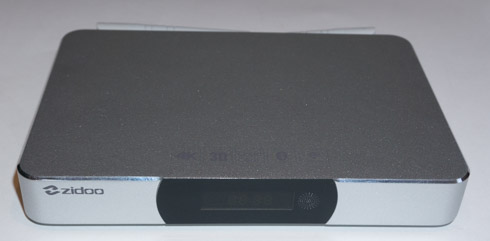
Roughly the size of a 7 inch tablet (187 x 127 x 27 mm ), the X9 crams all of its internals into a unibody aluminum chassis. The metal case is finished nicely, with subtly chamfered edges.

The front panel includes just a small LCD panel in the center, which is used to communicate the device status such as boot, in addition to displaying the time during operation. With the latest available firmware installed you cannot dim or even disable the LCD display for those who fight find it a bit flashy when they watch movies.
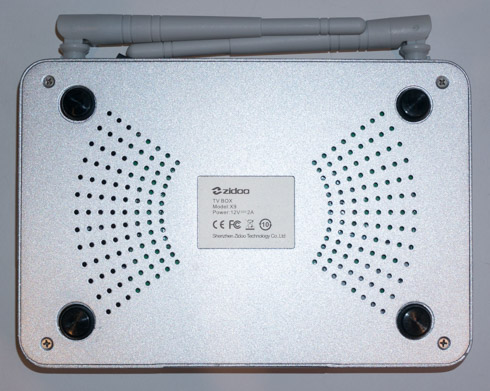
At the bottom, we will find the product ID and ventilation holes.
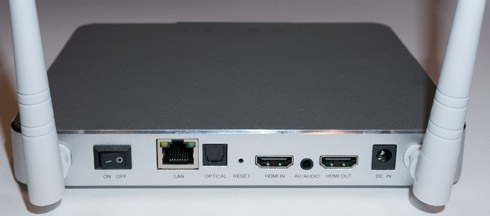
Most of the available ports are located at the back. Flanked by two large WiFi antennas (not removable), the ports are the power switch, 10/100 Ethernet (no 1Gigabit), Optical Audio, the Reset Button, HDMI In, Composite Video out, HDMI Out and DC In.
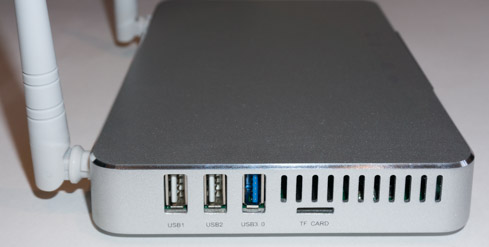
On the sides of the unit, one side houses 2 USB 2.0 ports, 1 USB3.0 port, some vents and the microSD card slot.
 

The remote control is looks typical and its layout should be familiar to anyone who had already access to other Android TV players. Using a remote wireless keyboard instead would make typing experience easier.


Review Pages

1. Specifications
2. Unboxing the player
3. User Interface, settings
4. Benchmarks
5. Video/Audio playback tests - video player
6. KODI, HDMI recording
7. Summary


Pages

  • « first
  • ‹ previous
  • 1
  • 2
  • 3
  • 4
  • 5
  • 6
  • 7
  • next ›
  • last »

Zidoo

Tags: Zidoo
Previous Post
AMD Radeon R7 240GB SSD review
Next Post
Toshiba TransMemory Pro 64GB USB 3.0 Flash Drive Review

Related Posts

  • Zidoo Z9S 4K Media Player review

  • Zidoo Launches New ZIDOO Z9S and ZIDOO Z10 4K Android TV Media Players

  • Zidoo X7 TV quad core processor TV Box Debuts for $69

  • Zidoo's Android Media Players To Get Full Blu-Ray Menu Navigation

  • Zidoo X9S and Zidoo Media Players Will Be BaSed On New RTD1295 Processor

  • Zidoo X1II Android Media Player review

  • Zidoo X6 Pro Media Player review

  • New Zidoo X9S Android Media Player Coming Next Month

Latest Reviews

Fanxiang MP83 M.2 NVMe SSD Enclosure
Enterprise & IT

Fanxiang MP83 M.2 NVMe SSD Enclosure

Ugreen CM642 USB4.0 Enclosure
PC components

Ugreen CM642 USB4.0 Enclosure

be quiet! Dark Power 14 IO
PC components

be quiet! Dark Power 14 IO

SanDisk High Endurance 512GB microSDXC
Cameras

SanDisk High Endurance 512GB microSDXC

Samsung PRO Ultimate 512GB microSDXC
Cameras

Samsung PRO Ultimate 512GB microSDXC

Popular News

CORSAIR announces Vanguard Pro 96 and Vanguard 96 Gaming Keyboards

CORSAIR announces Vanguard Pro 96 and Vanguard 96 Gaming Keyboards

MSI’s Latest AMD X870E MAX & EVO Series Motherboards

MSI’s Latest AMD X870E MAX & EVO Series Motherboards

Panasonic Introduces the First Ultra-Telephoto Zoom Lens in the LUMIX S Series

Panasonic Introduces the First Ultra-Telephoto Zoom Lens in the LUMIX S Series

COLORFUL Launches iGame B850M ULTRA Series Micro-ATX Motherboards

COLORFUL Launches iGame B850M ULTRA Series Micro-ATX Motherboards

COLORFUL Presents Limited Edition Chitu MAG-60 Magnetic Keyboard Inspired by the Year of the Horse

COLORFUL Presents Limited Edition Chitu MAG-60 Magnetic Keyboard Inspired by the Year of the Horse

COLORFUL Presents iGame Z890 ULTRA-S W and iGame Z890M ULTRA Z Motherboards

COLORFUL Presents iGame Z890 ULTRA-S W and iGame Z890M ULTRA Z Motherboards

COLORFUL Launches iGame B850I MINI OC V14 Motherboard

COLORFUL Launches iGame B850I MINI OC V14 Motherboard

COLORFUL Expands B850 Motherboard Lineup with New CVN, Battle-Ax, and MEOW Models

COLORFUL Expands B850 Motherboard Lineup with New CVN, Battle-Ax, and MEOW Models

Main menu

  • Home
  • News
  • Reviews
  • Essays
  • About
    • Submit News

    • Contact Us
    • Privacy

    • Promotion
    • Advertise

    • RSS Feed
  • About
  • Privacy
  • Contact Us
  • Promotional Opportunities @ CdrInfo.com
  • Advertise on out site
  • Submit your News to our site
  • RSS Feed