Breaking News

be quiet! enters high-end gaming mouse market with Dark Perk Ergo and Dark Perk Sym ASUS ROG announces ROG Strix GS-BE7200 Dual-Band WiFi 7 Gaming Router Transcend Launches RDE3 microSD Express Card Reader for Next-Generation High-Speed Performance Akasa Unleashes Six New Low-Profile CPU Coolers Up to 165W TDP Cooling in Compact Form Factors SWIT announces Powercell Battery Series for Sony, Canon, Nikon, and Fujifilm Cameras

logo

  • Share Us
    • Facebook
    • Twitter
  • Home
  • Home
  • News
  • Reviews
  • Essays
  • Forum
  • Legacy
  • About
    • Submit News

    • Contact Us
    • Privacy

    • Promotion
    • Advertise

    • RSS Feed
    • Site Map

Search form

Sony HTR-6000

Apr 18,2005 0

2. The RDR-GX3 recorder


Review Pages

1. Introduction
2. The RDR-GX3 recorder
3. Easy Setup
4. Main Menu
5. Recording Menu
6. Other Menus
7. Reading Tests
8. Error Correction Tests
9. Recording Tests
10. Writing Quality Tests
11. The STR-KSL60 A/V Receiver
12. Front - Menus
13. The Speakers
14. Conclusion


The retail package includes the following:

Audio and Video cables, Power cable, Antenna cable, Remote Control and two R6 batteries (size AA).

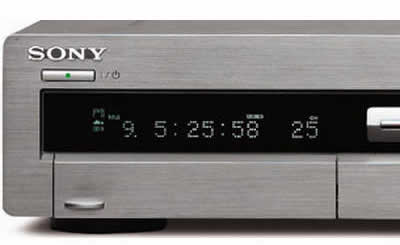
The power button is located on the front in the top left corner of the device. Directly below it is the led display, where various information depending on the device mode, is illustrated. Underneath the led display is a small panel which when opened, reveals more connections (S-VIDEO and Composite Video/Audio, see below).

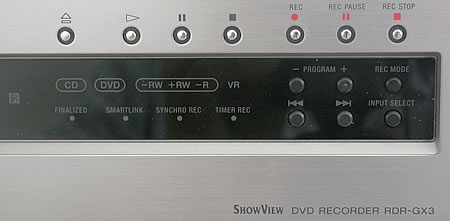
On the right hand side there are several control buttons such as eject, play, pause, stop and record functions. The display underneath the buttons shows information about the Finalized disc, SmartLink, SynchroRec and the Timer. To the right of the display on the far right, there are six more buttons which allow the user to select recording mode, input and program setup.
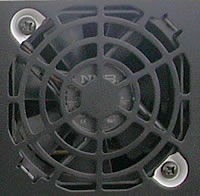
Looking at the rear of the device we find all the input output connections. To the right of the i/o connections is the fan outlet to keep the device cool.
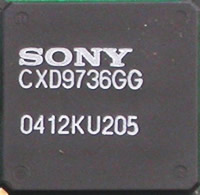
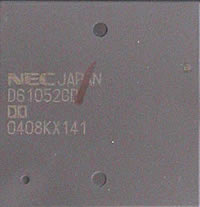
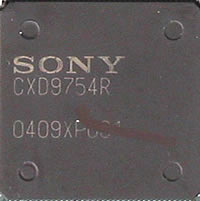
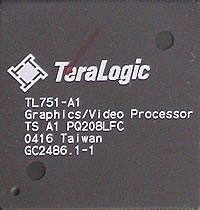
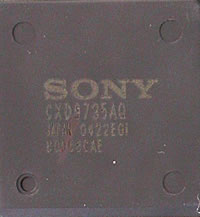
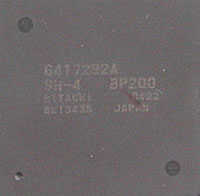
It is highly recommended that the cover NOT to be removed, so below is an inside view of the device along with some photos of the more important chipsets.

The NEC chipset is an MPEG2 Encoder with Dolby Audio Encoding.

The TL751 chipset is a Graphics processor for Personal Video Recorders, DVD, Digital STB and Internet TV applications.

The TL751 chipset provides advanced functionality such as fast response time to display graphics-rich content, high quality graphics and video capabilities to perform seamless integration of video and multimedia graphics content and easier navigation through the menu objects. A 32-bit hardware accelerated graphics engine performs fast rendering of onscreen menus and internet content and supplies 32-bit color depth for true color graphics. Alpha bending (129 levels) provides transparent graphics overlay for video/studio-like effects including fading in/out. A multi-tap anti-flicker filter creates readable text and graphics on interlaced displays. Scalable windowing enables picture-in-picture (PIP) and picture-in-graphics (PIG) functions. A hardware cursor controls the easy navigation of menus and internet-driven push content on the TV. All of the above functionality provide a compelling user experience.

The TL751 interfaces have been designed as such to reduce problems to key components ( MPEG Decoder, CPU, etc. ) and to try to keep the parts count on the system to a minimum. The TL751 offers a unified memory system allowing the CPU and the TL751 chipset to share the same memory whereby reducing the amount of memory required from the system. The TL751 interfaces to all existing standard definitions and enables migration from a basic Set-Top Box to a higher-end, graphics-rich advanced Set-Top Box or Personal Video Recorder. The TL751 is also capable of interfacing with RISC type CPUs' such as EmbeddedMIPS, StronARM, STMicroelectronic's ST20, Hitachi's SH Series, Motorola 68K, Toshiba Hawk, PowerPC and others

More detailed information on the Hitachi SH-4 chipset is found in the table below :

With the remote control, you can fully operate the recorder and optionally operate a TV set. When you open the slide cover on the remote control, you will find the record mode buttons. While with the setup button, the command mode can be changed.


Review Pages

1. Introduction
2. The RDR-GX3 recorder
3. Easy Setup
4. Main Menu
5. Recording Menu
6. Other Menus
7. Reading Tests
8. Error Correction Tests
9. Recording Tests
10. Writing Quality Tests
11. The STR-KSL60 A/V Receiver
12. Front - Menus
13. The Speakers
14. Conclusion


Pages

  • « first
  • ‹ previous
  • 1
  • 2
  • 3
  • 4
  • 5
  • 6
  • 7
  • 8
  • 9
  • …
  • next ›
  • last »

Sony

Tags: Sony
Previous Post
Sid Meier's Pirates!
Next Post
VSO latest results April 17th 2005

Related Posts

  • Sony Launches Alpha 7 V and FE 28-70mm f/3.5-5.6 OSS II

  • First look at PlayStation’s 27” Gaming Monitor

  • Sony Unveils Sony FE 100mm F2.8 Macro GM OSS

  • Sony Reimagines its 10 Series with Xperia 10 VII

  • Sony’s 360 Virtual Mixing Environment now available in Europe

  • Sony completes its INZONE gaming gear range with new headsets and more

  • PlayStation announces FlexStrike wireless fight stick

  • Sony Introduces the RX1R III

Latest Reviews

The Difference Between American and European Stakes and Why It Changes How People Bet
Enterprise & IT

The Difference Between American and European Stakes and Why It Changes How People Bet

Endorfy Thock V2 Wireless Keyboard
PC components

Endorfy Thock V2 Wireless Keyboard

Noctua NH-D15 G2 Chromax.Black
Cooling Systems

Noctua NH-D15 G2 Chromax.Black

EnGenius ECW520 AP
Enterprise & IT

EnGenius ECW520 AP

Noctua NP-DM3 desk mat
Gaming

Noctua NP-DM3 desk mat

Popular News

COLORFUL Introduces CVN B850I GAMING FROZEN Motherboard

COLORFUL Introduces CVN B850I GAMING FROZEN Motherboard

COLORFUL Presents CVN X870 ARK FROZEN Motherboard for AMD Ryzen 9000 CPUs

COLORFUL Presents CVN X870 ARK FROZEN Motherboard for AMD Ryzen 9000 CPUs

TEAMGROUP Launches EXPERT P34F Find My External SSD

TEAMGROUP Launches EXPERT P34F Find My External SSD

ASRock AM5 Motherboards Now Fully Support AMD Ryzen 9 9950X3D & 9900X3D Processors

ASRock AM5 Motherboards Now Fully Support AMD Ryzen 9 9950X3D & 9900X3D Processors

Samsung announces Galaxy Tab S11 and Galaxy S25 FE series

Samsung announces Galaxy Tab S11 and Galaxy S25 FE series

Viltrox Showcases Upcoming Lens Lineup and New TTL Flash at IBC 2025

Viltrox Showcases Upcoming Lens Lineup and New TTL Flash at IBC 2025

CORSAIR announces Vanguard Pro 96 and Vanguard 96 Gaming Keyboards

CORSAIR announces Vanguard Pro 96 and Vanguard 96 Gaming Keyboards

Panasonic Introduces the First Ultra-Telephoto Zoom Lens in the LUMIX S Series

Panasonic Introduces the First Ultra-Telephoto Zoom Lens in the LUMIX S Series

Main menu

  • Home
  • News
  • Reviews
  • Essays
  • Forum
  • Legacy
  • About
    • Submit News

    • Contact Us
    • Privacy

    • Promotion
    • Advertise

    • RSS Feed
    • Site Map
  • About
  • Privacy
  • Contact Us
  • Promotional Opportunities @ CdrInfo.com
  • Advertise on out site
  • Submit your News to our site
  • RSS Feed