Breaking News

Firewalla App 1.67 Brings Enterprise Wi-Fi, RADIUS, and Advanced AP7 Controls to Small Businesses and Power Users Samsung To Unveil AI Vision Built With Google Gemini at CES 2026 Samsung Unveils New Odyssey Gaming Monitor Lineup COLORFUL Launches iGame GeForce RTX 50 MINI OC Series Graphics Cards for Compact PCs LG Display unveils world’s first 240Hz RGB stripe OLED panel

logo

  • Share Us
    • Facebook
    • Twitter
  • Home
  • Home
  • News
  • Reviews
  • Essays
  • Forum
  • Legacy
  • About
    • Submit News

    • Contact Us
    • Privacy

    • Promotion
    • Advertise

    • RSS Feed
    • Site Map

Search form

Shuttle SN27P2

May 21,2007 0

11. Overclocking


Review Pages

1. Introduction
2. Full specifications
3. The Package
4. A Look Inside
5. Installation
6. bios
7. Everest Ultimate Edition 2006 - SiSoft Sandra
8. PCMARK - 3DMARK
9. Science Mark - PovRay - Nero Digital
10. CINEBENCH -SuperPI
11. Overclocking
12. Conclusion


Shuttle doesn't advertise the SN27P2 as an overclocker champion. There aren't many options in the BIOS to set exact voltages, so we have to see what we can get from this little box. To start off our overclocking attempts, we used Shuttle's XPC Tools:
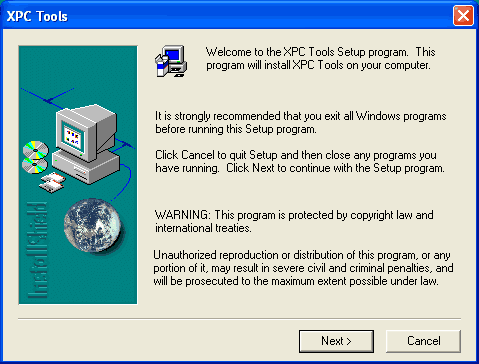
The installation process is easy, just follow the wizard. After the installer is finished, we can now see how this software works. The latest and our installed version is 1.50.
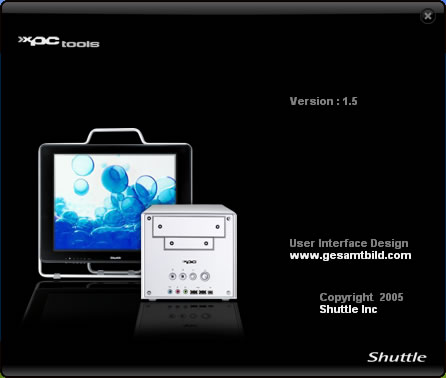
The main screen offers critical information about the temperatures and system voltages:
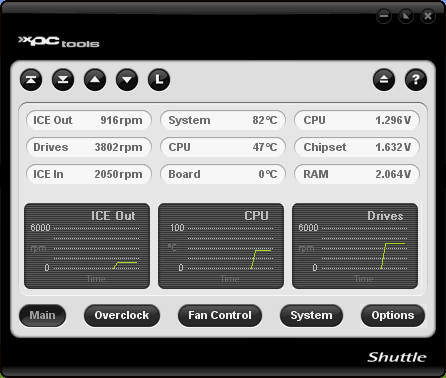
While we can also set the Fan functions:

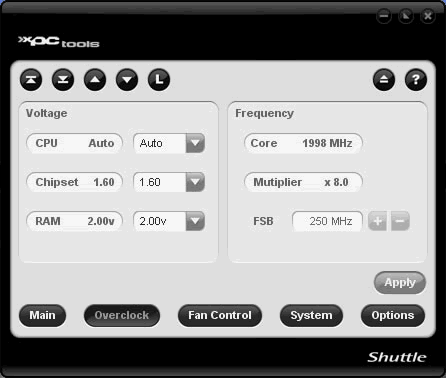
Time has come to overclock our processor (AMD Athlon X2 4600+). Unfortunately, you cannot set any options from within XPC Tools:
Our next best option was to use nVidia's nTune application. This time we were able to change the major settings for the Shuttle SN27P2, such as memory timings, HT multiplier and of course FSB. Unfortunately, you cannot set the FSB higher than 250MHz, at least with the latest release nTune:

In order to get a stable system, we lowered the HT multiplier to 3x, as recommended from most users:
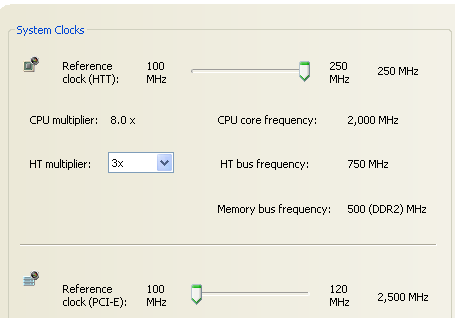
The system's stability was confirmed after running Orthos stability software for many hours. Of course, since the AMD Athlon X2 4600+ isn't exactly the best AMD processor to overclock, we lowered the CPU multiplier down to x8.0 and with the FSB at 250MHz, we reached 2.0GHz.
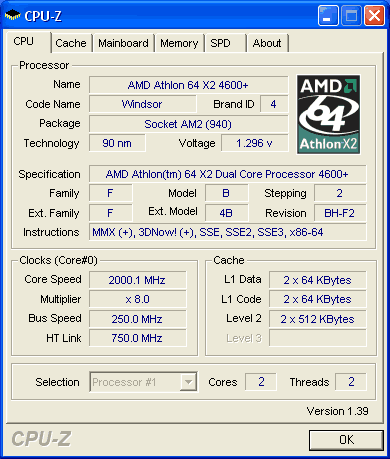
So far so good. Our next attempt was to go higher than 250FSB, something that at least with our PC setup, did not prove successful. Any setting above 250FSB resulted system failing the POST and needed a ClearCMOS (the back clear CMOS panel button came in very handy here). We have read reports that with other AM2 processors, the FSB can reach up to 300MHz (maximum BIOS setting), which indicates this box is very capable of overclocking.


Review Pages

1. Introduction
2. Full specifications
3. The Package
4. A Look Inside
5. Installation
6. bios
7. Everest Ultimate Edition 2006 - SiSoft Sandra
8. PCMARK - 3DMARK
9. Science Mark - PovRay - Nero Digital
10. CINEBENCH -SuperPI
11. Overclocking
12. Conclusion


Pages

  • « first
  • ‹ previous
  • …
  • 4
  • 5
  • 6
  • 7
  • 8
  • 9
  • 10
  • 11
  • 12
  • next ›
  • last »

Shuttle

AMD

SFF

Tags: Shuttle AMD SFF
Previous Post
Corsair PC2-6400C4
Next Post
Turtle Beach Audio Advantage SRM

Related Posts

  • ASUS Announces Turbo Radeon AI Pro R9700 32GB Graphics Card

  • AMD Introduces EPYC Embedded 4005 Processors for Low-Latency Applications at the Edge

  • Shuttle Introduces SPCNV03 Ultra-Compact Edge AI Computer

  • AMD announces Instinct MI350 Series GPUs

  • IBM and AMD Join Forces to Build the Future of Computing

  • AMD Introduces New Radeon Graphics Cards and Ryzen Threadripper Processors at COMPUTEX 2025

  • Shuttle announces DN11H at InfoComm 2025

  • AMD Announces Press Conference at COMPUTEX 2025

Latest Reviews

EnGenius ECW520 AP
Enterprise & IT

EnGenius ECW520 AP

Noctua NP-DM3 desk mat
Gaming

Noctua NP-DM3 desk mat

Crucial P510 2TB NMVE
PC components

Crucial P510 2TB NMVE

The Quiet Technology Behind the Spin
Enterprise & IT

The Quiet Technology Behind the Spin

Crucial DDR5 Pro 6400 CL32
PC components

Crucial DDR5 Pro 6400 CL32

Popular News

COLORFUL Introduces CVN B850I GAMING FROZEN Motherboard

COLORFUL Introduces CVN B850I GAMING FROZEN Motherboard

COLORFUL Presents CVN X870 ARK FROZEN Motherboard for AMD Ryzen 9000 CPUs

COLORFUL Presents CVN X870 ARK FROZEN Motherboard for AMD Ryzen 9000 CPUs

COLORFUL Presents the B860 Series Motherboards

COLORFUL Presents the B860 Series Motherboards

Intel-AMD new motherboards announced

Intel-AMD new motherboards announced

TEAMGROUP Launches EXPERT P34F Find My External SSD

TEAMGROUP Launches EXPERT P34F Find My External SSD

ASRock AM5 Motherboards Now Fully Support AMD Ryzen 9 9950X3D & 9900X3D Processors

ASRock AM5 Motherboards Now Fully Support AMD Ryzen 9 9950X3D & 9900X3D Processors

Samsung announces Galaxy Tab S11 and Galaxy S25 FE series

Samsung announces Galaxy Tab S11 and Galaxy S25 FE series

Viltrox Showcases Upcoming Lens Lineup and New TTL Flash at IBC 2025

Viltrox Showcases Upcoming Lens Lineup and New TTL Flash at IBC 2025

Main menu

  • Home
  • News
  • Reviews
  • Essays
  • Forum
  • Legacy
  • About
    • Submit News

    • Contact Us
    • Privacy

    • Promotion
    • Advertise

    • RSS Feed
    • Site Map
  • About
  • Privacy
  • Contact Us
  • Promotional Opportunities @ CdrInfo.com
  • Advertise on out site
  • Submit your News to our site
  • RSS Feed