Breaking News

ASUS Announces ProArt Router PRT-BE5000 and ProArt Switch PQG-U1080 CORSAIR Expands the Popular FRAME Series Case Lineup DeepCool Launches the LT360 VISION ARGB Noctua and Asetek Announce Flagship AIO Liquid Coolers Toshiba Begins Sampling of 30-34 TB SMR Nearline Hard Disk Drives

logo

  • Share Us
    • Facebook
    • Twitter
  • Home
  • Home
  • News
  • Reviews
  • Essays
  • Forum
  • Legacy
  • About
    • Submit News

    • Contact Us
    • Privacy

    • Promotion
    • Advertise

    • RSS Feed
    • Site Map

Search form

Shuttle SH55J2 review

Sep 6,2010 0

4. Installing the components


Review Pages

1. Features, specs
2. Opening the package
3. Internal
4. Installing the components
5. BIOS setings
6. Overclocking
7. Final words


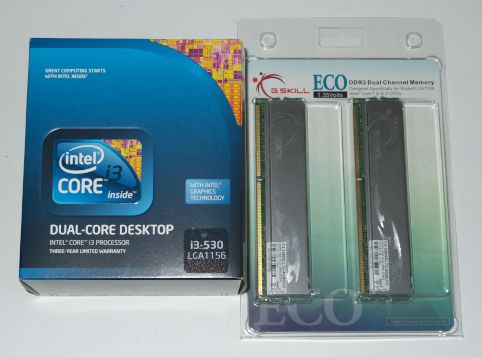
So what we need to have the system up and running? Probably just three components, a cpu, memory and a hard disk drive. For our tests, we used an Intel Core i3-530 processor and 2x2GB DDR3 memory by G-Skill:
The CPU should be handled with care and carefully put in place. There is only one direction you can install the CPU so you cannot make any mistake here:
Apply some thermal paste (included) and secure the Shuttle CPU cooler. It is advised to follow the X rule here to have the best results, meaning screwing diagonally:

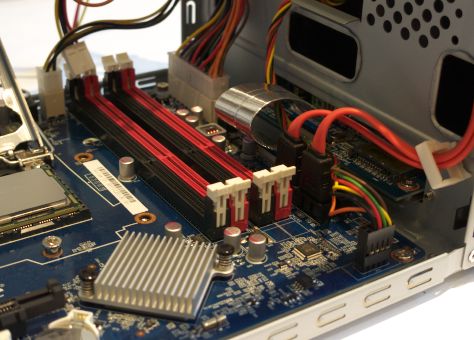
Installing the memory modules is also easy since they are properly colored:
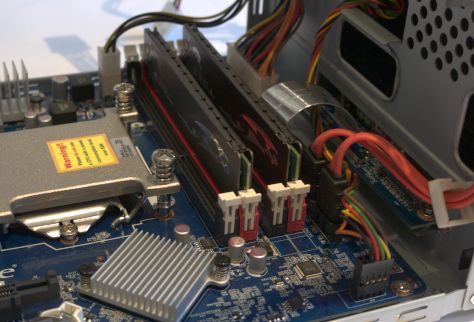
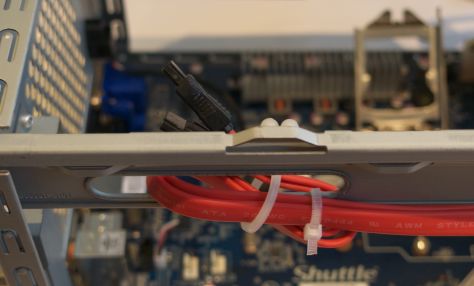
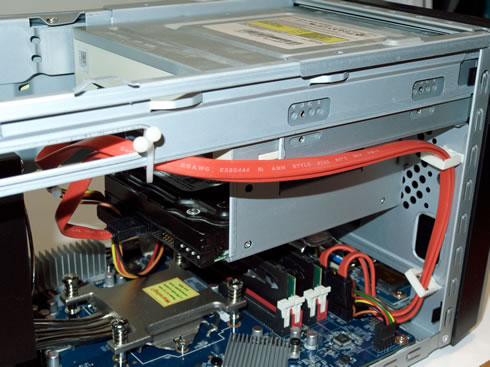
Before getting into the storage area, you need to arrange the SATA cables in order to easily reach the devices:
Installing a HDD and an optical device should be also very easy. The case is offering enough and properly placed holes for the installation screws you may need. The next step is to plug the SATA and power cables to the installed devices:
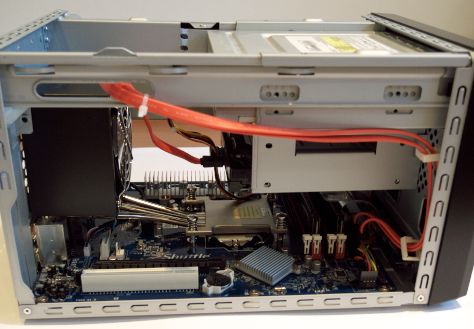
There is a lot of free space left between the SATA and ODD drives:
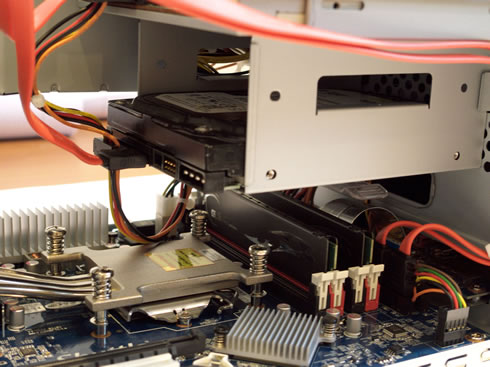
Here is a top view of the device:

As you can see in the picture below the SATA cables are already fastened on the case with plastic bands so you may find it hard to make them reach the installed SATA device. So you may need to cut the plastic band and possibly fasten the SATA cables on the case again in a more convenient position:

Finally our system is ready to use:
 

Review Pages

1. Features, specs
2. Opening the package
3. Internal
4. Installing the components
5. BIOS setings
6. Overclocking
7. Final words
 

Pages

  • « first
  • ‹ previous
  • 1
  • 2
  • 3
  • 4
  • 5
  • 6
  • 7
  • next ›
  • last »

Shuttle

Tags: Shuttle
Previous Post
Samsung SH-B123L review
Next Post
LiteOn iHBS112 review

Related Posts

  • Shuttle Launches the XZ890G2

  • Shuttle Introduces SPCNV03 Ultra-Compact Edge AI Computer

  • Shuttle announces DN11H at InfoComm 2025

  • Shuttle announces NA10H - NT10H

  • Flat Mini-PC Barebones for the latest LGA1700 processors from Shuttle

  • Shuttle announces Xeon-compatible Mini-PC Barebone with 4x LAN and ECC RAM support

  • Shuttle announces Mini-PC Barebone in a 4.7-litre format for two PCI Express cards

  • Shuttle Announces DH32 Mini-PC

Latest Reviews

In the Age of AI Phishing, the Best User Experience Might Be the One That Feels Safest
Enterprise & IT

In the Age of AI Phishing, the Best User Experience Might Be the One That Feels Safest

SoundPeats C30
Consumer Electronics

SoundPeats C30

Why Streaming Live Casino Games Demands Smarter Tech
Enterprise & IT

Why Streaming Live Casino Games Demands Smarter Tech

Kioxia Exceria Plus G3 512GB microSD
Cameras

Kioxia Exceria Plus G3 512GB microSD

SoundPeats Cove Pro
Consumer Electronics

SoundPeats Cove Pro

Popular News

TEAMGROUP Launches EXPERT P34F Find My External SSD

TEAMGROUP Launches EXPERT P34F Find My External SSD

Samsung announces Galaxy Tab S11 and Galaxy S25 FE series

Samsung announces Galaxy Tab S11 and Galaxy S25 FE series

Viltrox Showcases Upcoming Lens Lineup and New TTL Flash at IBC 2025

Viltrox Showcases Upcoming Lens Lineup and New TTL Flash at IBC 2025

CORSAIR announces Vanguard Pro 96 and Vanguard 96 Gaming Keyboards

CORSAIR announces Vanguard Pro 96 and Vanguard 96 Gaming Keyboards

Panasonic Introduces the First Ultra-Telephoto Zoom Lens in the LUMIX S Series

Panasonic Introduces the First Ultra-Telephoto Zoom Lens in the LUMIX S Series

MSI Launches DATAMAG 40Gbps Magnetic Portable SSD

MSI Launches DATAMAG 40Gbps Magnetic Portable SSD

MSI Launches FORGE GK600 TKL WIRELESS Special Edition Compact Mechanical Keyboard

MSI Launches FORGE GK600 TKL WIRELESS Special Edition Compact Mechanical Keyboard

Viltrox Joins the L-Mount Alliance, Expanding Creative Possibilities

Viltrox Joins the L-Mount Alliance, Expanding Creative Possibilities

Main menu

  • Home
  • News
  • Reviews
  • Essays
  • Forum
  • Legacy
  • About
    • Submit News

    • Contact Us
    • Privacy

    • Promotion
    • Advertise

    • RSS Feed
    • Site Map
  • About
  • Privacy
  • Contact Us
  • Promotional Opportunities @ CdrInfo.com
  • Advertise on out site
  • Submit your News to our site
  • RSS Feed