
Breaking News

Akasa Announces Fermi CM5 Fanless Case for Raspberry Pi Compute Module 5 LG Electronics Advances the LG Sound Suite Experience With New DTS DJI Delivers First Drone Dock with Automated, 25-Second Battery Swaps ASUS Announces ExpertBook A7 (AMD) Kioxia Introduces Direct Liquid Cooling Support for Enterprise SSDs

logo

  • Share Us
    • Facebook
    • Twitter
  • Home
  • Home
  • News
  • Reviews
  • Essays
  • About
    • Submit News

    • Contact Us
    • Privacy

    • Promotion
    • Advertise

    • RSS Feed

Search form

Patriot Memory Valkyrie NAS review

Jul 1,2010 0

5. Working with RAID fuctions, performance


Review Pages

1. Features
2. Package, HDD installation
3. Basic setup
4. Features
5. Working with RAID fuctions, performance
6. Other features, conclusion


We get back to the Settings menu and explore the Disk Management features of the device. Although you can install two HDDs into it, you cannot create two separate disk arrays. The available configurations are: one disk, two disks in JBOD, two disks in RAID0, and two disks in RAID1.

Below you can see the installed HDDs and format them suing the FAT32 or ext2. In our case, we installed two HDDs and after adding them with the >> button at the Raid device window, we are ready to format them:
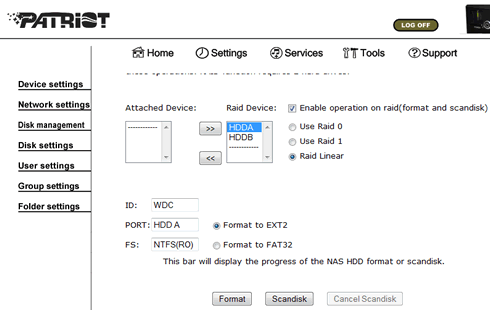
 

The formatting took around 30+ minutes. Of course this depends on the capacity of the installed HDD and their model:

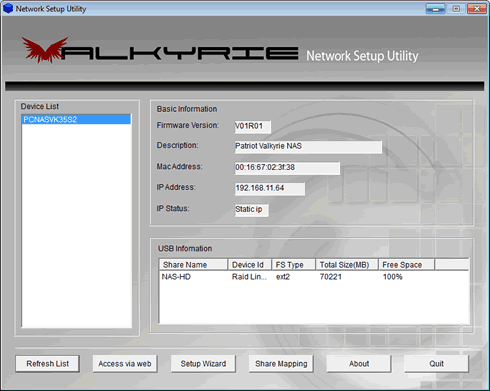
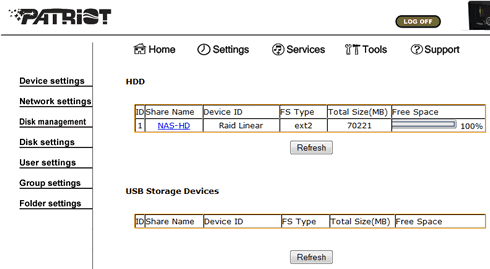
We rebooted the system and now we can access again the Valkyrie. Below you can see information about the installed HDDS. In our case, we have setup a NAS-HD with Raid Linear function with ext2 file system and a total capacity of 70GB (2x35GB):
More information is also available under the web access menu:
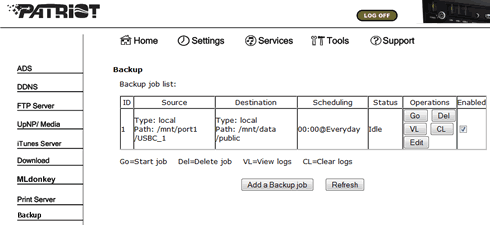
Other services include the backup job, which however is limited to backup external devices physically attached to the Valkyrie product:
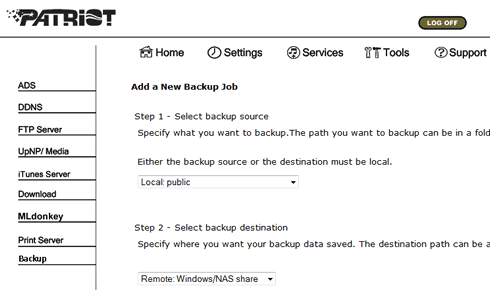
In our case we inserted a USB flash drive to the Valkyrie and created a backup job:

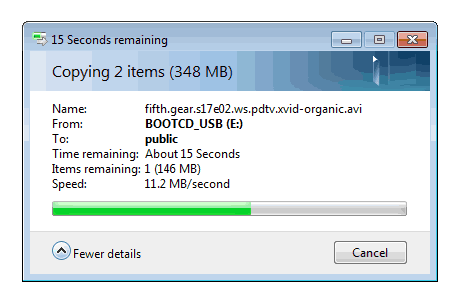
We are ready to test the performance of the NAS device. The reading performance under our configuration (Raid Linear/Raid 01 1 functions) was rather low. We measured a 11~12MB/sec reading and writing speed:
 

Review Pages

1. Features
2. Package, HDD installation
3. Basic setup
4. Features
5. Working with RAID fuctions, performance
6. Other features, conclusion


Pages

  • « first
  • ‹ previous
  • 1
  • 2
  • 3
  • 4
  • 5
  • 6
  • next ›
  • last »

Patriot Memory

Tags: Patriot Memory
Previous Post
Crucial RealSSD C300 64GB review
Next Post
Noctua NH-U9B SE2 review

Related Posts

  • Patriot Announces VIPER VENOM RGB and non-RGB DDR5 Kits

  • Patriot Announces Signature DDR5 Memory Series

  • PATRIOT VIPER GAMING STEEL RGB Memory Lineup

  • VIPER GAMING by PATRIOT Launches the PXD m.2 PCIe Type-C External SSD

  • Patriot Announces the VPR100 RGB M.2 NVMe SSD

  • Patriot Launches The P200 Series SATA SSDs

  • Viper Gaming Releases The VPN100 NVMe PCIe M.2 SSD

  • Patriot Launches the Viper Steel DDR4 16GB 4400MHz Memory

Latest Reviews

Fanxiang MP83 M.2 NVMe SSD Enclosure
Enterprise & IT

Fanxiang MP83 M.2 NVMe SSD Enclosure

Ugreen CM642 USB4.0 Enclosure
PC components

Ugreen CM642 USB4.0 Enclosure

be quiet! Dark Power 14 IO
PC components

be quiet! Dark Power 14 IO

SanDisk High Endurance 512GB microSDXC
Cameras

SanDisk High Endurance 512GB microSDXC

Samsung PRO Ultimate 512GB microSDXC
Cameras

Samsung PRO Ultimate 512GB microSDXC

Popular News

MSI’s Latest AMD X870E MAX & EVO Series Motherboards

MSI’s Latest AMD X870E MAX & EVO Series Motherboards

COLORFUL Launches iGame B850M ULTRA Series Micro-ATX Motherboards

COLORFUL Launches iGame B850M ULTRA Series Micro-ATX Motherboards

COLORFUL Presents Limited Edition Chitu MAG-60 Magnetic Keyboard Inspired by the Year of the Horse

COLORFUL Presents Limited Edition Chitu MAG-60 Magnetic Keyboard Inspired by the Year of the Horse

COLORFUL Launches iGame B850I MINI OC V14 Motherboard

COLORFUL Launches iGame B850I MINI OC V14 Motherboard

COLORFUL Presents iGame Z890 ULTRA-S W and iGame Z890M ULTRA Z Motherboards

COLORFUL Presents iGame Z890 ULTRA-S W and iGame Z890M ULTRA Z Motherboards

COLORFUL Launches the iGame X870E VULCAN W OC Motherboard

COLORFUL Launches the iGame X870E VULCAN W OC Motherboard

COLORFUL Expands B850 Motherboard Lineup with New CVN, Battle-Ax, and MEOW Models

COLORFUL Expands B850 Motherboard Lineup with New CVN, Battle-Ax, and MEOW Models

ASRock Adds Support for One Sub-Channel DRAM Module on Intel DDR5 Motherboards

ASRock Adds Support for One Sub-Channel DRAM Module on Intel DDR5 Motherboards

Main menu

  • Home
  • News
  • Reviews
  • Essays
  • About
    • Submit News

    • Contact Us
    • Privacy

    • Promotion
    • Advertise

    • RSS Feed
  • About
  • Privacy
  • Contact Us
  • Promotional Opportunities @ CdrInfo.com
  • Advertise on out site
  • Submit your News to our site
  • RSS Feed