
Breaking News

Kioxia Introduces Direct Liquid Cooling Support for Enterprise SSDs Apple announces new product for 2026 be quiet! launches Light Wings Pro IO all in one frame fan series with advanced lighting and cooling options Elgato Enters Wireless Audio with Wave Go, a Convertible Microphone That Adapts to How Creators Record AMD announces Ryzen AI Halo

logo

  • Share Us
    • Facebook
    • Twitter
  • Home
  • Home
  • News
  • Reviews
  • Essays
  • About
    • Submit News

    • Contact Us
    • Privacy

    • Promotion
    • Advertise

    • RSS Feed

Search form

KISS DP-558

May 18,2005 0

14. PC Link


Review Pages

1. Introduction
2. Specifications
3. Installation - Page 1
4. Installation - Page 2
5. Installation - Page 3
6. The Menus - Page 1
7. The Menus - Page 2
8. Online Functions - Page 1
9. Online Functions - Page 2
10. Online Functions - Page 3
11. Online Functions - Page 4
12. Recording
13. FTP Link
14. PC Link
15. The Tests - Page 1
16. Playback Tests - Page 2
17. Playback Tests - Page 3
18. Playback Tests - Page 4
19. Playback Tests - Page 5
20. Conclusion


In order for the DP-558 to access your PC/MAC HDD contents, you need to install the included KISS PC-Link software. After our installation had finished, we had to make some changes to the Windows Firewall (allow access). The KISS PC-Link interface is very simple. You can either do an automatic search or manual add folders/files.

Probably searching with the Search Wizard is what most users will use:

In our case, we added a MPEG file and several .VOB files (CSS free) to test if the DP-558 could play them. The KISS PC-Link doesn't offer any kind of transcoding, meaning you won't get any additional playback features (as in the case with IODATA's AveLink).

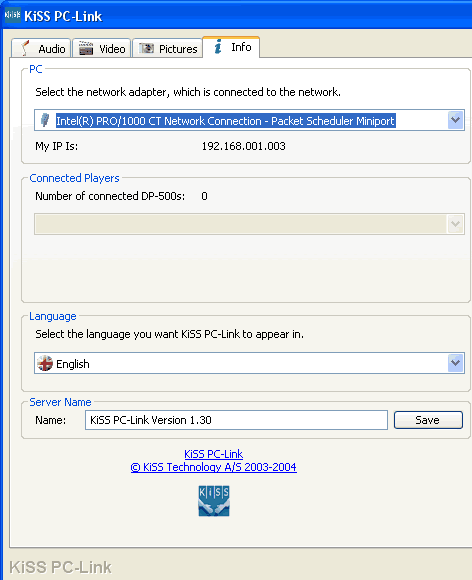
The info tab shown below, gives a few details about the network setup. The more astute readers will have noticed the "Connected Players" box which indicates that more than one player can be connected and accessed on the same network.
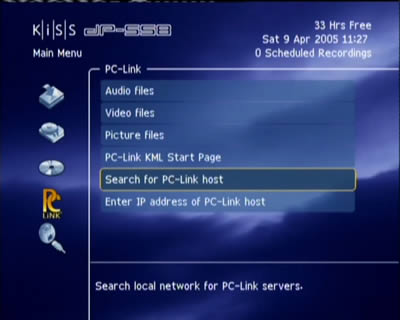
Going back to our DP-558, we tried to access our PC by selecting the option "Search for PC-Link host" from the Main Menu->PC Link screen.
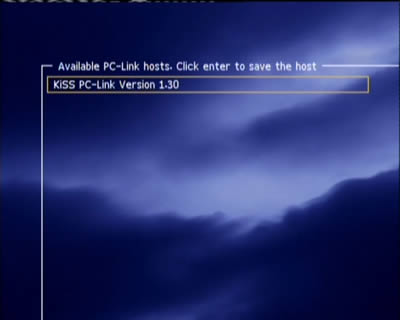
We waited for a few seconds...

The Kiss DP-558 found our PC-Link host PC...
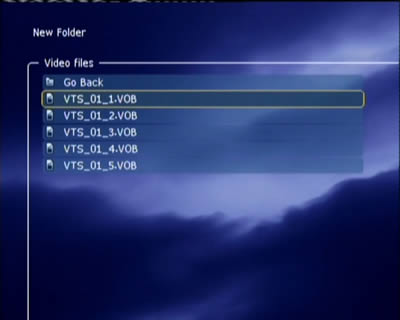
And the HDD contents were immediately available for playback!

 

Review Pages

1. Introduction
2. Specifications
3. Installation - Page 1
4. Installation - Page 2
5. Installation - Page 3
6. The Menus - Page 1
7. The Menus - Page 2
8. Online Functions - Page 1
9. Online Functions - Page 2
10. Online Functions - Page 3
11. Online Functions - Page 4
12. Recording
13. FTP Link
14. PC Link
15. The Tests - Page 1
16. Playback Tests - Page 2
17. Playback Tests - Page 3
18. Playback Tests - Page 4
19. Playback Tests - Page 5
20. Conclusion


 

Pages

  • « first
  • ‹ previous
  • …
  • 10
  • 11
  • 12
  • 13
  • 14
  • 15
  • 16
  • 17
  • 18
  • …
  • next ›
  • last »

KiSS Technology

Tags: KiSS Technology
Previous Post
Asus DRW-1608P
Next Post
Ridisc Media Tests

Related Posts

  • Nero Digital Certified High-Definition Media Player Now Available from KiSS

  • KiSS to Release AVC/H.264 High Definition DVD Player

  • Cisco Acquires KiSS Technology For $61 Million

  • DVD programming and recording via the Internet and the cell phone

  • KiSS DVD Players now support Nero Digital files

  • KiSS Technology and CinemaNow demonstrate movie streaming to connected DVD-players at CES

  • KiSS Technology introduces networked TVs for the Digital Home

  • KiSS Technology introduces DP-600 DVD-player for High Definition Windows Media Video

Latest Reviews

Fanxiang MP83 M.2 NVMe SSD Enclosure
Enterprise & IT

Fanxiang MP83 M.2 NVMe SSD Enclosure

Ugreen CM642 USB4.0 Enclosure
PC components

Ugreen CM642 USB4.0 Enclosure

be quiet! Dark Power 14 IO
PC components

be quiet! Dark Power 14 IO

SanDisk High Endurance 512GB microSDXC
Cameras

SanDisk High Endurance 512GB microSDXC

Samsung PRO Ultimate 512GB microSDXC
Cameras

Samsung PRO Ultimate 512GB microSDXC

Popular News

MSI’s Latest AMD X870E MAX & EVO Series Motherboards

MSI’s Latest AMD X870E MAX & EVO Series Motherboards

COLORFUL Launches iGame B850M ULTRA Series Micro-ATX Motherboards

COLORFUL Launches iGame B850M ULTRA Series Micro-ATX Motherboards

COLORFUL Presents Limited Edition Chitu MAG-60 Magnetic Keyboard Inspired by the Year of the Horse

COLORFUL Presents Limited Edition Chitu MAG-60 Magnetic Keyboard Inspired by the Year of the Horse

COLORFUL Launches iGame B850I MINI OC V14 Motherboard

COLORFUL Launches iGame B850I MINI OC V14 Motherboard

COLORFUL Presents iGame Z890 ULTRA-S W and iGame Z890M ULTRA Z Motherboards

COLORFUL Presents iGame Z890 ULTRA-S W and iGame Z890M ULTRA Z Motherboards

COLORFUL Launches the iGame X870E VULCAN W OC Motherboard

COLORFUL Launches the iGame X870E VULCAN W OC Motherboard

COLORFUL Expands B850 Motherboard Lineup with New CVN, Battle-Ax, and MEOW Models

COLORFUL Expands B850 Motherboard Lineup with New CVN, Battle-Ax, and MEOW Models

ASRock Adds Support for One Sub-Channel DRAM Module on Intel DDR5 Motherboards

ASRock Adds Support for One Sub-Channel DRAM Module on Intel DDR5 Motherboards

Main menu

  • Home
  • News
  • Reviews
  • Essays
  • About
    • Submit News

    • Contact Us
    • Privacy

    • Promotion
    • Advertise

    • RSS Feed
  • About
  • Privacy
  • Contact Us
  • Promotional Opportunities @ CdrInfo.com
  • Advertise on out site
  • Submit your News to our site
  • RSS Feed


