
Breaking News

Gemtek Unveils Wi-Fi 8 Vision at MWC 2026, Advancing Intelligent, AI-Driven Connectivity Kioxia Sampling UFS 5.0 Embedded Flash Memory Devices for Next-Generation Mobile Applications Sandisk Introduces Next-Generation Portable SSD Portfolio Nikon announces NIKKOR Z 70-200MM F/2.8 VR S II Casio to Release Full-Metal G-SHOCK

logo

  • Share Us
    • Facebook
    • Twitter
  • Home
  • Home
  • News
  • Reviews
  • Essays
  • Forum
  • Legacy
  • About
    • Submit News

    • Contact Us
    • Privacy

    • Promotion
    • Advertise

    • RSS Feed
    • Site Map

Search form

IOData AvelLink Player2

Mar 24,2005 0

15. Playback Tests - Page 1


Review Pages

1. Introduction
2. Features
3. The package
4. Removing the screws
5. Setting up the player
6. The Players Menu - Page 1
7. The Players Menu - Page 2
8. Updating firmware - Page 1
9. Updating firmware - Page 2
10. AvelLink Server - Page 1
11. Online content
12. DVD Loader mod - Page 1
13. DVD Loader mod - Page 2
14. The Tests
15. Playback Tests - Page 1
16. Playback Tests - Page 2
17. Playback Tests - Page 3
18. Playback Tests - Page 4
19. Playback Tests - Page 5
20. Conclusion


IOData AvelLink Player2 - Page 15

- The Tests

Disc compatibility

Format
Content
Booktype
Playback
DVD-R
DVD-Video
-
Yes
DVD-RW
-
DVD+R
DVD+R
DVD-ROM
DVD+RW
DVD+RW
DVD-ROM
DVD+R DL
DVD+R DL
No
DVD-ROM
Yes

The above tests were performed with the original, Epox CD/DVD loader. The only media that wasn't recognized was the +R9 media with DVD+R DL booktype.

Users can set the drive's speed from the Options selection, with available choices of, default, slow and very slow. Changing the speed allows smoother playback and less noise.

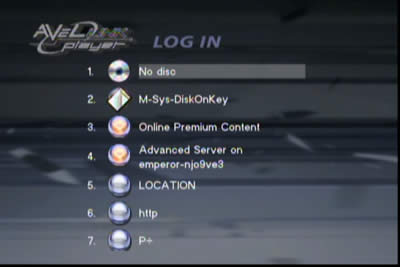
If the user inserts a USB device (stick, HDD), the AvelLink will recognize it and can access its contents. For some strange reason, the AvelLink player, added several other choices to the Login screen which could not be removed. We are not so sure if this is a bug but we will investigate it with I-O Data:
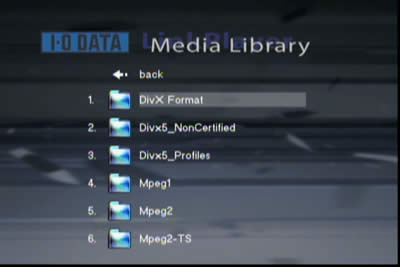
After the disc is recognized, the AvelLink player displays all the folders with the file formats that are currently supported, from the selected submenu (Video/Photo/Music)
What we found was a little annoying is that if a disc has many folders, when you enter from a folder, say the fifth in the list, into a sub-folder and then exit out again, the menu display doesn't highlight the same folder, but instead highlights the top (1st folder). So if you want to go to the 10th, 11th and 12th folders to see their contents, you have to scroll all the way down each. I-O Data should fix this...

The AvelLink player doesn't offer a lot of playback information on the selected file, nor can you can see which file you are currently playing unless you use the >> or << buttons, when pressing next, the player will display the full name of the file:

During DVD playback, at last you see some details about the time/title/chapter and selected angle.

Greek subtitles are also available,

and display clearly...

 

Review Pages

1. Introduction
2. Features
3. The package
4. Removing the screws
5. Setting up the player
6. The Players Menu - Page 1
7. The Players Menu - Page 2
8. Updating firmware - Page 1
9. Updating firmware - Page 2
10. AvelLink Server - Page 1
11. Online content
12. DVD Loader mod - Page 1
13. DVD Loader mod - Page 2
14. The Tests
15. Playback Tests - Page 1
16. Playback Tests - Page 2
17. Playback Tests - Page 3
18. Playback Tests - Page 4
19. Playback Tests - Page 5
20. Conclusion


 

Pages

  • « first
  • ‹ previous
  • …
  • 11
  • 12
  • 13
  • 14
  • 15
  • 16
  • 17
  • 18
  • 19
  • next ›
  • last »

i-o data

Tags: i-o data
Previous Post
Interview with DaTARIUS' James Steynor
Next Post
Thermaltake Big Typhoon

Related Posts

  • IO Data Releases New External UHD Blu-ray Burners

  • Apple to Install its iPhone Screen Repair machines to Third-party Repair Centers

  • IO Data Releases New 16x BD Burners

  • Buffalo And IO Data Release First 14x Blu-ray Disc Burners

  • I-O Data Introduces BDXL External Drive

  • I-O Data Releases Slim External 6x Blu-Ray Writer

  • I-O Data Ships The BRD-SH12B 12x Blu-ray Burner in Japan

  • I-O Data Signs Linux Software Patent Agreement With Microsoft

Latest Reviews

Kioxia Exceria Plus G3 512GB microSD
Cameras

Kioxia Exceria Plus G3 512GB microSD

SoundPeats Cove Pro
Consumer Electronics

SoundPeats Cove Pro

Asustor AS5404T 4-Bay NAS System
Enterprise & IT

Asustor AS5404T 4-Bay NAS System

be quiet! Pure Power 13M 1200W
PC components

be quiet! Pure Power 13M 1200W

Server-Side Gaming Why Canadian Online Casinos Are Abandoning Local Clients for HTML5 Clouds
Enterprise & IT

Server-Side Gaming Why Canadian Online Casinos Are Abandoning Local Clients for HTML5 Clouds

Popular News

COLORFUL Introduces CVN B850I GAMING FROZEN Motherboard

COLORFUL Introduces CVN B850I GAMING FROZEN Motherboard

COLORFUL Presents CVN X870 ARK FROZEN Motherboard for AMD Ryzen 9000 CPUs

COLORFUL Presents CVN X870 ARK FROZEN Motherboard for AMD Ryzen 9000 CPUs

TEAMGROUP Launches EXPERT P34F Find My External SSD

TEAMGROUP Launches EXPERT P34F Find My External SSD

Samsung announces Galaxy Tab S11 and Galaxy S25 FE series

Samsung announces Galaxy Tab S11 and Galaxy S25 FE series

Viltrox Showcases Upcoming Lens Lineup and New TTL Flash at IBC 2025

Viltrox Showcases Upcoming Lens Lineup and New TTL Flash at IBC 2025

CORSAIR announces Vanguard Pro 96 and Vanguard 96 Gaming Keyboards

CORSAIR announces Vanguard Pro 96 and Vanguard 96 Gaming Keyboards

Panasonic Introduces the First Ultra-Telephoto Zoom Lens in the LUMIX S Series

Panasonic Introduces the First Ultra-Telephoto Zoom Lens in the LUMIX S Series

MSI Launches DATAMAG 40Gbps Magnetic Portable SSD

MSI Launches DATAMAG 40Gbps Magnetic Portable SSD

Main menu

  • Home
  • News
  • Reviews
  • Essays
  • Forum
  • Legacy
  • About
    • Submit News

    • Contact Us
    • Privacy

    • Promotion
    • Advertise

    • RSS Feed
    • Site Map
  • About
  • Privacy
  • Contact Us
  • Promotional Opportunities @ CdrInfo.com
  • Advertise on out site
  • Submit your News to our site
  • RSS Feed




