Freecom FX-50 external 16X
23. Conclusion
Review Pages
2. Transfer Rate Reading Tests
3. CD Error Correction Tests
4. DVD Error Correction Tests
5. Protected Disc Tests
6. DAE Tests
7. Protected AudioCDs
8. CD Recording Tests
9. Writing Quality Tests - 3T Jitter Tests
10. Writing Quality Tests - C1 / C2 Error Measurements
11. DVD Recording Tests
12. CDSpeed/PlexTools Scans - Page 1
13. CDSpeed/PlexTools Scans - Page 2
14. CDSpeed/PlexTools Scans - Page 3
15. CDSpeed/PlexTools Scans - Page 4
16. CDSpeed/PlexTools Scans - Page 5
17. CDSpeed/PlexTools Scans - Page 6
18. CDSpeed/PlexTools Scans - Page 7
19. CDSpeed/PlexTools Scans - Page 8
20. DVD+R DL - Page 1
21. DVD+R DL - Page 2
22. BookType Setting
23. Conclusion
Freecom FX-50 DVD+/-RW 16X Burner - Page 23
Conclusion
 Freecom Technologies is known to be one of the leading manufacturers of optical storage drives that can be connected to just about any interface, supporting operating systems from Microsoft Windows XP to MacOS. Their latest 16X burner, the FX-50, uses both the USB2.0 and IEEE1394 interfaces. Of course, it ensures backward compatibility with USB1.1 interface. Freecom managed to gather all the latest technologies in one single package. It offers easy to use, powerful software from Roxio, and can do almost everything, from creating video files to burning professional looking DVDs or even convert from one video format to another. And all these at the highest speed available on the market currently with 2 years manufacturer warranty.

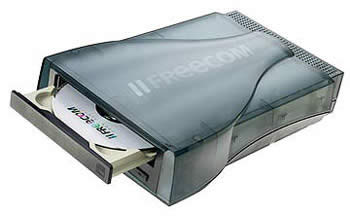
The first thing that will impress most end users is the drive's stylish case. Although the same case is used in many Freecom drives, we never seem to get tired of looking at it. Very good design. Having said this, what counts most of all is the performance of a drive and not its look. The drive exhibited very good DVD error correction capabilities, but CD error correction can be further improved. The DAE speed is considered to be low, compared with other optical drives with similar specifications. Also, it cannot make SafeDisc 2.60+ backups, due to the NEC chipsets used and cannot recognize 99mins discs.
 When we tried to use the drive to burn a series of CD-R media, we observed that not all media could be recorded at high speed (48X), not even well known media brands such as TY which could be recorded only at 32X. All media recorded at 48X speed indicated reduced media quality, but this was expected since a higher writing speed reduces quality. Of
course, writing speed can be better optimized with a future firmware release.
When we tried to use the drive to burn a series of CD-R media, we observed that not all media could be recorded at high speed (48X), not even well known media brands such as TY which could be recorded only at 32X. All media recorded at 48X speed indicated reduced media quality, but this was expected since a higher writing speed reduces quality. Of
course, writing speed can be better optimized with a future firmware release.
The drive's performance with DVD media however, is a totally different story. The drive uses CAV writing strategy with most media, and we were not surprised to see 13X speed supported, since Freecom FX-50 uses the same writing strategies as the latest NEC based drives. However, some 16X certified media could not be recorded at high speed, and Freecom should include these media ID codes in a future firmware release.
DVD media quality was further investigated. Although the drive can produce average quality results with +R media, it seems that it "prefers" the -R media format since it produced higher quality results with this format. In any case, most media was recorded and read successfully. RW media was no problem for the FX-50 and it can easily be used for back up operations.
Double Layer burning support enables users to store up to 8.5GB per media, doubling the storage capacity. The FX-50 can burn Double Layer media up to 4X, which is the highest speed available at this time. It was indeed the fastest Double Layer burner, and it needed only 22:50mins to burn our test complilation. Concerning the default booktype setting for +R9 media, the Freecom external burner automatically sets the booktype to DVD-ROM, increasing the compatibility with most stand-alone DVD Players. Of course, booktype setting can be changed with several utilities, easily found on the web, like DVDInfoPro. Unfortunately, booktype setting can be changed only for Double Layer media, and not for Single Layer media.
In general, this drive will not disappoint in anyway. Especially for notebook users or anyone who needs an external burner, the USB2.0 and Firewire support can be very handy.
- The Good
- Very good DVD error correction capabilities
- Supports CD-Text (reading/writing)
- Supports audio protected discs
- Good CD writing quality at 32X with low Jitter values
- Very good Single Layer DVD writing quality
- High C2% accuracy
- Fastest recorder with Double Layer media
- Very good writing quality with Double Layer media
- Can read/rip 90min Audio CDs
- Can overburn up to 88min CDs
- The Bad
- Poor CD error correction
- Slow ripping CSS DVD-Video performance
- DAE speed only up to 32X
- Mount Rainier is not supported
- Cannot recognize 99min Audio CD's
- Cannot create working backups with SafeDisc protected games over v2.60
- Cannot overburn DVD recordable media
- Medium CD writing quality at 48X
- Does not support Traxdata Double Layer media
- Like To be fixed
- Official firmware release to support booktype setting for +R/+RW media
- Better writing quality with 48X CD-R media
- Traxdata Double Layer media support
| Retail Package |  |
| Reading |  |
| Error Correction |  |
| Protected Discs | |
| Writing | |
| Features | |
Review Pages
2. Transfer Rate Reading Tests
3. CD Error Correction Tests
4. DVD Error Correction Tests
5. Protected Disc Tests
6. DAE Tests
7. Protected AudioCDs
8. CD Recording Tests
9. Writing Quality Tests - 3T Jitter Tests
10. Writing Quality Tests - C1 / C2 Error Measurements
11. DVD Recording Tests
12. CDSpeed/PlexTools Scans - Page 1
13. CDSpeed/PlexTools Scans - Page 2
14. CDSpeed/PlexTools Scans - Page 3
15. CDSpeed/PlexTools Scans - Page 4
16. CDSpeed/PlexTools Scans - Page 5
17. CDSpeed/PlexTools Scans - Page 6
18. CDSpeed/PlexTools Scans - Page 7
19. CDSpeed/PlexTools Scans - Page 8
20. DVD+R DL - Page 1
21. DVD+R DL - Page 2
22. BookType Setting
23. Conclusion