
Biostar T-Force P965
12. Summary
 The Biostar T-Force P965 motherboard comes to fill a gap between the low priced and the medium range motherboards, aimed at entry level users. Intel's P965Express chipset offers very good performance when paired with a Intel Core2Duo processor. This board supports all currently sold Intel processors for 775 socket, Intel® Core™ 2 Duo/ Intel® Pentium® D/Intel® Pentium® 4/ Intel® Celeron® D processor.
In all tests, the T-Force P965 was found to be slower than the Asus P5B Deluxe. This happened because the Asus P5B Deluxe can set the same memory with a higher divider (1:2~1067MHz), whereas the T-Force P965 could only be set at 2:3@800MHz. Besides this, we had some problem setting the timings lower than 5-4-4-12. Perhaps this "problem" will be fixed with a newer BIOS revision.
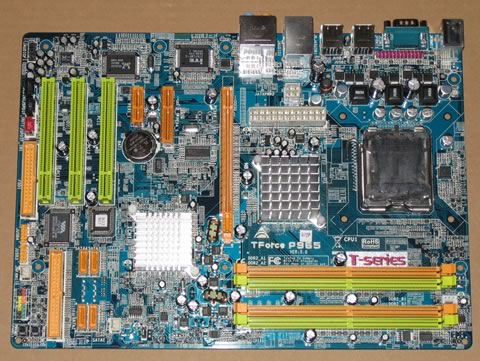
Passing on to the board itself, the overall design is good. There is plenty of free space around the CPU area, allowing installation of larger fans. There are both IDE and floppy connections, and four SATA II connections for HDD and optical storage devices. There are some minor design flaws in our opinion. For example, the 24pin & 4pin power inputs are located a little too close to the CPU, which makes cable management a problem, especially in a small case.
 With overclocking, the board proved to be easily overclockable, despite the fact that it doesn't offer as many options as the Asus P5B Deluxe. We managed to reach a top FSB of 340FSB without any voltage tweaks and the 9x Internal CPU multiplier. Unfortunately, you cannot set (lower) the CPU internal multiplier as with most other boards. With CPUs like the E6600 and newer, this could be an issue. With the E6300, this doesn't apply. Moreover, other reviewers have reported up to ~500FSB, with different cooling system, CPU and memory modules.
Ending our presentation, we can say that this board is a perfect match for entry level users. It costs around €100 and has good overclocking options. The Asus P5B Deluxe while faster and offering more overclocking capabilities, it almost twice the price at around €190...

We have no major complaints with the Biostar T-Force P965. A cheap entry lever board, combined with an Intel E6300 Core2Duo processor and fast memory can work wonders in terms of overclocking and overall system speed.






