
Battle of the CPU Coolers
1. Intro - AC Freezer 7 Pro
Review Pages
2. Akasa AK-965
3. Akasa AK-925 Revo
4. Asus Silent Knight II
5. Asus Triton 75
6. GlacialTech Igloo 5160
7. Noctua NH-U12F
8. OCZ Vendetta
9. Scythe Andy Samurai Master
10. Scythe Kama Cross
11. Scythe Infinity (Mugen)
12. Scythe Ninja Mini
13. SunbeamTech.com Silent Whisper
14. Titan Amanda Tec
15. Titan TTC-NK34TZ
16. Titan Vanessa L-Type
17. Tuniq Tower 120
18. Zalman CNPS8700NT
19. Zalman CNPS9700LED
20. Zaward VIVO
21. Test methodology
22. Results - Idle
23. Results - Load
24. Results - Noise
25. Summary
Cooling has been a rather hot subject for many users, from amateurs to experienced ones. As we all know, both AMD and Intel are offering coolers at their retail package, these coolers are sufficient for normal everyday use. However recently there are so many different needs to be covered that we have seen enormous growth in the cooling systems world. There's no doubt that the market is very strong and while most CPU coolers are priced low, there is a higher demand for less noise and increased performance. After receiving a great number of emails, we decided to perform a rather "big" roundup with many different coolers from well known and established companies. We will how they perform with as much as possible accurate measurements and correct testing methodology. More on this later, lets meet our first contender.
- AC Freezer 7 Pro
| Manufacturer | Arctic Cooling |
| Model | |
| Price | $27 |
| Category | Medium Level |
AC Freezer 7 Pro is a well known CPU cooler. We have already reviewed AC Freezer 7 Pro in the past. For your convenience we'll sum up its most important features. The AC Freezer 7 Pro consists of a copper base with six heatpipes ending up in aluminum fins. We would say that it has a rather typical design and it's easy to install. The CPU cooler has PMW function that allows it to operate very well producing low levels of noise, depending on the work load. All this of course if the motherboard supports this function.

- Full specifications
| Heat Sink: | 104 x 58 x 126.5 mm |
| Fan: | 107 x 43.5 x 96 mm |
| Overall Dimensions: | 107 x 96.5 x 126.5 mm |
| Rated Fan Speed: | 900 - 2500 RPM (PWM) |
| Power Consumption: | 0.16 Amp. |
| Air Flow: | 45 CFM / 77 m3/h |
| Weight: | 520 g |
| Noise Level: | 0.9 Sone |
| Thermal Resistance: | 0.17°C/Watt |
| Thermal Interface Material: | Pre-applied MX-1 Paste |
| Warranty: | 6 Years |
- Retail package
The retail package of AC Freezer 7 Pro is rather simple and doesn't include much, only an installation guide and the ARCTIC MX-1 thermal compound preapplied. Of course this was removed in order to perform all CPU coolers tests with the same thermal compound.
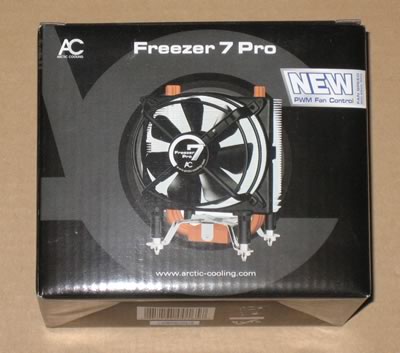
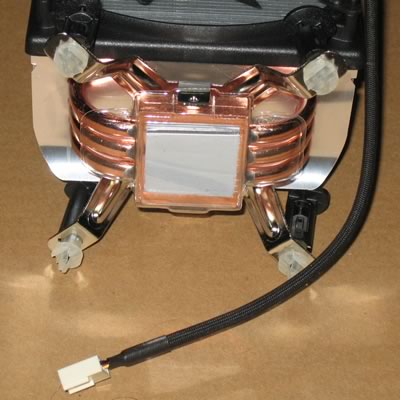
As we said earlier, the base is fully made of copper and the three U-shaped heatpipes should absorb and release heat very efficient. The four rubber connectors on the fan base act as vibration dampers preventing vibrations from being transfered to the heatsink and to the system. Surprisingly, this works rather well and the noise that comes from that CPU cooler is quite low.

A closer look at the base. AC Cooling has included the MX-1 thermal paste, which was left for all tests:
- Installation
The AC Freezer 7 Pro installation process is very simple. For best results it's advised to remove the fan (it's very simple) for securing the cooler at the motherboard. Note that the white plastic fasteners bend too easily so it takes some time until you align all four to complete the task. Make sure to hear the clicking sound that indicates that all four plastic fasteners are at the same depth and therefore at the correct position. If you miss one, the cooling performance is highly affected.

Due to its design, it's very possible that you need to rotate the fan until you would be able to fit it. In our case we did noticed that the right side of the cooler was very close to the motherboard's copper heatsinks, I guess you could bend the aluminium fins to avoid any contact.


After that you can finally attach the rotating fan to the cpu cooler. This is very easy, nothing to worry about.

Installing the whole structure to our case, can unveil how big and how empty space was left from the cpu cooler. As we can see there is enough room around the cpu cooler.

Another picture...
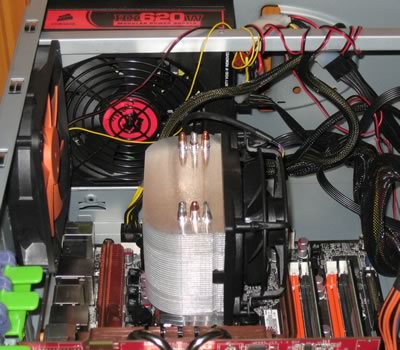
The height of the cooler is not that big...
- Ratings
| Retail package |  |
| Design | |
| Motherboard compatibility | |
| Installation time | |
| Copper Base quality | |
Review Pages
2. Akasa AK-965
3. Akasa AK-925 Revo
4. Asus Silent Knight II
5. Asus Triton 75
6. GlacialTech Igloo 5160
7. Noctua NH-U12F
8. OCZ Vendetta
9. Scythe Andy Samurai Master
10. Scythe Kama Cross
11. Scythe Infinity (Mugen)
12. Scythe Ninja Mini
13. SunbeamTech.com Silent Whisper
14. Titan Amanda Tec
15. Titan TTC-NK34TZ
16. Titan Vanessa L-Type
17. Tuniq Tower 120
18. Zalman CNPS8700NT
19. Zalman CNPS9700LED
20. Zaward VIVO
21. Test methodology
22. Results - Idle
23. Results - Load
24. Results - Noise
25. Summary





