Breaking News

DZOFILM Expands Arles Cine Lens System With 25–75mm and 65–180mm T2.6 Zooms G.SKILL Launches Trident Z5 Royal NeoX Series DDR5 Memory with AMD EXPO Technology XERON Launches NEX A61 ARGB CPU Air Cooler Viltrox to Unveil New Lenses And Production Solutions at IBC2026 ASUS Announces WiFi 8 Router

logo

  • Share Us
    • Facebook
    • Twitter
  • Home
  • Home
  • News
  • Reviews
  • Essays
  • About
    • Submit News

    • Contact Us
    • Privacy

    • Promotion
    • Advertise

    • RSS Feed

Search form

Thermaltake Silent939

May 16,2005 0

3. Performance/Overclocking


Review Pages

1. Introduction
2. Installation
3. Performance/Overclocking
4. Conclusion


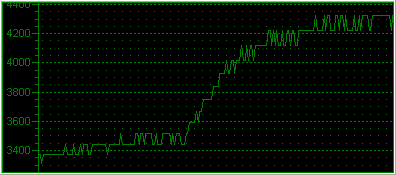
To measure the CPU's temperature, we used SpeedFan v4.21, which offers real time temperature monitoring and we created a graph of the temperature over time. After letting the processor cool down in idle mode, we fired up Prime95 and ran the In-place large FFT test to heat it up to its maximum level. This is the graph of the temperature with the original Intel fansink:

The temperature starts at 40°C and reaches 57°C when running the stress test. The graph below shows the fan rotation speed in RPM. As expected, rotation speed is increased up to 4280RPM during high CPU load.
After installing the Silent939, this is what we got with SpeedFan and Prime95.
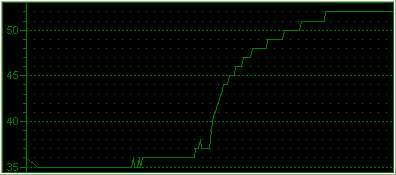
The CPU temperature was 35°C in idle mode, and reached 52°C when we ran the In-place large FFT test (100% CPU load). In both cases, there was a temperature decrease of 5°C which indicates very good performance for a low profile cooler.
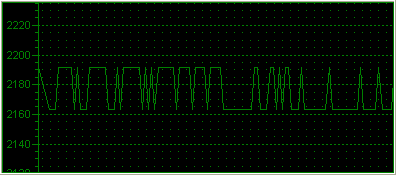
As you can see, fan speed remained the same, even when we ran the FFT test. This means that even at high loads, the Silent939 remains silent. It looks like the heat pipes are really doing a good job.

Overclocking

The default setting for the AMD64 3500+ is set to 2200GHz (200MHz HTT and x11 multiplier). We fooled around with the BIOS settings and we got the system running nicely at 2700 GHz. At that speed, the system was able to boot and when running Prime95, which is very sensitive and hence ideal for identifying errors, it reported all calculations correct.
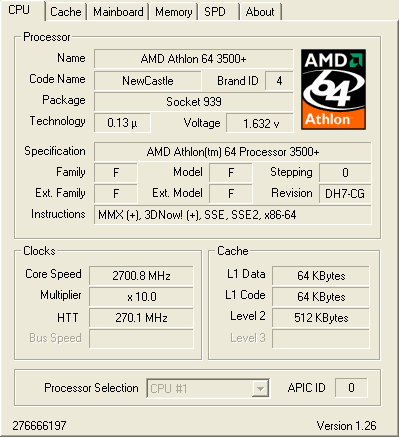
SpeedFan again gave us real time temperature monitoring throughout the CPU stress test.

The idle temperature now starts from 40°C, just as with the stock cooler. The maximum temperature reported was 52°C, the same as when the system was not overclocked.

Again, the fan rotation speed cannot be increased.
 

Review Pages

1. Introduction
2. Installation
3. Performance/Overclocking
4. Conclusion


Pages

  • « first
  • ‹ previous
  • 1
  • 2
  • 3
  • 4
  • next ›
  • last »

Thermaltake

Tags: Thermaltake
Previous Post
Fighting Big Brother
Next Post
ArcticCooling - ATI Silencer5

Related Posts

  • Thermaltake Launches AW360/420 AIO Liquid Cooler and WAir CPU Cooler for Workstations

  • Begin the Racing Journey with the Thermaltake GR300 Racing Simulator Cockpit

  • Thermaltake Unveils the Massive EXTREME with Cross-flow Fan

  • Thermaltake Releases the Toughpower TF3 1300W with Support for RTX50 Series GPUs

  • Thermaltake Unveils G6 Direct Drive Racing Wheel Bundle and GM5 3DOF Motion System

  • Thermaltake Launches the TT150 LED Bag in Different Sizes and New Colors

  • Thermaltake New TH V2 Ultra EX ARGB Sync AIO – Snow Edition is Now Available Worldwide

  • Thermaltake Coolers Support New-Gen Intel and AMD CPUs

Latest Reviews

be quiet! Dark Power 14 IO
PC components

be quiet! Dark Power 14 IO

SanDisk High Endurance 512GB microSDXC
Cameras

SanDisk High Endurance 512GB microSDXC

Samsung PRO Ultimate 512GB microSDXC
Cameras

Samsung PRO Ultimate 512GB microSDXC

be quiet! Light Mount TKL
Consumer Electronics

be quiet! Light Mount TKL

be quiet! Light Loop IO LCD
Cooling Systems

be quiet! Light Loop IO LCD

Popular News

CORSAIR announces Vanguard Pro 96 and Vanguard 96 Gaming Keyboards

CORSAIR announces Vanguard Pro 96 and Vanguard 96 Gaming Keyboards

MSI Launches FORGE GK600 TKL WIRELESS Special Edition Compact Mechanical Keyboard

MSI Launches FORGE GK600 TKL WIRELESS Special Edition Compact Mechanical Keyboard

Panasonic Introduces the First Ultra-Telephoto Zoom Lens in the LUMIX S Series

Panasonic Introduces the First Ultra-Telephoto Zoom Lens in the LUMIX S Series

MSI’s Latest AMD X870E MAX & EVO Series Motherboards

MSI’s Latest AMD X870E MAX & EVO Series Motherboards

COLORFUL Launches iGame B850M ULTRA Series Micro-ATX Motherboards

COLORFUL Launches iGame B850M ULTRA Series Micro-ATX Motherboards

COLORFUL Presents Limited Edition Chitu MAG-60 Magnetic Keyboard Inspired by the Year of the Horse

COLORFUL Presents Limited Edition Chitu MAG-60 Magnetic Keyboard Inspired by the Year of the Horse

COLORFUL Presents iGame Z890 ULTRA-S W and iGame Z890M ULTRA Z Motherboards

COLORFUL Presents iGame Z890 ULTRA-S W and iGame Z890M ULTRA Z Motherboards

LIAN LI Launches 8.8” Universal Screen with Flexible Mounting Solution

LIAN LI Launches 8.8” Universal Screen with Flexible Mounting Solution

Main menu

  • Home
  • News
  • Reviews
  • Essays
  • About
    • Submit News

    • Contact Us
    • Privacy

    • Promotion
    • Advertise

    • RSS Feed
  • About
  • Privacy
  • Contact Us
  • Promotional Opportunities @ CdrInfo.com
  • Advertise on out site
  • Submit your News to our site
  • RSS Feed