Breaking News

LG Display launches 24.5-inch 720Hz Gaming OLED Panel Razer Unveils the Mako Desktop Gaming Speakers TerraMaster Launches 725 Series Xeon Rackmount NAS Viltrox Brings Its Full-Frame Air Series to L-Mount with Four Compact Prime Lenses CORSAIR Deploys the WARTHOG Airflow Mid-Tower PC Case

logo

  • Share Us
    • Facebook
    • Twitter
  • Home
  • Home
  • News
  • Reviews
  • Essays
  • About
    • Submit News

    • Contact Us
    • Privacy

    • Promotion
    • Advertise

    • RSS Feed

Search form

PowerColor X300

Oct 27,2004 0

15. Overclocking


Review Pages

1. Introduction
2. A closer look
3. Test System
4. 3DMark05
5. 3DMark 2003
6. 3DMark 2001
7. Codecreatures
8. Half life 2
9. Doom 3
10. Far Cry
11. Medal of Honour Pacific Assault
12. Thief 3
13. Colin McRae 05
14. Ground Control II
15. Overclocking
16. Conclusion


15 - Overclocking

Before we start, here's a little note: Don't try to do this at home unless you are completely sure of what you are doing. It might sound a bit cliche but believe me, the kind of overclocking that you are about to see can't be done with any kind of VGA card.

Normally, you can clock most cards using their stock cooling system from 25 to at most 100 MHz over their default speeds for core and memory. From that point on, you either get strange sand-like effects or other anomalies on your screen (called artifacts) or between some short amounts of time the whole game pauses for 2-3 secs.

The first case is a sign that you have pushed your memory clock speed beyond its limits and the second is that the core's clock is the one that is set too high. In both cases, you should lower the clocks until you experience none of these effects for 10-15 minutes of intense gameplay.

Here comes Powercolour's X300 to become the exception to the rule.

It's stock speeds were 320Mhz for the core and 400Mhz for the memory. Using AtiTool, we managed to clock this card to 500MHz for the core and 490MHz for the memory!!! It's simply an insane amount of overclocking. But the most insane thing we saw is yet to come.

Most cards when overclocked, get an average boost of 5 fps on the games. We pushed this baby again to 500/490 and ran our Half Life 2 Video Stress Test and Doom 3 benchmarks:

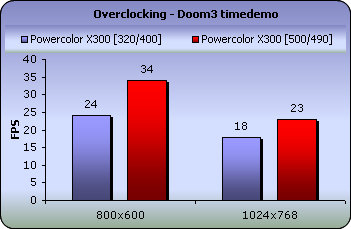
That was too much to believe. 22 more frames per second on the Video Stress Test for Half Life 2. We ran the two benchmarks one more time to make sure we were not mistaken but we got the same results. Then we ran our Far Cry benchmark.

21 frames more at 800x600 and 14 at 1024x768. This time we knew nothing went wrong. It's just that this card is born with a mysterious overclocking potential.

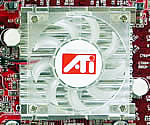
The funniest part is that it has no heatsinks on its RAM modules and its only method of cooling the GPU core is this little fan:
I'm sure you'll agree with us as we present the Powercolor X300 with our Overclocker Award for this year.

 

Review Pages

1. Introduction
2. A closer look
3. Test System
4. 3DMark05
5. 3DMark 2003
6. 3DMark 2001
7. Codecreatures
8. Half life 2
9. Doom 3
10. Far Cry
11. Medal of Honour Pacific Assault
12. Thief 3
13. Colin McRae 05
14. Ground Control II
15. Overclocking
16. Conclusion


Pages

  • « first
  • ‹ previous
  • …
  • 8
  • 9
  • 10
  • 11
  • 12
  • 13
  • 14
  • 15
  • 16
  • next ›
  • last »

PowerColor

Tags: PowerColor
Previous Post
Samsung TS-H552
Next Post
NeuNeo HVD108 DVD Player

Related Posts

  • PowerColor Announces Radeon RX 6800 XT and RX 6800 Graphics Cards

  • Powercolor Releases Overclocked HD5550 Graphics Solution

  • Powercolor's Overcloced HD5870 Comes With DiRT2 Game Bundle

  • Powercolor HD5770 Eyefinity 5 Supports Up To 5 Display Monitors

  • Powercolor Adds A Powerful Upgrade To The HD4890 Series

  • PowerColor Launches World's First 2GB Frame Buffer Graphics Card for PCS HD 4850

  • PowerColor Introduces X1950 PRO Silence Edition

  • Powercolour X1950Pro

Latest Reviews

Fanxiang MP83 M.2 NVMe SSD Enclosure
Enterprise & IT

Fanxiang MP83 M.2 NVMe SSD Enclosure

Ugreen CM642 USB4.0 Enclosure
PC components

Ugreen CM642 USB4.0 Enclosure

be quiet! Dark Power 14 IO
PC components

be quiet! Dark Power 14 IO

SanDisk High Endurance 512GB microSDXC
Cameras

SanDisk High Endurance 512GB microSDXC

Samsung PRO Ultimate 512GB microSDXC
Cameras

Samsung PRO Ultimate 512GB microSDXC

Popular News

CORSAIR announces Vanguard Pro 96 and Vanguard 96 Gaming Keyboards

CORSAIR announces Vanguard Pro 96 and Vanguard 96 Gaming Keyboards

MSI’s Latest AMD X870E MAX & EVO Series Motherboards

MSI’s Latest AMD X870E MAX & EVO Series Motherboards

Panasonic Introduces the First Ultra-Telephoto Zoom Lens in the LUMIX S Series

Panasonic Introduces the First Ultra-Telephoto Zoom Lens in the LUMIX S Series

COLORFUL Launches iGame B850M ULTRA Series Micro-ATX Motherboards

COLORFUL Launches iGame B850M ULTRA Series Micro-ATX Motherboards

COLORFUL Presents Limited Edition Chitu MAG-60 Magnetic Keyboard Inspired by the Year of the Horse

COLORFUL Presents Limited Edition Chitu MAG-60 Magnetic Keyboard Inspired by the Year of the Horse

COLORFUL Presents iGame Z890 ULTRA-S W and iGame Z890M ULTRA Z Motherboards

COLORFUL Presents iGame Z890 ULTRA-S W and iGame Z890M ULTRA Z Motherboards

COLORFUL Launches iGame B850I MINI OC V14 Motherboard

COLORFUL Launches iGame B850I MINI OC V14 Motherboard

COLORFUL Expands B850 Motherboard Lineup with New CVN, Battle-Ax, and MEOW Models

COLORFUL Expands B850 Motherboard Lineup with New CVN, Battle-Ax, and MEOW Models

Main menu

  • Home
  • News
  • Reviews
  • Essays
  • About
    • Submit News

    • Contact Us
    • Privacy

    • Promotion
    • Advertise

    • RSS Feed
  • About
  • Privacy
  • Contact Us
  • Promotional Opportunities @ CdrInfo.com
  • Advertise on out site
  • Submit your News to our site
  • RSS Feed