
Plextor PX-712A
13. Kprobe PI/PO Quality Tests for DVD-R/RW
Review Pages
2. Data CD/DVD Reading Tests
3. CD Error Correction Tests
4. DVD Error Correction Tests
5. Protected Disc Tests
6. DAE Tests
7. CD Recording Tests
8. CD Writing Quality - Jitter Tests
9. CD Writing Quality - C1/C2 Error Measurements
10. Kprobe PI/PO Quality Tests for DVD+R/RW
11. DVD Recording Tests
12. VariREC Tests for CD Format
13. Kprobe PI/PO Quality Tests for DVD-R/RW
14. VariREC Tests for DVD Format
15. GigaRec Tests - Page 1
16. GigaRec Tests - Page 2
17. Q-Check Tests
18. PleXTools vs. SA300 - Page 1
19. PleXTools vs. SA300 - Page 2
20. PleXTools vs. SA300 - Page 3
21. SilentMode / SecuRec
22. BookType Setting Tests
23. Conclusion
Plextor PX-712A Dual DVD±RW recorder - Page 13
VariREC (CD Format)
Plextor improved VariRec and along with CD, now also supports the DVD format. The VariRec function in general, changes the laser power values producing changes of sound quality and playability with a player. The VariRec function can be used either inside PlexTools (Drive Settings ->VariRec) or under Nero Burning ROM.
When you attempt to access for the first time the VariRec tab, a wanring window prompts, giving details about the use of this function and restrictions:
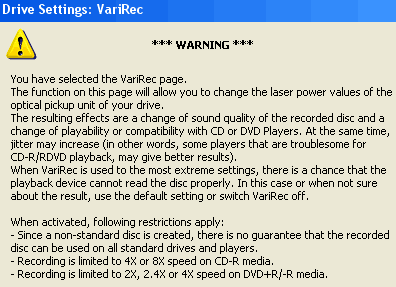
When selecting VariREC, the burning speeds are limited to 4X/8X for CD-R and 2X/4X for DVD±R media. Mainly VariREC can be used with for CD-DA (CD) and DVD-Video (DVD) formats.
Below is a screenshot when a blank CD-R media is inserted in the drive. Users can select from -4~+4 values with 1 value stepping. There are two burning speeds (4X/8X), and change of recording strategy method according to the used dye material of the inserted disc:
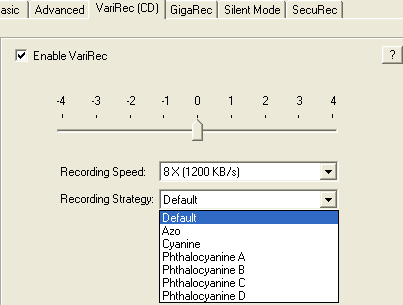
For our tests we used:
- Recording Speed: 8X
- Used media: BenQ 80min 48X
We burned one media each VariRec value: -4, -3, -2, -1, +0, +1, +2, +3, +4. The burned media tested with a desktop mini system and a car CD player. Below are the test results
VariRec |
|||||||||
Players |
-4 |
-3 |
-2 |
-1 |
0 |
+1 |
+2 |
+3 |
+4 |
JVC LCX-257 |
TOC recognized correctly, no playback problems |
Disc was not recognized! |
TOC recognized correctly, no playback problems |
||||||
JVC KD-SH9101 |
|||||||||
The test results were very good. Almost all produced discs were playable and without any problem (skipping, muting). The only problem comes from the -2 VariRec value, since it produced a disc that wasn't recognized by any of the two CD players. Generally speaking, we didn't hear any change in sound tone during our listening tests, Plextor claims that VariRec can change the music tone, maybe with a better system, such changes could be audible...
We measured the jitter levels on the same media, using our LEADER LE 1853 machine, in order to see the recording quality while using the VariREC feature and the normal mode. Below are the results:


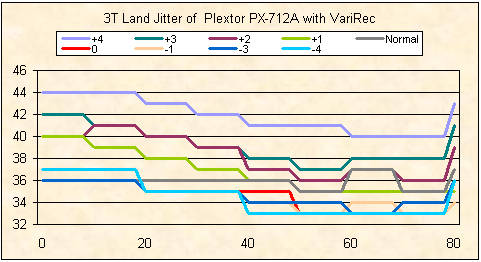
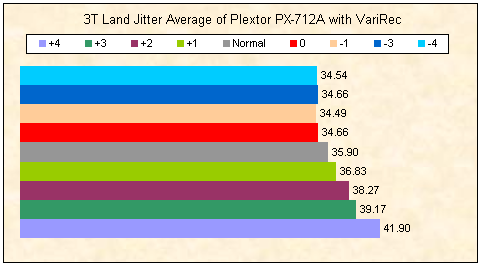
As can been seen on the graphs above, the lower the step the better the quality is. The normal writing is placed exactly in the middle of the jitter levels. The -2 step is missing from our graphs since it was not recognized and so it was not possible to be measure.
Review Pages
2. Data CD/DVD Reading Tests
3. CD Error Correction Tests
4. DVD Error Correction Tests
5. Protected Disc Tests
6. DAE Tests
7. CD Recording Tests
8. CD Writing Quality - Jitter Tests
9. CD Writing Quality - C1/C2 Error Measurements
10. Kprobe PI/PO Quality Tests for DVD+R/RW
11. DVD Recording Tests
12. VariREC Tests for CD Format
13. Kprobe PI/PO Quality Tests for DVD-R/RW
14. VariREC Tests for DVD Format
15. GigaRec Tests - Page 1
16. GigaRec Tests - Page 2
17. Q-Check Tests
18. PleXTools vs. SA300 - Page 1
19. PleXTools vs. SA300 - Page 2
20. PleXTools vs. SA300 - Page 3
21. SilentMode / SecuRec
22. BookType Setting Tests
23. Conclusion




