Breaking News

Akasa Launches Newton N16, Compact Fanless Case for ASUS NUC 16 Pro TEAMGROUP Unveils the ACE 8K MicroSDXC Memory Card ASUS Announces Ascent QN10 Mini PC CORSAIR Launches Second Generation Nautilus II AIO CPU Coolers CORSAIR Launches VOXARA USB Gaming Condenser Microphone

logo

  • Share Us
    • Facebook
    • Twitter
  • Home
  • Home
  • News
  • Reviews
  • Essays
  • About
    • Submit News

    • Contact Us
    • Privacy

    • Promotion
    • Advertise

    • RSS Feed

Search form

OCZ Gladiator Max

Feb 2,2009 0

3. How we test


Review Pages

1. Features
2. Retail box, installation
3. How we test
4. Test results
5. Final words


In the following page we compare the performance of the OCZ Gladiator Max with some other CPU coolers.

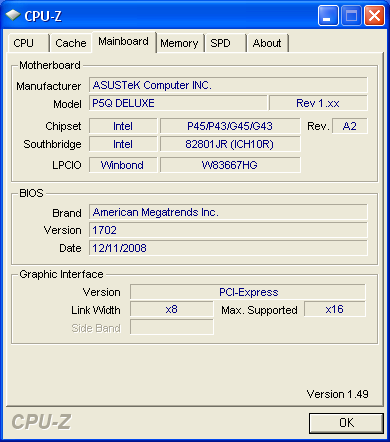
We have chosen to test all the coolers after installing them on the same motherboard. The motherboard we used was the Asus P5Q Deluxe, since it comes equipped with many copper heatpipes and components. Such complicated designs are appropriate for testing the compatibility of the big-sized CPU coolers with the various motherboards.

The testbed configuration is as follows:

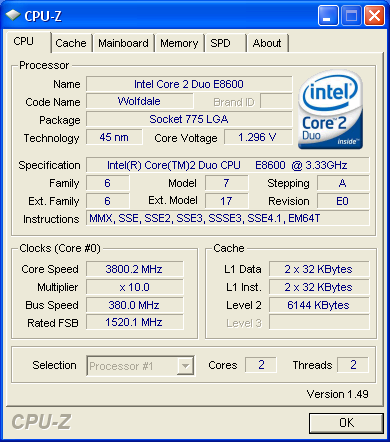
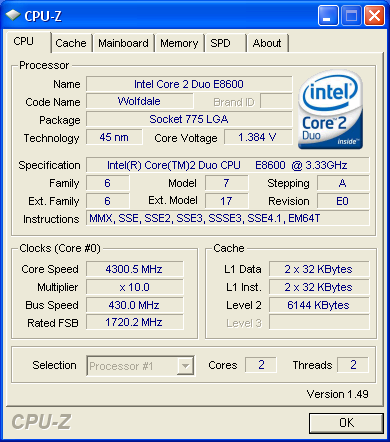
  • CPU: Intel E8600 Retail
  • Case: ThermalTake Soprano
  • Motherboard: Asus P5Q Deluxe Bios 1704
  • Memory: 2x1GB OCZ PC2-8500
  • PSU: OCZ 720W
  • HDD: WD 80JB
  • Operating system Windows XP with all the latest updates installed
  • Software: OCCT v2.0.1 & CoreTemp 0.99.3
  • Thermal Paste: Tuniq TX-2
  • Idle time: ~30min
  • Load time: ~30min
  • Case fan rpm: 1250 rpm (full speed)
  • RPM speed controllable via SmartFan BIOS or via external hardware controller

The used OCCT v2.0.1 software was used to produce high amounts of heat inside the PC case.
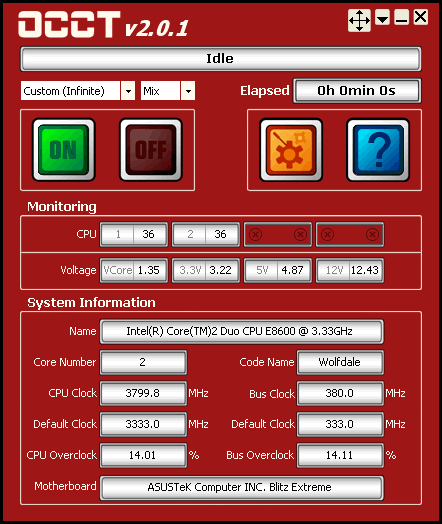
We left both cores running at full load for ~30 minutes. All temperatures were logged via the CoreTemp 0.99.3 and the software itself. We followed two overclocking scenarios:

  • Intel E8600 @ 3.80GHz
  • Vcore: 1.30625V
  • DDR3 Voltage: 1.80V
  • Other BIOS values: Auto

  • Intel E8600 @ 4.30GHz
  • Vcore: 1.4000V
  • DDR3 Voltage: 1.80V
  • Other BIOS values: Auto

For the noise tests, we measured the noise produced by each cooler using the Precision Gold N09AQ Environment Meter. The measured noise was coming from the CPU cooler itself, as well as from the two Thermaltake system fans (120mm ) installed in our PC case and the PSU. The noise meter wes placed outside the PC case, in an effort to have an idea of the overall noise than may reach your ears as you are using your heavily loaded PC.

Remember that higher rpm means more noise, so we lowered the rpm either via the BIOS smartfan or via the 3pin controller. This way we tested all the coolers either at full rpm speed or at low rpm speed.

The thermal paste we used for all the coolers was the Tuniq TX-2. We should also note here that all tests were performed with the front PC panel closed, which is the worse case scenario in terms of internal air flow.


Review Pages

1. Features
2. Retail box, installation
3. How we test
4. Test results
5. Final words


Pages

  • « first
  • ‹ previous
  • 1
  • 2
  • 3
  • 4
  • 5
  • next ›
  • last »

OCZ Technology

Tags: OCZ Technology
Previous Post
Asus P6T Deluxe Vs Foxconn Renaissance
Next Post
Akasa Nero (AK-967) CPU Cooler

Related Posts

  • Toshiba completes acquisition of OCZ Technology Group's Assets and launches new subsidiary, OCZ Storage Solutions

  • Value-Optimized Toshiba RC100 NVMe SSDs Now Available

  • Toshiba Introduces New XS700 Series of Portable SSDs

  • Toshiba OCZ RD400 512GB M.2 PCIe SSD

  • Toshiba Introduces the Value-oriented OCZ TL100 SATA SSD Series

  • Toshiba Introduces the OCZ VX500 SATA SSD Series

  • OCZ RD400 NVMe SSD Series Released

  • OCZ Z-Drive 6000 And 6300 NVMe U.2 SSDs Released With Dual-port Functionality

Latest Reviews

Fanxiang MP83 M.2 NVMe SSD Enclosure
Enterprise & IT

Fanxiang MP83 M.2 NVMe SSD Enclosure

Ugreen CM642 USB4.0 Enclosure
PC components

Ugreen CM642 USB4.0 Enclosure

be quiet! Dark Power 14 IO
PC components

be quiet! Dark Power 14 IO

SanDisk High Endurance 512GB microSDXC
Cameras

SanDisk High Endurance 512GB microSDXC

Samsung PRO Ultimate 512GB microSDXC
Cameras

Samsung PRO Ultimate 512GB microSDXC

Popular News

CORSAIR announces Vanguard Pro 96 and Vanguard 96 Gaming Keyboards

CORSAIR announces Vanguard Pro 96 and Vanguard 96 Gaming Keyboards

MSI’s Latest AMD X870E MAX & EVO Series Motherboards

MSI’s Latest AMD X870E MAX & EVO Series Motherboards

Panasonic Introduces the First Ultra-Telephoto Zoom Lens in the LUMIX S Series

Panasonic Introduces the First Ultra-Telephoto Zoom Lens in the LUMIX S Series

COLORFUL Launches iGame B850M ULTRA Series Micro-ATX Motherboards

COLORFUL Launches iGame B850M ULTRA Series Micro-ATX Motherboards

COLORFUL Presents Limited Edition Chitu MAG-60 Magnetic Keyboard Inspired by the Year of the Horse

COLORFUL Presents Limited Edition Chitu MAG-60 Magnetic Keyboard Inspired by the Year of the Horse

COLORFUL Presents iGame Z890 ULTRA-S W and iGame Z890M ULTRA Z Motherboards

COLORFUL Presents iGame Z890 ULTRA-S W and iGame Z890M ULTRA Z Motherboards

COLORFUL Launches iGame B850I MINI OC V14 Motherboard

COLORFUL Launches iGame B850I MINI OC V14 Motherboard

COLORFUL Expands B850 Motherboard Lineup with New CVN, Battle-Ax, and MEOW Models

COLORFUL Expands B850 Motherboard Lineup with New CVN, Battle-Ax, and MEOW Models

Main menu

  • Home
  • News
  • Reviews
  • Essays
  • About
    • Submit News

    • Contact Us
    • Privacy

    • Promotion
    • Advertise

    • RSS Feed
  • About
  • Privacy
  • Contact Us
  • Promotional Opportunities @ CdrInfo.com
  • Advertise on out site
  • Submit your News to our site
  • RSS Feed