
Breaking News

ASUS Announces T1 GeForce RTX 5070 and RTX 5060 Ti Graphics Cards COLORFUL Launches iGame B850M ULTRA Series Micro-ATX Motherboards Sony Unveils 1000X THE COLLEXION Samsung Launches Next-Gen Odyssey, ViewFinity and The Movingstyle Essential Monitors LG Electronics Introduces World’s First Native 1000Hz Full HD Gaming Monitor

logo

  • Share Us
    • Facebook
    • Twitter
  • Home
  • Home
  • News
  • Reviews
  • Essays
  • Forum
  • Legacy
  • About
    • Submit News

    • Contact Us
    • Privacy

    • Promotion
    • Advertise

    • RSS Feed
    • Site Map

Search form

OAK SimpliCD CD-R Software

Feb 18,2002 0

9. SimpliCD ReWriter - Page 1


Review Pages

1. Introduction
2. Installation/First Look and feel
3. SimpliCD ROM - Page 1
4. SimpliCD ROM - Page 2
5. SimpliCD Recorder - Page 1
6. SimpliCD Recorder - Page 2
7. SimpliCD Recorder - Page 3
8. SimpliCD Copy
9. SimpliCD ReWriter - Page 1
10. SimpliCD ReWriter - Page 2
11. Final Conclusion


OAK's "SimpliCD" review - Page 9

SimpliCD ReWriter - Page 1

SimpliCD ReWrite - This module includes a Universal Disk Format (UDF) read/write device driver, with advanced defect management that allows CD-RW discs to be used like floppy disks. The SimpliCD ReWrite application can be easily selected from the OAK quick launcher from Disk Utilities>>Format CD like a floppy. Also it can be selected via the drive details tab (format):
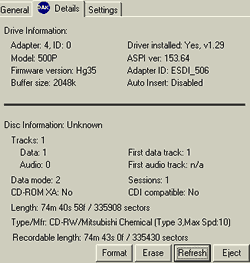
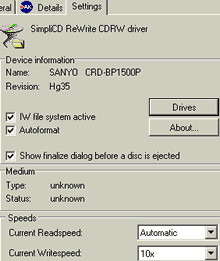
If we press the "Drives" tab we can select an alternative driver for the current recorder and in the "About" tab we see the build info:
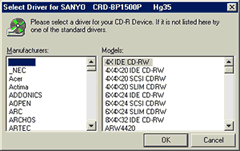
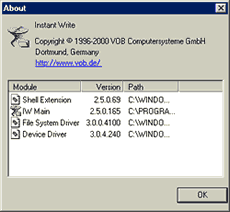
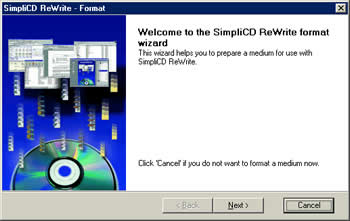
We will see both ways to format a disc. From the OAK quick launcher we choose
"Format CD like a floppy" and a wizard will come up in your screen guiding you through the whole process:
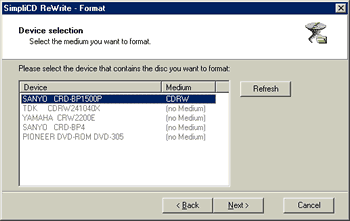
In the device selection screen we must choose the desired drive. The software shows if the inserted CD is RW or CD-R media. In SimpliCD ReWrite, you can use both CD-RW and CD-R discs like a floppy. However, the procedure is slightly different. CD-RW discs can be formatted and can be read on your computer or other computers with UDF software installed. CD-R discs can be formatted and used like a floppy. However, before they can be read on other computers, they must be finalized:
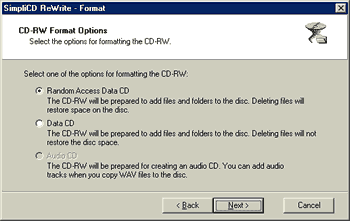
After we press "Next", we can select which way we want our disc to be used. Either in "Random Access Data" or in normal "Data CD".
Or through the format CD (drive's tab properties):
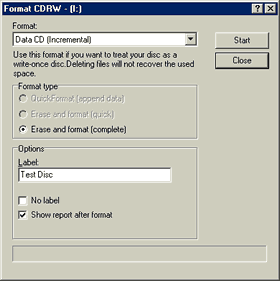
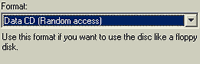
If are starting with data on your CD-RW disc, select "Incremental" in the Format drop-down box and Quick Format in the Format Type area. This will prepare your disc to append data without erasing or formatting the entire disc. If you are starting with a blank CD-RW disc, select "Random Access" in the Format Pull-down menu and Erase and Format in the Format Type window.


 

Review Pages

1. Introduction
2. Installation/First Look and feel
3. SimpliCD ROM - Page 1
4. SimpliCD ROM - Page 2
5. SimpliCD Recorder - Page 1
6. SimpliCD Recorder - Page 2
7. SimpliCD Recorder - Page 3
8. SimpliCD Copy
9. SimpliCD ReWriter - Page 1
10. SimpliCD ReWriter - Page 2
11. Final Conclusion


Pages

  • « first
  • ‹ previous
  • …
  • 3
  • 4
  • 5
  • 6
  • 7
  • 8
  • 9
  • 10
  • 11
  • next ›
  • last »

Tags:
Previous Post
Sanyo CRD-BP1500P CD-RW
Next Post
Iomega Predator USB CD-RW

Related Posts

Latest Reviews

The Technology Stack Behind Modern Digital Gaming Platforms
Consumer Electronics

The Technology Stack Behind Modern Digital Gaming Platforms

be quiet! Dark Rock Pro 6
Cooling Systems

be quiet! Dark Rock Pro 6

How Online Casinos Use Encryption, Verification, and Risk Controls to Build User Trust
Enterprise & IT

How Online Casinos Use Encryption, Verification, and Risk Controls to Build User Trust

Why Low-Latency Infrastructure Matters More Than Raw Specs
Enterprise & IT

Why Low-Latency Infrastructure Matters More Than Raw Specs

In the Age of AI Phishing, the Best User Experience Might Be the One That Feels Safest
Enterprise & IT

In the Age of AI Phishing, the Best User Experience Might Be the One That Feels Safest

Popular News

TEAMGROUP Launches EXPERT P34F Find My External SSD

TEAMGROUP Launches EXPERT P34F Find My External SSD

CORSAIR announces Vanguard Pro 96 and Vanguard 96 Gaming Keyboards

CORSAIR announces Vanguard Pro 96 and Vanguard 96 Gaming Keyboards

Samsung announces Galaxy Tab S11 and Galaxy S25 FE series

Samsung announces Galaxy Tab S11 and Galaxy S25 FE series

Viltrox Showcases Upcoming Lens Lineup and New TTL Flash at IBC 2025

Viltrox Showcases Upcoming Lens Lineup and New TTL Flash at IBC 2025

MSI Launches FORGE GK600 TKL WIRELESS Special Edition Compact Mechanical Keyboard

MSI Launches FORGE GK600 TKL WIRELESS Special Edition Compact Mechanical Keyboard

Panasonic Introduces the First Ultra-Telephoto Zoom Lens in the LUMIX S Series

Panasonic Introduces the First Ultra-Telephoto Zoom Lens in the LUMIX S Series

MSI Launches DATAMAG 40Gbps Magnetic Portable SSD

MSI Launches DATAMAG 40Gbps Magnetic Portable SSD

Viltrox Joins the L-Mount Alliance, Expanding Creative Possibilities

Viltrox Joins the L-Mount Alliance, Expanding Creative Possibilities

Main menu

  • Home
  • News
  • Reviews
  • Essays
  • Forum
  • Legacy
  • About
    • Submit News

    • Contact Us
    • Privacy

    • Promotion
    • Advertise

    • RSS Feed
    • Site Map
  • About
  • Privacy
  • Contact Us
  • Promotional Opportunities @ CdrInfo.com
  • Advertise on out site
  • Submit your News to our site
  • RSS Feed