
OAK SimpliCD CD-R Software
2. Installation/First Look and feel
OAK's "SimpliCD" review - Page 2
Installation/First Look and feel
- Package/Installation
 OAK
provide the retail package, which contained a CD among with a nice, guide/manual
for SimpliCD. Oak's SimpliCD software costs $49.95 (downloadable
version) and $64.95 for the physical shipment version.
OAK
provide the retail package, which contained a CD among with a nice, guide/manual
for SimpliCD. Oak's SimpliCD software costs $49.95 (downloadable
version) and $64.95 for the physical shipment version.
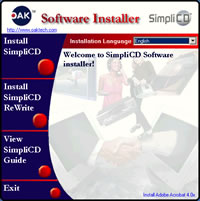
The installation process is very easy. Insert the CD, and the installation guide will pop-up, press the big red button side to the appropriate selection.. From there you can select installation language. SimpliCD version 1.0 supports only English. All subsequent versions of SimpliCD will support the following languages: English, Chinese (simplified), Chinese (traditional), French, German, Italian, Japanese, Korean, and Spanish. SimpliCD currently supports Win9x/ME, Windows NT 4.0 with Service Pack 6 and Win2k.
OAK is testing with beta releases of Windows XP and plans to officially support it when officially released by Microsoft. For our test purposes we installed both SimpliCD and SimpliCD ReWrite software. You can also view the SimpliCD guide, which explain the program's features/capabilities in depth. After installation you will have to reboot.
- First Look and Feel
 The
SimpliCD really intergrates with Windows (in our case WinME) and provides drag'n'drop
access through Windows Explorer and desktop. This is the first time that a software
offers such capabilities - maybe exept from Windows XP internal CD Recording
,from Roxio, software.
The
SimpliCD really intergrates with Windows (in our case WinME) and provides drag'n'drop
access through Windows Explorer and desktop. This is the first time that a software
offers such capabilities - maybe exept from Windows XP internal CD Recording
,from Roxio, software.
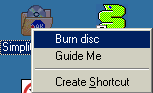 After
the reboot you will notice a new icon placed in your desktop with the name "SimpliCD
ROM". If you press right click above it you will see 2 options. The first
option is "Burn Disc" and the second is "Guide Me". Even
if you wish, you cannot remove the SimpliCD ROM icon from the desktop. SimpliCD
ROM component of SimpliCD is integrated into the operating system.
After
the reboot you will notice a new icon placed in your desktop with the name "SimpliCD
ROM". If you press right click above it you will see 2 options. The first
option is "Burn Disc" and the second is "Guide Me". Even
if you wish, you cannot remove the SimpliCD ROM icon from the desktop. SimpliCD
ROM component of SimpliCD is integrated into the operating system.
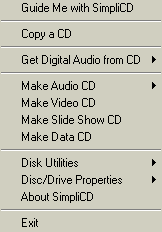
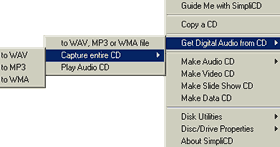
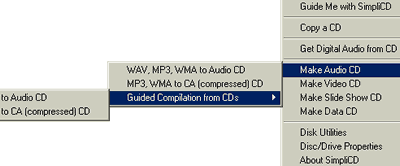
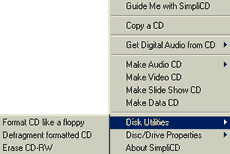
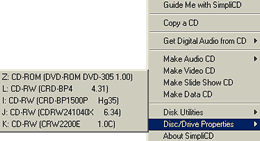
 Also
a new icon (with the OAK logo) will appear in the task launcher. If you press
right click above it you can instantly access all major functions of SimpliCD:
CopyCD, Rip AudioCDs directly to wav, mp3 or wma, make Audio/Video/Slide Show/Data
CDs and erase and see the drive's properties:
Also
a new icon (with the OAK logo) will appear in the task launcher. If you press
right click above it you can instantly access all major functions of SimpliCD:
CopyCD, Rip AudioCDs directly to wav, mp3 or wma, make Audio/Video/Slide Show/Data
CDs and erase and see the drive's properties:
SimpliCD is comprised of four core components: SimpliCD ROM, SimpliCD Copy, SimpliCD ReWrite and SimpliCD Recorder. They are actually 4 different software modules which of course have different purposes.
Lets meet the first component SimpliCD ROM....




