
OAK SimpliCD CD-R Software
5. SimpliCD Recorder - Page 1
OAK's "SimpliCD" review - Page 5
SimpliCD Recorder - Page 1
SimpliCD Recorder is actually a media player with intergraded recording capabilities. The application can create audio, slide show and video discs on CD-R or CD-RW media. Also it can convert MP3s to CDs. Last it also mix and match audio files such as Windows Media Audio, WAV and MP3 files, automatically converting them on the fly and burning them to standard CD Audio (Redbook) or CD-Text discs! Sounds cool huh?
Because SimpliCD Recorder is integrated inside the Windows, there are many ways to open it. The fastest is to select it through the OAK launcher. Simply select anything that has to do with Audio/Video/Slide Show CD....The software will open up and according to your selection it's background can be either red (record) or green (play/rip Audio CDs) and can be switched from one mode to other by simply selecting the big indicators in the right:

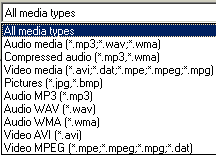
In the following picture we can see the "media" types that SimpliCD Recorder accepts as media types:
- SimpliCD Recorder for AudioCDs
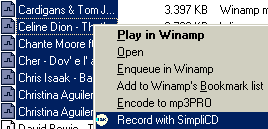 We
selected to create an AudioCD from wav, Mp3 and WMA files. The software prompt
us to select wav, mp3 or wma files and hit the big red button for record them
to AudioCD by drag & drop. You can also send file to SimpliCD Recorder by
just selecting them, trough the Windows Explorer, and from the right click menu
choosing "Record with SimpliCD":
We
selected to create an AudioCD from wav, Mp3 and WMA files. The software prompt
us to select wav, mp3 or wma files and hit the big red button for record them
to AudioCD by drag & drop. You can also send file to SimpliCD Recorder by
just selecting them, trough the Windows Explorer, and from the right click menu
choosing "Record with SimpliCD":

We did insert several Mp3 tracks and the SimpliCD Recorder now offer much more details such as the disc layout tracks, artist name, ID genre, track time, total project time:

 As
you can see in the above picture now you set the name of the disc (CDRInfo.COM
- Disc 2), the author (The Recording Authority), playback every single track,
move the playback forward/backwards inside the track (the slider above the author
empty space), change the volume (big circle selector), move to next/preview
track, pause, ejectCD, record, see the program's properties...ouff..
As
you can see in the above picture now you set the name of the disc (CDRInfo.COM
- Disc 2), the author (The Recording Authority), playback every single track,
move the playback forward/backwards inside the track (the slider above the author
empty space), change the volume (big circle selector), move to next/preview
track, pause, ejectCD, record, see the program's properties...ouff..
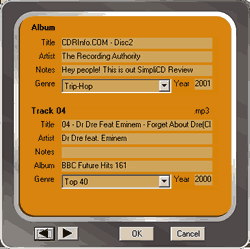
Let's take a breath and continue: add/delete more tracks (the left bottom buttons), open/save/shuffle playlist, delete all (the right bottom buttons) and of course edit the ID3 tag (right click-properties at any track-check left picture). In the bottom you will notice 2 navigation arrows so you can change/review the ID tag at all tracks without need to leave the properties bar.




