Neodigits HVD2085
4. Performance
- Power up the player
The HVD2085 setup menu is divided into 6 areas: Random play, Play mode, Lock, Display, Sound and Languages. We found the menu easy enough but without many advanced options. Let's check out the most interesting menu, the Display Menu.
Here, you can set all Video output settings, depending on which connection interface you are planning to use. The options are NTSC (480i), PAL (576i), Progressive 480p, Progressive 576p, 720p, 1080i, 1080p, VGA, SVGA, XGA, and SXGA. The computer resolutions are only available via the HDMI or DSub15 outputs. The Composite and S-Video can be set to NTSC or PAL. NeoDigits made this player quite universal and with the push of one button, you can convert to and from different frequencies and formats (e.g. NTSC/PAL) so you can play just about any DVD disc from around the world.
- Performance
The HVD2085 will only accept the following types of discs:
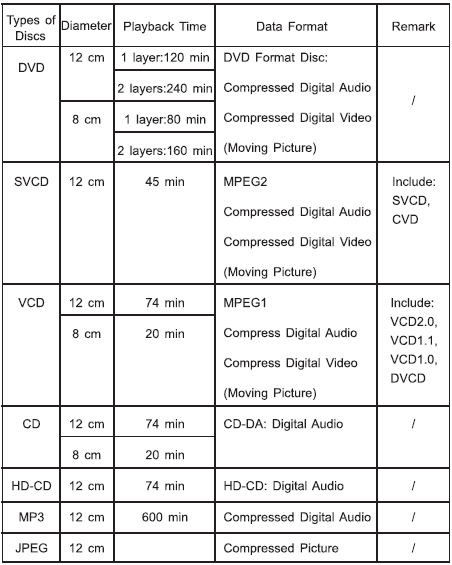
If you try to insert anything else, it will be ejected (tray will automatically open). On the bright side, the player had no problems with the DVD±R/RW formats and while it recognized DVD+R DL (DVD-ROM booktype), it failed to playback DVD+R DL (DVD+R DL booktype) and DVD-R DL. This is something that NeoDigitis should look into with a firmware update.
Testing the player was more complicated than we had first imagined. The player requires an HD TV (1080p/720p) to show its true potential. While we don't have such equipment at our labs, we connected the device to an LG 1915S 19" TFT monitor via D-SUB15 cable, where we performed all tests.
The HVD2058 gives you the option to switch between VGA (640x480), SVGA (800x600), XGA (1024x768) and finally SXGA (1280x1024). The monitor didn't have any problem, although at resolutions other than VGA, there was empty space, depending on the resolution. The worst case was SXGA, where we could measure 5cm (from bottom). This could be corrected if your TFT/LCD screen has the corresponding setting. In order to switch between the various VGA resolutions, press the VGA buttons and an information screen appears as you rotate through the resolutions.
While our TFT monitor was connected, we pressed the HD button and... the player did indeed upscale the content, but with something missing, the red colour. After reading the manual, it was confirmed that 720p/1080p content is only available through the HDMI/Component interfaces.
Trying out various DVDs, we didn't notice any problems during playback. The FF/RF seems to work OK, the zoom has four stages (2X,3X,4X,5X) and you can move the zoomed area (pan) with the 4-direction joypad. Greek subtitles from DVD movies were displayed correctly. We also noticed that despite choosing 4:3 Pan-Scan, the player didn't remove the blank regions, only with 16:9 mode...
Since we couldn't test the performance under HDMI (and DVI via the HDMI-DVI cable), we looked at several other reviews, which indicated that the overall produced quality is good, when the content is properly encoded. It seems though, that the de-interlace and upscaling functions of the HVD2058 do need some further fine tuning.