
Media Quality Tests
16. APPENDIX 1. UmDoctor Pro II
Review Pages
2. View Page Description
3. Submission of Tests
4. Submit Tests detailled description
5. List of Tests conducted by a particular reader
6. Empty
7. An example of viewing a test
8. An example of submitting a test
9. Security constraints
10. Csv file format
11. Some suggestions for the proper submission
12. Measuring the quality of recorded media
13. Frequently Asked Questions
14. Glossary of Terms
15. Programming decisions
16. APPENDIX 1. UmDoctor Pro II
17. APPENDIX 2. KProbe
18. APPENDIX 3. CdSpeed
19. APPENDIX 4. PlexTools Professional
APPENDIX 1. UMDoctor PRO II
In this and the following apprentices you can find some useful information on the 4 particular programs that are able to reproduce C1/C2 and/or PI/PO errors on regular production level recorder drives. We include a brief program description, information about the features and possible restrictions, especially those concerning our case of quality tests.
At the end of each page you can find a table with the drives compatible with each program, as long as error estimation in the form of C1/C2 and PI/PO is concerned.
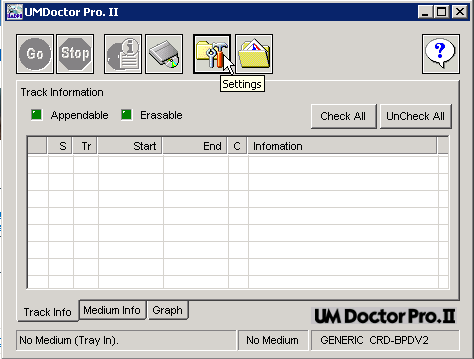
UMDoctor Pro. II is an accurate and easy to use program. Within just a few steps the user is able to test the C1/C2 errors for a written CD-R and the PI/UncoractablePI errors of a DVD or DVD-R. For this demonstration we will use a CD-R disc.
This is the main screen of the UMDoctor Pro II. Lets take a look to the settings by pressing the settings button:
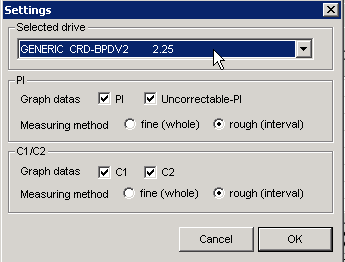
On this window we choose the test device we want to use. Note, that the software works only with DVD recorders that support the Sanyo's HD-BURN feature, which are the Optorite DD0401, DD0201 and DD0203. Here, we can also select the type of data displayed in the graph (PI, Uncorrectable-PI, C1 and C2). User is also able to adjust the accuracy of the graph in relation to the data addresses (fine, rough).
According to Sanyo, the UMDoctor PRO II measures PI and Uncorrectable-PI errors for every 8 ECC.
We press the Go Button and the test process starts
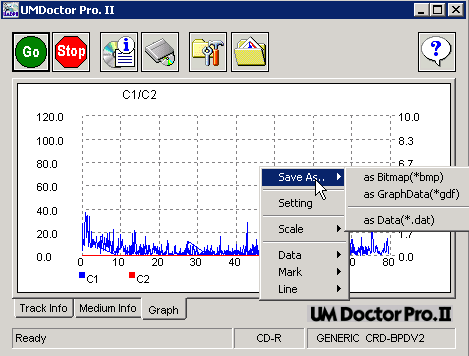
After the end of the test we do a right click on the graph area and from the menu we choose "Save As Data" (*.dat) and we choose the destination folder.
For the DVD test, just follow the same steps, UMDoctor Pro II will automatically recognize the inserted DVD and adjust the settings for you.
As pointed out UMDoctor Pro II works with Optorite DD0201, DD0203 and DD0401 drives. Newer versions of the software will add support for more drives. The UMDoctor PRO II is available in the Sanyo website.
Review Pages
2. View Page Description
3. Submission of Tests
4. Submit Tests detailled description
5. List of Tests conducted by a particular reader
6. Empty
7. An example of viewing a test
8. An example of submitting a test
9. Security constraints
10. Csv file format
11. Some suggestions for the proper submission
12. Measuring the quality of recorded media
13. Frequently Asked Questions
14. Glossary of Terms
15. Programming decisions
16. APPENDIX 1. UmDoctor Pro II
17. APPENDIX 2. KProbe
18. APPENDIX 3. CdSpeed
19. APPENDIX 4. PlexTools Professional





