Media Quality Tests
18. APPENDIX 3. CdSpeed
Review Pages
2. View Page Description
3. Submission of Tests
4. Submit Tests detailled description
5. List of Tests conducted by a particular reader
6. Empty
7. An example of viewing a test
8. An example of submitting a test
9. Security constraints
10. Csv file format
11. Some suggestions for the proper submission
12. Measuring the quality of recorded media
13. Frequently Asked Questions
14. Glossary of Terms
15. Programming decisions
16. APPENDIX 1. UmDoctor Pro II
17. APPENDIX 2. KProbe
18. APPENDIX 3. CdSpeed
19. APPENDIX 4. PlexTools Professional
APPENDIX 3. CdSpeed
For CD quality measurements of the type discussed in our review, you will need the Nero CDSpeed v2.11 or higher. Notice that you can only measure CD media at this time. Unfortunately, the software does not allow to save the quality results in a *.csv or *.dat format. Hence you can not presently use this program for submitting your own results. However, we hope Ahead will add support for this type of file-saving, along with support for DVD checking (PI/PO) in the immediate future.
Run the program and select its "CD Quality Test..." option, in the "Extra" drop-down menu, as shown below.
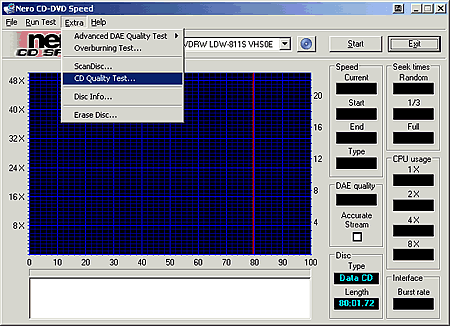
As soon as you do this, you will see the next screen:

Check "Report C1 errors", if you want to see the C1 error level in the graph. You must check the "Show speed" option if you want to include the speed graph. Adjust the speed and press Start.
 Before
the process begins, you will have to wait for the drive to spin up.
Before
the process begins, you will have to wait for the drive to spin up.
Below is a complete quality test with a data CD. The green line is the speed while the blue and the yellow refers to the C1 and C2 error-levels respectively.

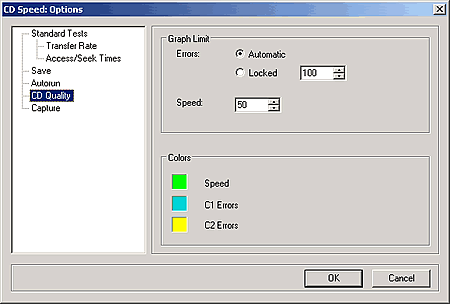
If you want to adjust the setting, you can easily do it from the File menu and the "Options", as seen below.

Check the CD Quality on the left and adjust the setting according to your needs. Change the graph limit for errors and the maximum speed. You can also select a color of your choice for the speed, C1 and C2, by pressing on each color and adjusting accordingly.
CdSpeed works with Plextor Premium and LiteOn CD-RW recorders, as readers.
Review Pages
2. View Page Description
3. Submission of Tests
4. Submit Tests detailled description
5. List of Tests conducted by a particular reader
6. Empty
7. An example of viewing a test
8. An example of submitting a test
9. Security constraints
10. Csv file format
11. Some suggestions for the proper submission
12. Measuring the quality of recorded media
13. Frequently Asked Questions
14. Glossary of Terms
15. Programming decisions
16. APPENDIX 1. UmDoctor Pro II
17. APPENDIX 2. KProbe
18. APPENDIX 3. CdSpeed
19. APPENDIX 4. PlexTools Professional