Breaking News

G.SKILL Launches Flare X5X Series with AMD EXPO Ultra Low Latency ASUS Republic of Gamers Unveils Next-Gen Hardware, 20th Anniversary Limited Editions, and Charity Initiatives at Gamescom 2026 IFA Berlin 2026 Hardware And Tech Announcements from Gamescom 2026 Samsung announces Galaxy S26 FE

logo

  • Share Us
    • Facebook
    • Twitter
  • Home
  • Home
  • News
  • Reviews
  • Essays
  • About
    • Submit News

    • Contact Us
    • Privacy

    • Promotion
    • Advertise

    • RSS Feed

Search form

LiteOn LVW-5045 HDD&DVD Recorder

Feb 9,2005 0

13. Easy Guider - Timer Record Menu


Review Pages

1. Introduction
2. Packaging & Interior Look
3. Control Menu
4. The Language Menu
5. The Playback menu
6. The Record Menu
7. The Audio Menu
8. The TV Tuner Menu
9. Reading tests
10. Compressed Audio (data CD/DVD)
11. The Easy Guider Menu
12. Easy Guider - Recording Menu
13. Easy Guider - Timer Record Menu
14. Easy Guider - Copy Menu
15. Photo management
16. Writing Quality Tests - Page 1
17. Writing Quality Tests - Page 2
18. Recommended Media List
19. Making the LV-5045 Region Free
20. Conclusion


LiteOn LVW-5045 HDD&DVD Recorder

Easy Guider - Timer Record Menu

By using the timer record option, we can program the LVW-5045 to record video of a given duration at a predetermined time in the future.

First option is to enter manually the date/time of the recording or use the Showview system.

Then we have to select the video source.

We selected TV from the previous menu so now we have to select the channel.

We can select here, how often the recording will take place (once, daily, weekly). For example, you can select here the weekly option if you want to record your favorite TV series each week.
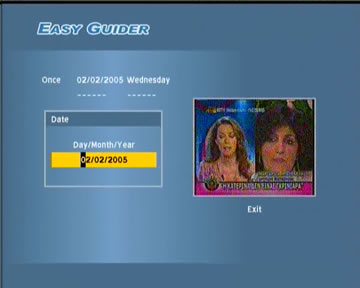
Set the date and time the recording will start.

Set the duration of the recording.
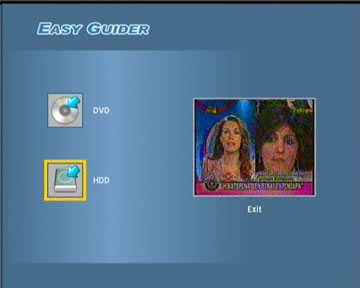
Select where the video will be recorded (hard disk or DVD).


After we've successfully programmed a timer recording, we can see a summary of all our choices in order to verify everything is setup as desired.


Review Pages

1. Introduction
2. Packaging & Interior Look
3. Control Menu
4. The Language Menu
5. The Playback menu
6. The Record Menu
7. The Audio Menu
8. The TV Tuner Menu
9. Reading tests
10. Compressed Audio (data CD/DVD)
11. The Easy Guider Menu
12. Easy Guider - Recording Menu
13. Easy Guider - Timer Record Menu
14. Easy Guider - Copy Menu
15. Photo management
16. Writing Quality Tests - Page 1
17. Writing Quality Tests - Page 2
18. Recommended Media List
19. Making the LV-5045 Region Free
20. Conclusion
 

Pages

  • « first
  • ‹ previous
  • …
  • 9
  • 10
  • 11
  • 12
  • 13
  • 14
  • 15
  • 16
  • 17
  • …
  • next ›
  • last »

LiteOn

Tags: LiteOn
Previous Post
Should ideas be patented
Next Post
The Internet ERA Pirates

Related Posts

  • LITE-ON Technology Delays Transfer of Its Solid State Drives Business to Kioxia

  • SSSTC is Sampling the CA6 PCIe Gen 4 SSDs

  • LITE-ON Technology Approves the Transfer of its Solid State Drives Business to Toshiba Memory

  • Toshiba to Buy Lite-On Technology’s Storage Business Unit

  • LITE-ON to Release Project Denali Compliant SSDs

  • LITE-ON Unveils New SSD for Enterprise Workloads

  • Lite-On to Unveil New NVRAM Hybrid Solid-State Drive at OCP 2018

  • LITE-ON Transfers its Camera Module Business to LuxVisions

Latest Reviews

SanDisk High Endurance 512GB microSDXC
Cameras

SanDisk High Endurance 512GB microSDXC

Samsung PRO Ultimate 512GB microSDXC
Cameras

Samsung PRO Ultimate 512GB microSDXC

be quiet! Light Mount TKL
Consumer Electronics

be quiet! Light Mount TKL

be quiet! Light Loop IO LCD
Cooling Systems

be quiet! Light Loop IO LCD

KIOXIA Exceria Pro G2 NVME 2TB
PC components

KIOXIA Exceria Pro G2 NVME 2TB

Popular News

CORSAIR announces Vanguard Pro 96 and Vanguard 96 Gaming Keyboards

CORSAIR announces Vanguard Pro 96 and Vanguard 96 Gaming Keyboards

MSI Launches FORGE GK600 TKL WIRELESS Special Edition Compact Mechanical Keyboard

MSI Launches FORGE GK600 TKL WIRELESS Special Edition Compact Mechanical Keyboard

TEAMGROUP Launches EXPERT P34F Find My External SSD

TEAMGROUP Launches EXPERT P34F Find My External SSD

Samsung announces Galaxy Tab S11 and Galaxy S25 FE series

Samsung announces Galaxy Tab S11 and Galaxy S25 FE series

Viltrox Showcases Upcoming Lens Lineup and New TTL Flash at IBC 2025

Viltrox Showcases Upcoming Lens Lineup and New TTL Flash at IBC 2025

Panasonic Introduces the First Ultra-Telephoto Zoom Lens in the LUMIX S Series

Panasonic Introduces the First Ultra-Telephoto Zoom Lens in the LUMIX S Series

MSI Launches DATAMAG 40Gbps Magnetic Portable SSD

MSI Launches DATAMAG 40Gbps Magnetic Portable SSD

MSI’s Latest AMD X870E MAX & EVO Series Motherboards

MSI’s Latest AMD X870E MAX & EVO Series Motherboards

Main menu

  • Home
  • News
  • Reviews
  • Essays
  • About
    • Submit News

    • Contact Us
    • Privacy

    • Promotion
    • Advertise

    • RSS Feed
  • About
  • Privacy
  • Contact Us
  • Promotional Opportunities @ CdrInfo.com
  • Advertise on out site
  • Submit your News to our site
  • RSS Feed