Breaking News

DeepCool Launches the LT360 VISION ARGB Noctua and Asetek Announce Flagship AIO Liquid Coolers Toshiba Begins Sampling of 30-34 TB SMR Nearline Hard Disk Drives ASUS ROG Strix Laptop Lineup Returns With the Latest Intel Core Ultra 9 290HX Plus Processors EnGenius Brings AI-Powered Analytics and Sophisticated Cloud Management to Existing ONVIF Cameras

logo

  • Share Us
    • Facebook
    • Twitter
  • Home
  • Home
  • News
  • Reviews
  • Essays
  • Forum
  • Legacy
  • About
    • Submit News

    • Contact Us
    • Privacy

    • Promotion
    • Advertise

    • RSS Feed
    • Site Map

Search form

LiteOn LVW-5045 HDD&DVD Recorder

Feb 9,2005 0

13. Easy Guider - Timer Record Menu


Review Pages

1. Introduction
2. Packaging & Interior Look
3. Control Menu
4. The Language Menu
5. The Playback menu
6. The Record Menu
7. The Audio Menu
8. The TV Tuner Menu
9. Reading tests
10. Compressed Audio (data CD/DVD)
11. The Easy Guider Menu
12. Easy Guider - Recording Menu
13. Easy Guider - Timer Record Menu
14. Easy Guider - Copy Menu
15. Photo management
16. Writing Quality Tests - Page 1
17. Writing Quality Tests - Page 2
18. Recommended Media List
19. Making the LV-5045 Region Free
20. Conclusion


LiteOn LVW-5045 HDD&DVD Recorder

Easy Guider - Timer Record Menu

By using the timer record option, we can program the LVW-5045 to record video of a given duration at a predetermined time in the future.

First option is to enter manually the date/time of the recording or use the Showview system.

Then we have to select the video source.

We selected TV from the previous menu so now we have to select the channel.

We can select here, how often the recording will take place (once, daily, weekly). For example, you can select here the weekly option if you want to record your favorite TV series each week.
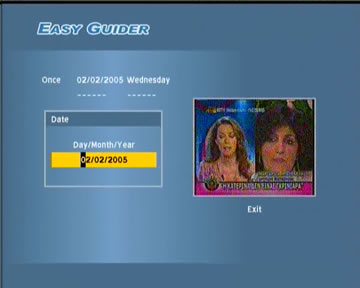
Set the date and time the recording will start.

Set the duration of the recording.
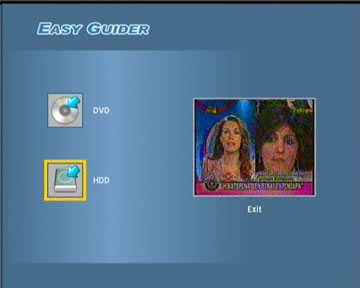
Select where the video will be recorded (hard disk or DVD).


After we've successfully programmed a timer recording, we can see a summary of all our choices in order to verify everything is setup as desired.


Review Pages

1. Introduction
2. Packaging & Interior Look
3. Control Menu
4. The Language Menu
5. The Playback menu
6. The Record Menu
7. The Audio Menu
8. The TV Tuner Menu
9. Reading tests
10. Compressed Audio (data CD/DVD)
11. The Easy Guider Menu
12. Easy Guider - Recording Menu
13. Easy Guider - Timer Record Menu
14. Easy Guider - Copy Menu
15. Photo management
16. Writing Quality Tests - Page 1
17. Writing Quality Tests - Page 2
18. Recommended Media List
19. Making the LV-5045 Region Free
20. Conclusion
 

Pages

  • « first
  • ‹ previous
  • …
  • 9
  • 10
  • 11
  • 12
  • 13
  • 14
  • 15
  • 16
  • 17
  • …
  • next ›
  • last »

LiteOn

Tags: LiteOn
Previous Post
Should ideas be patented
Next Post
The Internet ERA Pirates

Related Posts

  • LITE-ON Technology Delays Transfer of Its Solid State Drives Business to Kioxia

  • SSSTC is Sampling the CA6 PCIe Gen 4 SSDs

  • LITE-ON Technology Approves the Transfer of its Solid State Drives Business to Toshiba Memory

  • Toshiba to Buy Lite-On Technology’s Storage Business Unit

  • LITE-ON to Release Project Denali Compliant SSDs

  • LITE-ON Unveils New SSD for Enterprise Workloads

  • Lite-On to Unveil New NVRAM Hybrid Solid-State Drive at OCP 2018

  • LITE-ON Transfers its Camera Module Business to LuxVisions

Latest Reviews

In the Age of AI Phishing, the Best User Experience Might Be the One That Feels Safest
Enterprise & IT

In the Age of AI Phishing, the Best User Experience Might Be the One That Feels Safest

SoundPeats C30
Consumer Electronics

SoundPeats C30

Why Streaming Live Casino Games Demands Smarter Tech
Enterprise & IT

Why Streaming Live Casino Games Demands Smarter Tech

Kioxia Exceria Plus G3 512GB microSD
Cameras

Kioxia Exceria Plus G3 512GB microSD

SoundPeats Cove Pro
Consumer Electronics

SoundPeats Cove Pro

Popular News

COLORFUL Presents CVN X870 ARK FROZEN Motherboard for AMD Ryzen 9000 CPUs

COLORFUL Presents CVN X870 ARK FROZEN Motherboard for AMD Ryzen 9000 CPUs

TEAMGROUP Launches EXPERT P34F Find My External SSD

TEAMGROUP Launches EXPERT P34F Find My External SSD

Samsung announces Galaxy Tab S11 and Galaxy S25 FE series

Samsung announces Galaxy Tab S11 and Galaxy S25 FE series

Viltrox Showcases Upcoming Lens Lineup and New TTL Flash at IBC 2025

Viltrox Showcases Upcoming Lens Lineup and New TTL Flash at IBC 2025

CORSAIR announces Vanguard Pro 96 and Vanguard 96 Gaming Keyboards

CORSAIR announces Vanguard Pro 96 and Vanguard 96 Gaming Keyboards

Panasonic Introduces the First Ultra-Telephoto Zoom Lens in the LUMIX S Series

Panasonic Introduces the First Ultra-Telephoto Zoom Lens in the LUMIX S Series

MSI Launches DATAMAG 40Gbps Magnetic Portable SSD

MSI Launches DATAMAG 40Gbps Magnetic Portable SSD

MSI Launches FORGE GK600 TKL WIRELESS Special Edition Compact Mechanical Keyboard

MSI Launches FORGE GK600 TKL WIRELESS Special Edition Compact Mechanical Keyboard

Main menu

  • Home
  • News
  • Reviews
  • Essays
  • Forum
  • Legacy
  • About
    • Submit News

    • Contact Us
    • Privacy

    • Promotion
    • Advertise

    • RSS Feed
    • Site Map
  • About
  • Privacy
  • Contact Us
  • Promotional Opportunities @ CdrInfo.com
  • Advertise on out site
  • Submit your News to our site
  • RSS Feed