Breaking News

Samsung Introduces Galaxy Tab S12 Series PlayStation Plus Monthly Games for October 2026 Logitech announces Zone Vibe Pro Headset Razer Expands Sanrio Collection With Pompompurin Eared Headset And Kuromi Earbuds TerraMaster Launches Storage Upgrade Season with Up to 30% Off During Prime Big Deal Days

logo

  • Share Us
    • Facebook
    • Twitter
  • Home
  • Home
  • News
  • Reviews
  • Essays
  • About
    • Submit News

    • Contact Us
    • Privacy

    • Promotion
    • Advertise

    • RSS Feed

Search form

LiteOn EZ-DUB

Jan 3,2006 0

2. A Closer Look


Review Pages

1. Introduction
2. A Closer Look
3. EZ-DUB functions
4. Final Words


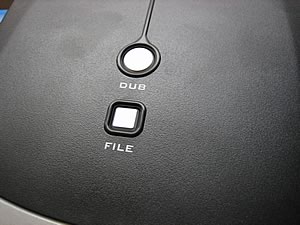
As already mentioned, on the top of the drive you will find the "File" and "Dub" buttons. As always, the CDRinfo team is curious to open the case and see how this works. Of course, doing so will void the warranty, so we strongly advise you not to do this with your drive. You can use the following pictures instead as reference.
As you can see, the main layout is like all other external drive enclosures, with one big difference. There is a small PCB which connects the EZ-DUB buttons.
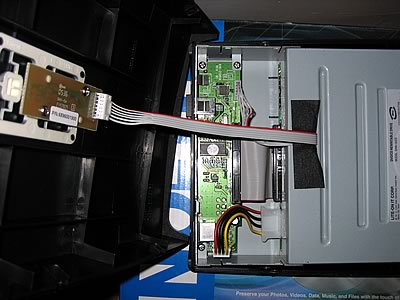
This PCB is in turn connected to the main circuitry of the drive enclosure. All the EZ-DUB functions pass through the main PCB logic and along with the USB port, allows control of the EZ-DUB functionality through software. The software in other words, controls the drive's functioning.
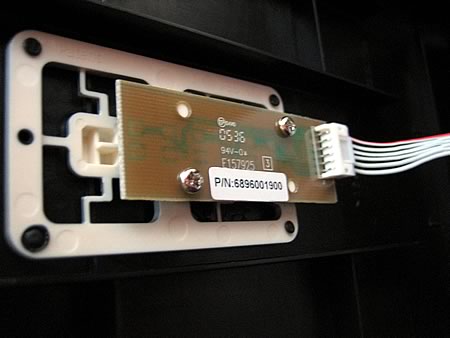
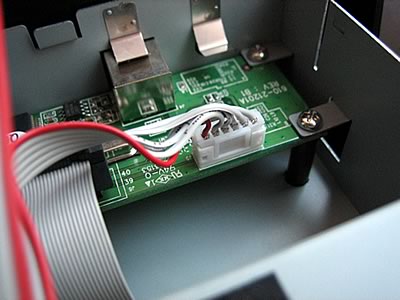
In fact, all the buttons do is simply activate the software.

The drive is indeed the LiteOn SHW-1635S burner...
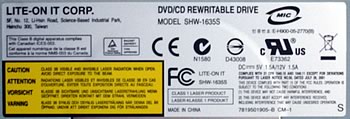
... and uses the MT1888E chipset.
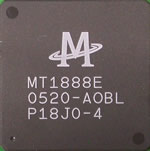
The photo below is the main circuit board in the drive itself. Clicking on the image will reveal a more detailed picture.

click to enlarge!

Since the LiteOn SHW-1635SU is the same drive as the SHW-1635S, we will not be testing this drive for writing and reading performance. Additionally, we will not do any writing quality tests. However, you can always check the previously released LiteOn SHW-1635S review if you need to see writing quality and performance of this drive, as well as comparison charts with other drives that have similar features. In this review, we will focus on the EZ-DUB functions.
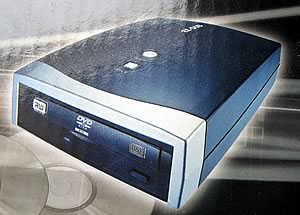
We decided to go a little further with this drive, and we changed the LiteOn 1635S internal drive with another drive, to see if the EZ-DUB functions will continue to work. And they did. This was more or less expected, since the software scans the USB ports to see if there is an EZ-DUB drive available, and by "drive", we mean "drive enclosure".
 

Review Pages

1. Introduction
2. A Closer Look
3. EZ-DUB functions
4. Final Words


Pages

  • « first
  • ‹ previous
  • 1
  • 2
  • 3
  • 4
  • next ›
  • last »

LiteOn

Tags: LiteOn
Previous Post
Benchmarking update
Next Post
Mushkin XP4000 Redline

Related Posts

  • LITE-ON Technology Delays Transfer of Its Solid State Drives Business to Kioxia

  • SSSTC is Sampling the CA6 PCIe Gen 4 SSDs

  • LITE-ON Technology Approves the Transfer of its Solid State Drives Business to Toshiba Memory

  • Toshiba to Buy Lite-On Technology’s Storage Business Unit

  • LITE-ON to Release Project Denali Compliant SSDs

  • LITE-ON Unveils New SSD for Enterprise Workloads

  • Lite-On to Unveil New NVRAM Hybrid Solid-State Drive at OCP 2018

  • LITE-ON Transfers its Camera Module Business to LuxVisions

Latest Reviews

Fanxiang MP83 M.2 NVMe SSD Enclosure
Enterprise & IT

Fanxiang MP83 M.2 NVMe SSD Enclosure

Ugreen CM642 USB4.0 Enclosure
PC components

Ugreen CM642 USB4.0 Enclosure

be quiet! Dark Power 14 IO
PC components

be quiet! Dark Power 14 IO

SanDisk High Endurance 512GB microSDXC
Cameras

SanDisk High Endurance 512GB microSDXC

Samsung PRO Ultimate 512GB microSDXC
Cameras

Samsung PRO Ultimate 512GB microSDXC

Popular News

MSI’s Latest AMD X870E MAX & EVO Series Motherboards

MSI’s Latest AMD X870E MAX & EVO Series Motherboards

COLORFUL Launches iGame B850M ULTRA Series Micro-ATX Motherboards

COLORFUL Launches iGame B850M ULTRA Series Micro-ATX Motherboards

COLORFUL Presents Limited Edition Chitu MAG-60 Magnetic Keyboard Inspired by the Year of the Horse

COLORFUL Presents Limited Edition Chitu MAG-60 Magnetic Keyboard Inspired by the Year of the Horse

COLORFUL Launches iGame B850I MINI OC V14 Motherboard

COLORFUL Launches iGame B850I MINI OC V14 Motherboard

COLORFUL Presents iGame Z890 ULTRA-S W and iGame Z890M ULTRA Z Motherboards

COLORFUL Presents iGame Z890 ULTRA-S W and iGame Z890M ULTRA Z Motherboards

COLORFUL Expands B850 Motherboard Lineup with New CVN, Battle-Ax, and MEOW Models

COLORFUL Expands B850 Motherboard Lineup with New CVN, Battle-Ax, and MEOW Models

ASRock Adds Support for One Sub-Channel DRAM Module on Intel DDR5 Motherboards

ASRock Adds Support for One Sub-Channel DRAM Module on Intel DDR5 Motherboards

Exceed the Infinite with New ASRock X870E Taichi White Motherboard

Exceed the Infinite with New ASRock X870E Taichi White Motherboard

Main menu

  • Home
  • News
  • Reviews
  • Essays
  • About
    • Submit News

    • Contact Us
    • Privacy

    • Promotion
    • Advertise

    • RSS Feed
  • About
  • Privacy
  • Contact Us
  • Promotional Opportunities @ CdrInfo.com
  • Advertise on out site
  • Submit your News to our site
  • RSS Feed