
Breaking News

ASUS Announces T1 GeForce RTX 5070 and RTX 5060 Ti Graphics Cards COLORFUL Launches iGame B850M ULTRA Series Micro-ATX Motherboards Sony Unveils 1000X THE COLLEXION Samsung Launches Next-Gen Odyssey, ViewFinity and The Movingstyle Essential Monitors LG Electronics Introduces World’s First Native 1000Hz Full HD Gaming Monitor

logo

  • Share Us
    • Facebook
    • Twitter
  • Home
  • Home
  • News
  • Reviews
  • Essays
  • Forum
  • Legacy
  • About
    • Submit News

    • Contact Us
    • Privacy

    • Promotion
    • Advertise

    • RSS Feed
    • Site Map

Search form

IOData AvelLink Player2

Mar 24,2005 0

3. The package


Review Pages

1. Introduction
2. Features
3. The package
4. Removing the screws
5. Setting up the player
6. The Players Menu - Page 1
7. The Players Menu - Page 2
8. Updating firmware - Page 1
9. Updating firmware - Page 2
10. AvelLink Server - Page 1
11. Online content
12. DVD Loader mod - Page 1
13. DVD Loader mod - Page 2
14. The Tests
15. Playback Tests - Page 1
16. Playback Tests - Page 2
17. Playback Tests - Page 3
18. Playback Tests - Page 4
19. Playback Tests - Page 5
20. Conclusion


IOData AvelLink Player2 - Page 3

- The package

We received at our labs, the USA retail version of AvelLink Player2. The package comes in a red colored box and contains:

  • the player itself
  • one remote control
  • two AAA batteries
  • a D4 cable
  • an AV Cable
  • a LAN cable
  • CD-ROM with software
  • a printed manual
  • a quick reference guide
  • and warranty card.

The player itself has a simple layout in both the front and rear panels:

On the front we find the power button,
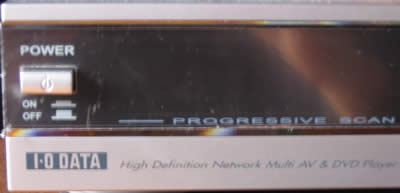
and the basic operating buttons along with the USB1.1/2.0 interface. The AvelLink Player2 also carries all the formats that it is certified to play:

On the rear, we find the Lan (10/100) connection, Composite/SVIDEO/D4 video out connection interfaces, and the Analog/Digital and Optical sound outputs:
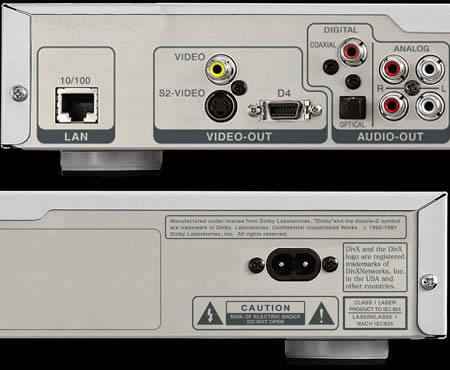
The D connector is mainly used in Japan. The functionality is the same as the universal components. This standard has some different types such as D1 480i, D2 480p, D3 720p, D5 1080p. The D4 connector supports D4 1080i high definition video input.

The LinkPlayer has a D4 to Component cable included in the package, so you can enjoy large screen viewing (with component input) with this cable. The S/B and MAC information are also present on the back (not shown for obvious reasons), along with the power input. Notice that the player can work at both AC voltage ranges, 100/240V:

The remote control is quite good and fits snugly in the palm of the hand. Click on the following image to see a high res photo:

Click To Enlarge!


Review Pages

1. Introduction
2. Features
3. The package
4. Removing the screws
5. Setting up the player
6. The Players Menu - Page 1
7. The Players Menu - Page 2
8. Updating firmware - Page 1
9. Updating firmware - Page 2
10. AvelLink Server - Page 1
11. Online content
12. DVD Loader mod - Page 1
13. DVD Loader mod - Page 2
14. The Tests
15. Playback Tests - Page 1
16. Playback Tests - Page 2
17. Playback Tests - Page 3
18. Playback Tests - Page 4
19. Playback Tests - Page 5
20. Conclusion


 

Pages

  • « first
  • ‹ previous
  • 1
  • 2
  • 3
  • 4
  • 5
  • 6
  • 7
  • 8
  • 9
  • …
  • next ›
  • last »

i-o data

Tags: i-o data
Previous Post
Interview with DaTARIUS' James Steynor
Next Post
Thermaltake Big Typhoon

Related Posts

  • IO Data Releases New External UHD Blu-ray Burners

  • Apple to Install its iPhone Screen Repair machines to Third-party Repair Centers

  • IO Data Releases New 16x BD Burners

  • Buffalo And IO Data Release First 14x Blu-ray Disc Burners

  • I-O Data Introduces BDXL External Drive

  • I-O Data Releases Slim External 6x Blu-Ray Writer

  • I-O Data Ships The BRD-SH12B 12x Blu-ray Burner in Japan

  • I-O Data Signs Linux Software Patent Agreement With Microsoft

Latest Reviews

The Technology Stack Behind Modern Digital Gaming Platforms
Consumer Electronics

The Technology Stack Behind Modern Digital Gaming Platforms

be quiet! Dark Rock Pro 6
Cooling Systems

be quiet! Dark Rock Pro 6

How Online Casinos Use Encryption, Verification, and Risk Controls to Build User Trust
Enterprise & IT

How Online Casinos Use Encryption, Verification, and Risk Controls to Build User Trust

Why Low-Latency Infrastructure Matters More Than Raw Specs
Enterprise & IT

Why Low-Latency Infrastructure Matters More Than Raw Specs

In the Age of AI Phishing, the Best User Experience Might Be the One That Feels Safest
Enterprise & IT

In the Age of AI Phishing, the Best User Experience Might Be the One That Feels Safest

Popular News

TEAMGROUP Launches EXPERT P34F Find My External SSD

TEAMGROUP Launches EXPERT P34F Find My External SSD

CORSAIR announces Vanguard Pro 96 and Vanguard 96 Gaming Keyboards

CORSAIR announces Vanguard Pro 96 and Vanguard 96 Gaming Keyboards

Samsung announces Galaxy Tab S11 and Galaxy S25 FE series

Samsung announces Galaxy Tab S11 and Galaxy S25 FE series

Viltrox Showcases Upcoming Lens Lineup and New TTL Flash at IBC 2025

Viltrox Showcases Upcoming Lens Lineup and New TTL Flash at IBC 2025

MSI Launches FORGE GK600 TKL WIRELESS Special Edition Compact Mechanical Keyboard

MSI Launches FORGE GK600 TKL WIRELESS Special Edition Compact Mechanical Keyboard

Panasonic Introduces the First Ultra-Telephoto Zoom Lens in the LUMIX S Series

Panasonic Introduces the First Ultra-Telephoto Zoom Lens in the LUMIX S Series

MSI Launches DATAMAG 40Gbps Magnetic Portable SSD

MSI Launches DATAMAG 40Gbps Magnetic Portable SSD

Viltrox Joins the L-Mount Alliance, Expanding Creative Possibilities

Viltrox Joins the L-Mount Alliance, Expanding Creative Possibilities

Main menu

  • Home
  • News
  • Reviews
  • Essays
  • Forum
  • Legacy
  • About
    • Submit News

    • Contact Us
    • Privacy

    • Promotion
    • Advertise

    • RSS Feed
    • Site Map
  • About
  • Privacy
  • Contact Us
  • Promotional Opportunities @ CdrInfo.com
  • Advertise on out site
  • Submit your News to our site
  • RSS Feed




