Breaking News

Toshiba Storage Trends 2026 AWS introduces Graviton5 CPU New Stoneflow mousepads by ENDORFY XPG Launches New ARMAX DDR5 Gaming Memory Series TEAMGROUP Launches the TEAMGROUP PD40 Mini External SSD

logo

  • Share Us
    • Facebook
    • Twitter
  • Home
  • Home
  • News
  • Reviews
  • Essays
  • Forum
  • Legacy
  • About
    • Submit News

    • Contact Us
    • Privacy

    • Promotion
    • Advertise

    • RSS Feed
    • Site Map

Search form

GlobalSat BT-338, SD-502 and BC-337

Jan 13,2006 0

3. BT-338 Installation


Review Pages

1. Introduction
2. GlobalSat BT-338
3. BT-338 Installation
4. GlobalSat SD-502
5. SD-502 Installation
6. GlobalSat BC-337
7. Tests - Day 1
8. Tests - Day 2
9. Conclusion


In order to start using the BT-338, firstly you have to fully charge it. From our tests, it would need around 2~2.5 hours το fully charged, but remember its battery can last up to 17hours! After pressing the power button, you can move to your connected device, at our case a Dell Axim x50V with Windows Mobile 2003 SE. The installation process is clearly described at a included PDF file, but we will show some steps for your reference.

Start by accesing the bluetooth manager and tap New->Connect
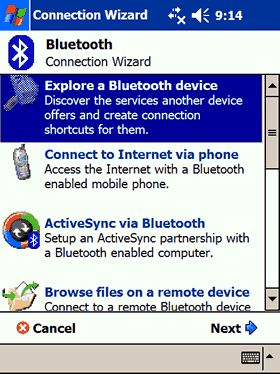
The BT-338 will show up with the BT-GPS-316FB2 ID:
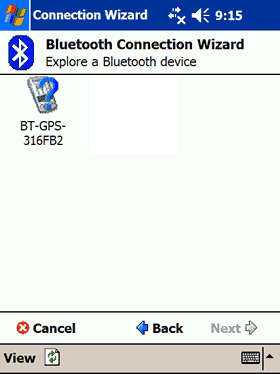
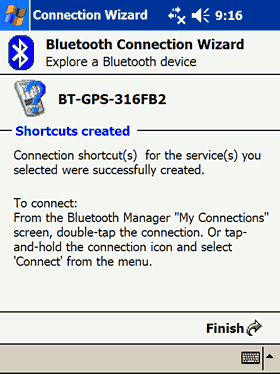
Press Next->Select BT-GPS COM Port -> Next
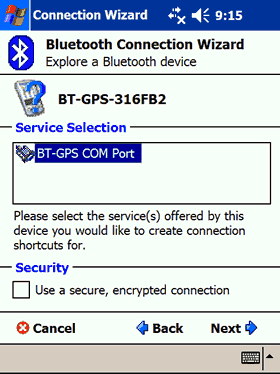
Done!
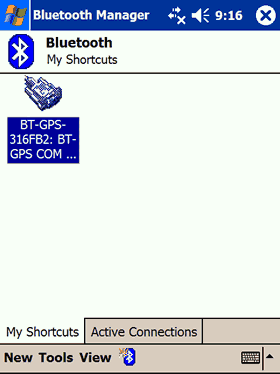
After accessing the BT Manager, press right click
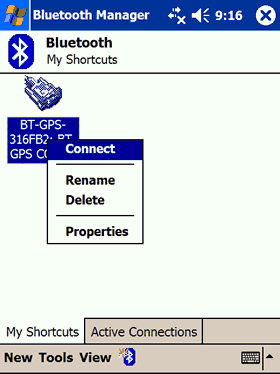
, select Connect
Finally, our BT-338 is connected with the Dell Axim x50V PDA and ready to use!
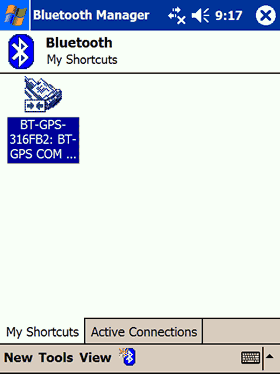
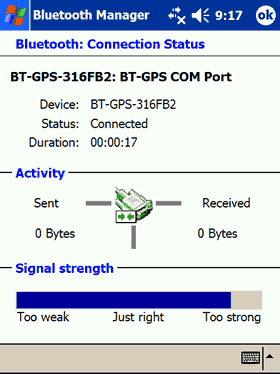
There are several details available about the activity of the BT port,
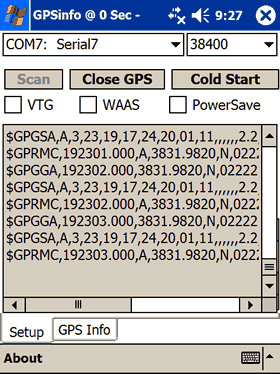
Globalsat suggests to use the included GPS Info software for checking if and how the BT-338 works. There is an executable file at the included CD-ROM disc, run it, then follow the instructions and will be installed at your PDA. While the included PDF manual suggests to look at COM5, our BT-338 found at COM7, make sure to select the communication speed (38400). Press the "Scan GPS" and if all goes well, you will see many numbers start scrolling down. Don't be afraid, its just what the receiver gets from the satellites.
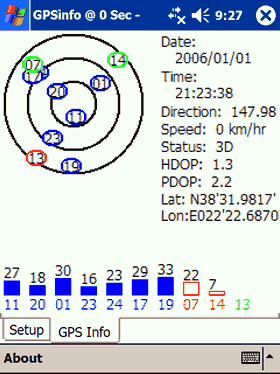
After waiting few seconds, select the "GPS Info" tab to see several useful information about the satellites signal power, the current speed and co-ordinations. Our BT-338 works just fine even its placed at a window, real life tests later at this article...
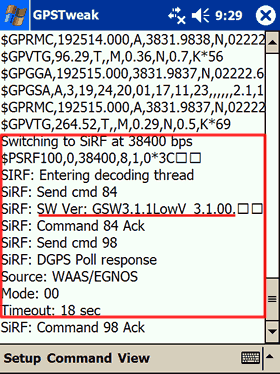
Are we done? Not yet, lets check several other useful information, like the device firmware revision (latest know 3.1.1), with GPS Tweak. By using the special SiRF mode, we confirmed that our device had the 3.1.1 firmware:
 

Review Pages
1. Introduction
2. GlobalSat BT-338
3. BT-338 Installation
4. GlobalSat SD-502
5. SD-502 Installation
6. GlobalSat BC-337
7. Tests - Day 1
8. Tests - Day 2
9. Conclusion


Pages

  • « first
  • ‹ previous
  • 1
  • 2
  • 3
  • 4
  • 5
  • 6
  • 7
  • 8
  • 9
  • next ›
  • last »

GlobalSat

Tags: GlobalSat
Previous Post
AMD 4200+ X2
Next Post
Dell Axim x51v

Related Posts

  • Globalsat BT-368

  • Globalsat TR-101

  • Globalsat BT-328 Review

  • Globalsat BT-359b

  • Globalsat BT-359: The Next Generation Bluetooth GPS Receiver

  • Globalsat GH-601

  • Ricoh and GlobalSat Embed GPS Data into Digital Images

  • Turn Your iPod Into a Wireless Music Center

Latest Reviews

Noctua NP-DM3 desk mat
Gaming

Noctua NP-DM3 desk mat

Crucial P510 2TB NMVE
PC components

Crucial P510 2TB NMVE

The Quiet Technology Behind the Spin
Enterprise & IT

The Quiet Technology Behind the Spin

Crucial DDR5 Pro 6400 CL32
PC components

Crucial DDR5 Pro 6400 CL32

SOUNDPEATS Clip1
Consumer Electronics

SOUNDPEATS Clip1

Popular News

COLORFUL Introduces CVN B850I GAMING FROZEN Motherboard

COLORFUL Introduces CVN B850I GAMING FROZEN Motherboard

COLORFUL Presents CVN X870 ARK FROZEN Motherboard for AMD Ryzen 9000 CPUs

COLORFUL Presents CVN X870 ARK FROZEN Motherboard for AMD Ryzen 9000 CPUs

COLORFUL Presents the B860 Series Motherboards

COLORFUL Presents the B860 Series Motherboards

Intel-AMD new motherboards announced

Intel-AMD new motherboards announced

TEAMGROUP Launches EXPERT P34F Find My External SSD

TEAMGROUP Launches EXPERT P34F Find My External SSD

ASRock AM5 Motherboards Now Fully Support AMD Ryzen 9 9950X3D & 9900X3D Processors

ASRock AM5 Motherboards Now Fully Support AMD Ryzen 9 9950X3D & 9900X3D Processors

Samsung announces Galaxy Tab S11 and Galaxy S25 FE series

Samsung announces Galaxy Tab S11 and Galaxy S25 FE series

Viltrox Showcases Upcoming Lens Lineup and New TTL Flash at IBC 2025

Viltrox Showcases Upcoming Lens Lineup and New TTL Flash at IBC 2025

Main menu

  • Home
  • News
  • Reviews
  • Essays
  • Forum
  • Legacy
  • About
    • Submit News

    • Contact Us
    • Privacy

    • Promotion
    • Advertise

    • RSS Feed
    • Site Map
  • About
  • Privacy
  • Contact Us
  • Promotional Opportunities @ CdrInfo.com
  • Advertise on out site
  • Submit your News to our site
  • RSS Feed