Breaking News

NVIDIA and Microsoft Reinvent Windows PCs for the Age of Personal AI WD at Computex 2026 Lexar at COMPUTEX 2026 ASRock Announces AMD Radeon RX 9070 GRE Steel Legend Dark 12GB OC Graphics Card ARCTIC Showcases New Products at COMPUTEX 2026

logo

  • Share Us
    • Facebook
    • Twitter
  • Home
  • Home
  • News
  • Reviews
  • Essays
  • Forum
  • Legacy
  • About
    • Submit News

    • Contact Us
    • Privacy

    • Promotion
    • Advertise

    • RSS Feed
    • Site Map

Search form

EnGenius ECS2512FP Network Switch

Dec 23,2022 0

3. Features


Review Pages

1. Introduction
2. Retail Package
3. Features
4. Installation/Performance
5. Conclusion


Before starting the installation process for any EnGenius product, you need to create a free online account. You can login either with new account or use Google/Facebook or E Partner login credentials. After we finished our EnGenius Cloud account, we then head over to the Google Play store and got the Cloud-To-Go free app. You need to use your already EnGenius Cloud account password/login in order to access the app features. After pressing Register Device you should scan the QR code that is under the device to get things started.

The device recognized immediately and after pressing register, the device will connect to the Internet and register itself at your Cloud network. So we added our first EnGenius Cloud device at our personal network. After few minutes the device will get the latest stable firmware, reboot and will be ready to get things started.

In order to access the device menu you can either type its IP through Chrome or via EnGenius Cloud Network. For the local network you can use admin/admin as default password/login (change this to secure device).
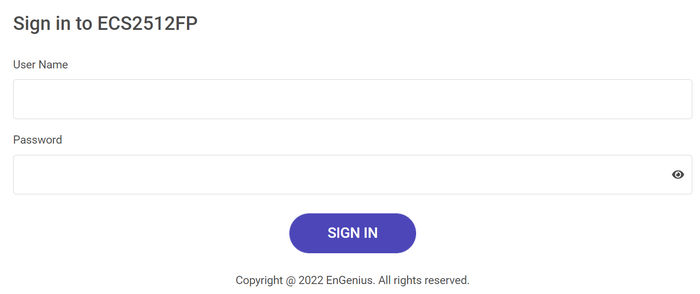
The local web admin interface includes much information, which however is locked from the EnGenius Cloud network, so it’s advised to better to over for its administration or via the Cloud-To-Go app.

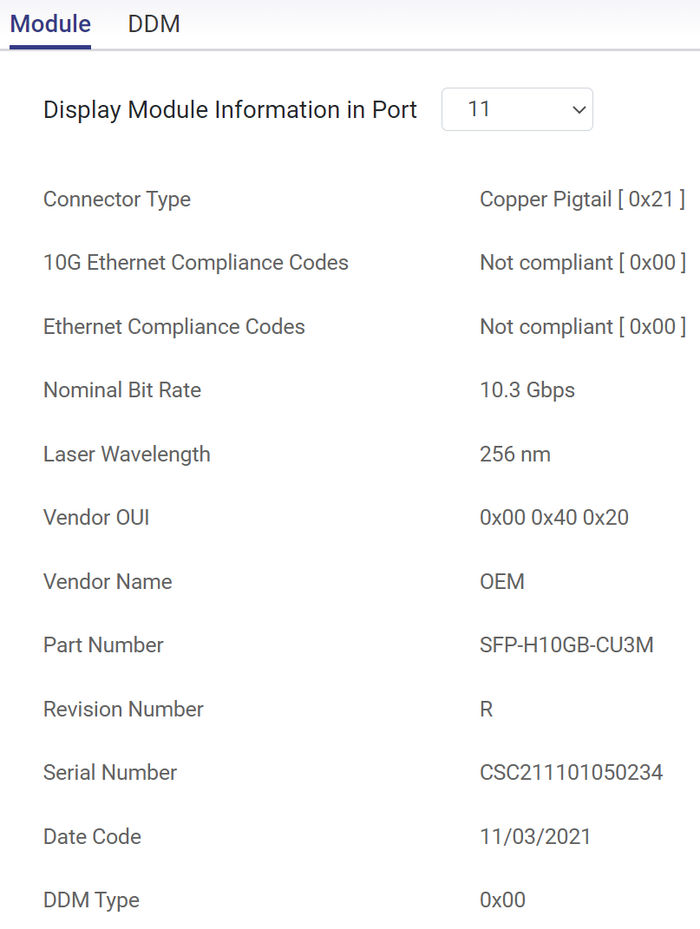
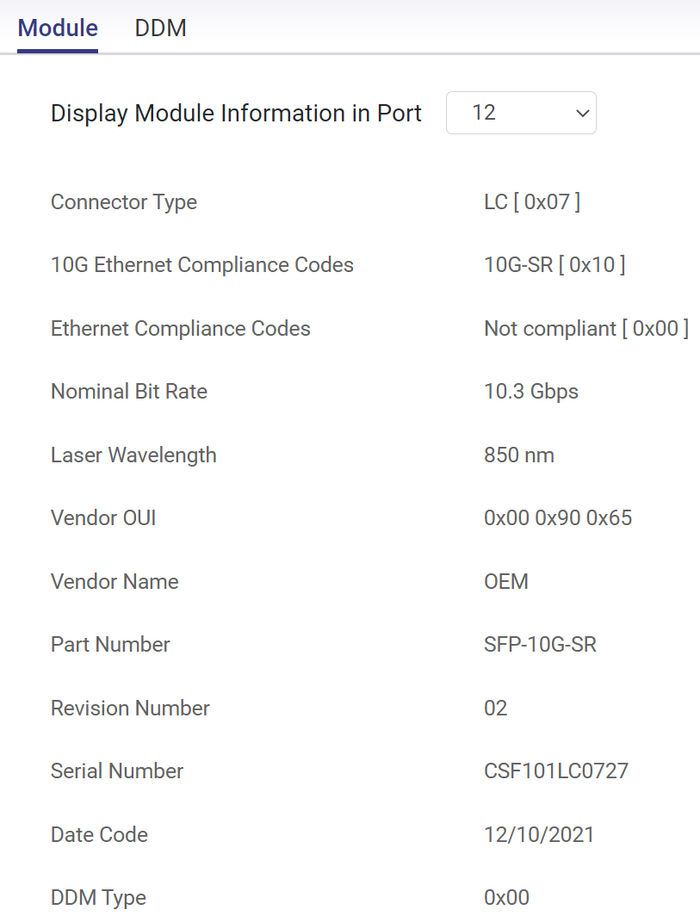
There is a lot of information at the local web interface about the used ports, its CPU usage, MAC addresses, security, etc. For the SFP+ ports there is additional information, depending the used module
 

Review Pages

1. Introduction
2. Retail Package
3. Features
4. Installation/Performance
5. Conclusion


Pages

  • « first
  • ‹ previous
  • 1
  • 2
  • 3
  • 4
  • 5
  • next ›
  • last »

EnGenius

Tags: EnGenius
Previous Post
Toshiba MG10 20TB HDD
Next Post
5 Reasons Students Need Technology in the Classroom

Related Posts

  • EnGenius ECW515 Brings Wi-Fi 7 Performance to In-Room and In-Unit Deployments

  • EnGenius Unveils Cloud-Managed ECW536S Wi-Fi 7 with 24/7 AirGuard Security

  • EnGenius ECW520 AP

  • EnGenius Brings Wi-Fi 7 to Small Businesses with Affordable ECW510 Access Point

  • EnGenius Multi-Gigabit Switch Delivers 2.5G Performance with 90W PoE

  • EnGenius Announces Affordable ECW520 Access Point

  • EnGenius Launches Cloud-Lite Switch Series

  • EnGenius EXT1105P Switch Extender

Latest Reviews

Swit NP-FZ100 Battery
Cameras

Swit NP-FZ100 Battery

The Technology Stack Behind Modern Digital Gaming Platforms
Consumer Electronics

The Technology Stack Behind Modern Digital Gaming Platforms

be quiet! Dark Rock Pro 6
Cooling Systems

be quiet! Dark Rock Pro 6

How Online Casinos Use Encryption, Verification, and Risk Controls to Build User Trust
Enterprise & IT

How Online Casinos Use Encryption, Verification, and Risk Controls to Build User Trust

Why Low-Latency Infrastructure Matters More Than Raw Specs
Enterprise & IT

Why Low-Latency Infrastructure Matters More Than Raw Specs

Popular News

TEAMGROUP Launches EXPERT P34F Find My External SSD

TEAMGROUP Launches EXPERT P34F Find My External SSD

CORSAIR announces Vanguard Pro 96 and Vanguard 96 Gaming Keyboards

CORSAIR announces Vanguard Pro 96 and Vanguard 96 Gaming Keyboards

MSI Launches FORGE GK600 TKL WIRELESS Special Edition Compact Mechanical Keyboard

MSI Launches FORGE GK600 TKL WIRELESS Special Edition Compact Mechanical Keyboard

Samsung announces Galaxy Tab S11 and Galaxy S25 FE series

Samsung announces Galaxy Tab S11 and Galaxy S25 FE series

Viltrox Showcases Upcoming Lens Lineup and New TTL Flash at IBC 2025

Viltrox Showcases Upcoming Lens Lineup and New TTL Flash at IBC 2025

Panasonic Introduces the First Ultra-Telephoto Zoom Lens in the LUMIX S Series

Panasonic Introduces the First Ultra-Telephoto Zoom Lens in the LUMIX S Series

MSI Launches DATAMAG 40Gbps Magnetic Portable SSD

MSI Launches DATAMAG 40Gbps Magnetic Portable SSD

Viltrox Joins the L-Mount Alliance, Expanding Creative Possibilities

Viltrox Joins the L-Mount Alliance, Expanding Creative Possibilities

Main menu

  • Home
  • News
  • Reviews
  • Essays
  • Forum
  • Legacy
  • About
    • Submit News

    • Contact Us
    • Privacy

    • Promotion
    • Advertise

    • RSS Feed
    • Site Map
  • About
  • Privacy
  • Contact Us
  • Promotional Opportunities @ CdrInfo.com
  • Advertise on out site
  • Submit your News to our site
  • RSS Feed