Breaking News

SCUF Gaming Introduces the SCUF Nemesis Pro 8K PC Controller Family CORSAIR Expands the iCUE LINK Ecosystem with Quieter, Higher-Performance AIOs and Fans Razer announces XBOX 25 Anniversary Collection Apple Unveils Next-Generation Mac Lineup and Silicon Architecture M6, M5 Pro, M5 Max, and M5 Ultra Garmin expands its flagship performance smartwatch lineup with fēnix9 and fēnix9 Pro

logo

  • Share Us
    • Facebook
    • Twitter
  • Home
  • Home
  • News
  • Reviews
  • Essays
  • About
    • Submit News

    • Contact Us
    • Privacy

    • Promotion
    • Advertise

    • RSS Feed

Search form

EnGenius ECS2512FP Network Switch

Dec 23,2022 0

2. Retail Package


Review Pages

1. Introduction
2. Retail Package
3. Features
4. Installation/Performance
5. Conclusion


The EnGenius Cloud ECS2512FP is an enterprise product that comes with a high retail price ~$749, which is a good price for all it offers. The product has 2 years of warranty and of course all major certifications like CE, FCC and has been tested to work at 0ºC~40 ºC and Humidity (non-condensing) 90% or less. The retail package is simple, just the basic stuff here for Enterprise users.

Opening the box, unveils its contents, everything is well secured. The main product is secured and well placed at a cartoon box to protect it at transportation.

Inside, you will find two mounting plates, screws, four plastic feet, a RJ45 console cable and a power cable.

Removing this product, unveil a "big" network switch. Its dimensions are 230mmX330mmX44mm with 2.6kg weight and of course the building material is metal full house with vents at its sides and with a pair of "loud" fans that help dispass the produced internal heat.

At the bottom area you will only find the product label with some information.

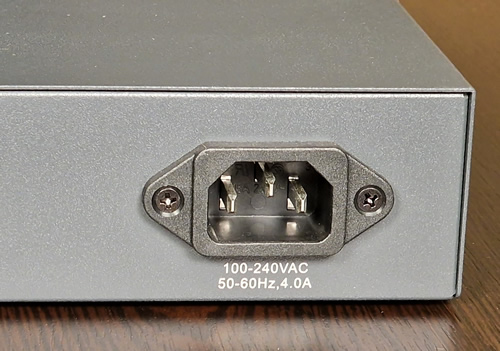
At the back you will find the power jack

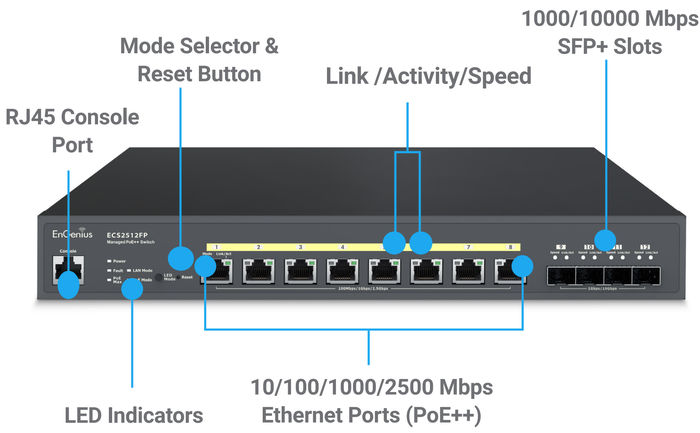
At the front you will find all major connections that are explained below, users can connect up to 8-2.5G Lan ports and four 1/10G SFP+ Slots:

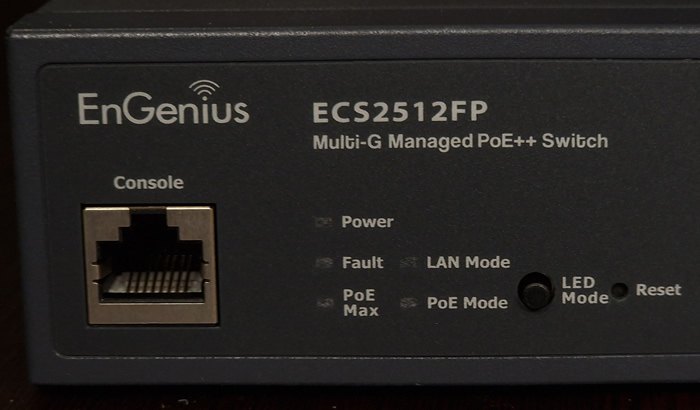
The Power Led is solid green when the device is operating and there is also a Fault LED and turns RED is problem occurs. There are also a LAN mode and PoE mode, which intent to let you know if or not devices use PoE to get powered on. The PoE Max will light up when you get to the maximum 240Watt power limit for PoE devices. The Reset button can be used to obviously reset the device.
You can connect up to four devices with 1G/10G SPF+ capability, there are several adapters either for normal LAN devices or fiber, from various manufacturers or even EnGenius with up to 300m connectivity.

At the main area you can find 8 2.5G ports for connecting various devices. Each port supports up to 60Watt PoE devices and all ports have a maximum of 240Watt consumption.


Review Pages

1. Introduction
2. Retail Package
3. Features
4. Installation/Performance
5. Conclusion


Pages

  • « first
  • ‹ previous
  • 1
  • 2
  • 3
  • 4
  • 5
  • next ›
  • last »

EnGenius

Tags: EnGenius
Previous Post
Toshiba MG10 20TB HDD
Next Post
5 Reasons Students Need Technology in the Classroom

Related Posts

  • EnGenius ECW515 Brings Wi-Fi 7 Performance to In-Room and In-Unit Deployments

  • EnGenius Unveils Cloud-Managed ECW536S Wi-Fi 7 with 24/7 AirGuard Security

  • EnGenius ECW520 AP

  • EnGenius Brings Wi-Fi 7 to Small Businesses with Affordable ECW510 Access Point

  • EnGenius Multi-Gigabit Switch Delivers 2.5G Performance with 90W PoE

  • EnGenius Announces Affordable ECW520 Access Point

  • EnGenius Launches Cloud-Lite Switch Series

  • EnGenius EXT1105P Switch Extender

Latest Reviews

Samsung PRO Ultimate 512GB microSDXC
Cameras

Samsung PRO Ultimate 512GB microSDXC

be quiet! Light Mount TKL
Consumer Electronics

be quiet! Light Mount TKL

be quiet! Light Loop IO LCD
Cooling Systems

be quiet! Light Loop IO LCD

KIOXIA Exceria Pro G2 NVME 2TB
PC components

KIOXIA Exceria Pro G2 NVME 2TB

Online Casino Games That Offer Something Different
Consumer Electronics

Online Casino Games That Offer Something Different

Popular News

CORSAIR announces Vanguard Pro 96 and Vanguard 96 Gaming Keyboards

CORSAIR announces Vanguard Pro 96 and Vanguard 96 Gaming Keyboards

MSI Launches FORGE GK600 TKL WIRELESS Special Edition Compact Mechanical Keyboard

MSI Launches FORGE GK600 TKL WIRELESS Special Edition Compact Mechanical Keyboard

TEAMGROUP Launches EXPERT P34F Find My External SSD

TEAMGROUP Launches EXPERT P34F Find My External SSD

Samsung announces Galaxy Tab S11 and Galaxy S25 FE series

Samsung announces Galaxy Tab S11 and Galaxy S25 FE series

Viltrox Showcases Upcoming Lens Lineup and New TTL Flash at IBC 2025

Viltrox Showcases Upcoming Lens Lineup and New TTL Flash at IBC 2025

Panasonic Introduces the First Ultra-Telephoto Zoom Lens in the LUMIX S Series

Panasonic Introduces the First Ultra-Telephoto Zoom Lens in the LUMIX S Series

MSI Launches DATAMAG 40Gbps Magnetic Portable SSD

MSI Launches DATAMAG 40Gbps Magnetic Portable SSD

Viltrox Joins the L-Mount Alliance, Expanding Creative Possibilities

Viltrox Joins the L-Mount Alliance, Expanding Creative Possibilities

Main menu

  • Home
  • News
  • Reviews
  • Essays
  • About
    • Submit News

    • Contact Us
    • Privacy

    • Promotion
    • Advertise

    • RSS Feed
  • About
  • Privacy
  • Contact Us
  • Promotional Opportunities @ CdrInfo.com
  • Advertise on out site
  • Submit your News to our site
  • RSS Feed