Breaking News

ASUS Unveils Mac-Friendly Features on ProArt Displays to Enhance Workflows Ricoh announces GR IV Monochrome Acer ProDesigner PE320QX monitor excels at tests! MSI announces Roamii BE Pro Mesh WiFi 7 System Samsung Mobile Gaming Hub Reshapes Personalized Play

logo

  • Share Us
    • Facebook
    • Twitter
  • Home
  • Home
  • News
  • Reviews
  • Essays
  • Forum
  • Legacy
  • About
    • Submit News

    • Contact Us
    • Privacy

    • Promotion
    • Advertise

    • RSS Feed
    • Site Map

Search form

Crucial DDR5 Pro 6400 CL32

Nov 18,2025 0

2. Tests


Review Pages

1. Introduction - Retail package
2. Tests
3. Conclusion


For our tests, we used the following test system

  • AMD 7950X CPU + Noctua NH-U12A Chromax.black (2x120mm fans)
  • Asus ProArt X670E-CREATOR WIFI Motherboard with the latest BIOS installed (3401 AGESA 1.2.7.0)
  • MSI 4090 Suprim X Graphics Card with the latest Nvidia Drivers installed
  • Samsung 980Pro 1TB with the latest BIOS NVME SSD
  • Seasonic Vertex GX 1000W Power Supply
  • Dell S2721QS 4K Monitor @ 60Hz
  • Windows 11 Pro Edition + latest updates installed
  • Test Stability:
    • quick testing 30min OCCT v12 Memory Test
    • stable testing Testmem5 absolute(01102021)@anta777.cfg (3 cycles)

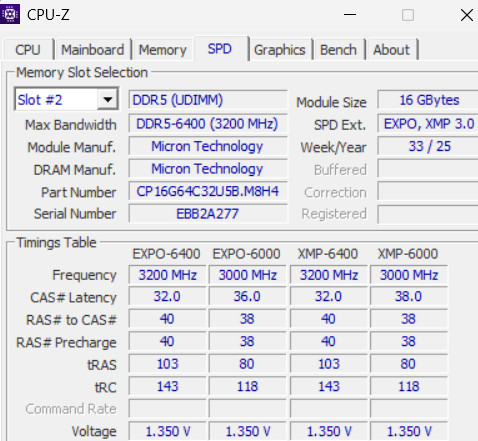
Both modules were installed at the B2/B4 channels suggested by the motherboard vendor. With the latest ASUS BIOS, the boot-up process is very quick compared to the past. The memory by default is recognized as DDR5-5200 under AUTO mode, and you have to manually select the EXPO profile either for the DDR5-6000 or DDR5-6400 speeds. Getting into Windows 11, we get more information about our memory kit from the CPU-Z software.

The DDR5-6400 memory kit was manufactured in the 33rd week of 2025 and has both EXPO/XMP profiles running at 6000/6400MHz at 1.35V.
Then we used the free latest version of the Thaiphoon Burner, which includes more information about the used modules.

The default running speed of the Crucial Pro OC DDR5-6400 is DDR5-5200

Enabling the XMP/EXPO profile (under BIOS) can give you either a DDR5-6000 or a DDR5-6400 speed.

This memory kit doesn't like all further performance tuning, at least with stock 1.35V, we couldn't make the system post with anything higher than stock 6400MHz speeds, or even lower CL, either in 6000MHz or 6400MHz, so OC isn't something that is possible here.

Lets now start our testing.

AIDA64 Cache And Memory Benchmark
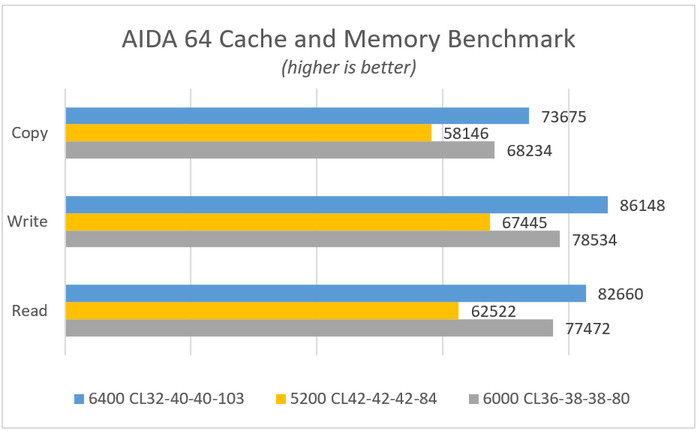
As was expected, the higher memory performance comes from the 6400CL32, which delivers very good performance. We did notice high Cache latency, which isn't explained; maybe it's the beta BIOS we were using.

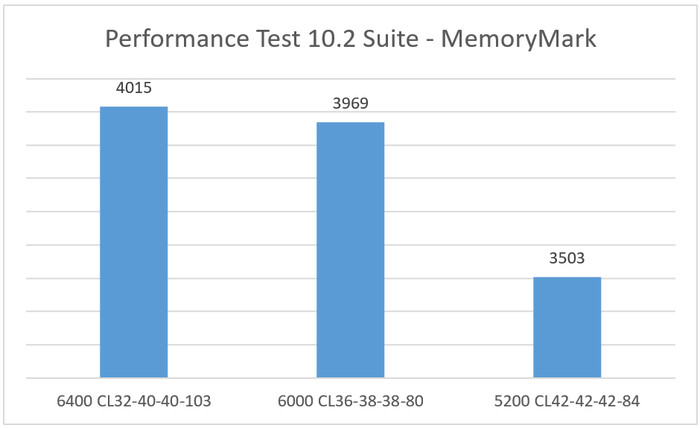
MemoryMark (Performance Test 10.2 Suite)

This test gives an overall score for the installed memory, and we can see that the 6400CL32 gave a score above 4000 points.
GeekBench v6.0.3

Passing to the well-known GeekBench, this software tests the performance either in single or total cores. Here we got better results from the 6000MHz preset.

PCMark10

We used the latest version of the well-known PCMark10, and there are some minor differences between the various frequencies of each EXPO profile.


Review Pages

1. Introduction - Retail package
2. Tests
3. Conclusion


Pages

  • « first
  • ‹ previous
  • 1
  • 2
  • 3
  • next ›
  • last »

Crucial Technology

Crucial

Tags: Crucial Technology Crucial
Previous Post
The Quiet Technology Behind the Spin
Next Post
SOUNDPEATS Clip1

Related Posts

  • Micron Announces Exit from Crucial Consumer Business!!

  • Crucial P510 2TB NMVE

  • Crucial UK Black Friday SSD Deals Are Live

  • Crucial Unleashes Its Most Powerful Gaming Memory Yet: DDR5 Pro OC 6400 CL32

  • Crucial’s UK promos for Amazon’s Prime Day Deals 2025

  • Crucial UK - Amazon Prime Deals

  • Crucial T710 2TB NVME SSD

  • Crucial X10 2TB Portable SSD

Latest Reviews

The Difference Between American and European Stakes and Why It Changes How People Bet
Enterprise & IT

The Difference Between American and European Stakes and Why It Changes How People Bet

Endorfy Thock V2 Wireless Keyboard
PC components

Endorfy Thock V2 Wireless Keyboard

Noctua NH-D15 G2 Chromax.Black
Cooling Systems

Noctua NH-D15 G2 Chromax.Black

EnGenius ECW520 AP
Enterprise & IT

EnGenius ECW520 AP

Noctua NP-DM3 desk mat
Gaming

Noctua NP-DM3 desk mat

Popular News

COLORFUL Introduces CVN B850I GAMING FROZEN Motherboard

COLORFUL Introduces CVN B850I GAMING FROZEN Motherboard

COLORFUL Presents CVN X870 ARK FROZEN Motherboard for AMD Ryzen 9000 CPUs

COLORFUL Presents CVN X870 ARK FROZEN Motherboard for AMD Ryzen 9000 CPUs

COLORFUL Presents the B860 Series Motherboards

COLORFUL Presents the B860 Series Motherboards

TEAMGROUP Launches EXPERT P34F Find My External SSD

TEAMGROUP Launches EXPERT P34F Find My External SSD

ASRock AM5 Motherboards Now Fully Support AMD Ryzen 9 9950X3D & 9900X3D Processors

ASRock AM5 Motherboards Now Fully Support AMD Ryzen 9 9950X3D & 9900X3D Processors

Samsung announces Galaxy Tab S11 and Galaxy S25 FE series

Samsung announces Galaxy Tab S11 and Galaxy S25 FE series

Viltrox Showcases Upcoming Lens Lineup and New TTL Flash at IBC 2025

Viltrox Showcases Upcoming Lens Lineup and New TTL Flash at IBC 2025

CORSAIR announces Vanguard Pro 96 and Vanguard 96 Gaming Keyboards

CORSAIR announces Vanguard Pro 96 and Vanguard 96 Gaming Keyboards

Main menu

  • Home
  • News
  • Reviews
  • Essays
  • Forum
  • Legacy
  • About
    • Submit News

    • Contact Us
    • Privacy

    • Promotion
    • Advertise

    • RSS Feed
    • Site Map
  • About
  • Privacy
  • Contact Us
  • Promotional Opportunities @ CdrInfo.com
  • Advertise on out site
  • Submit your News to our site
  • RSS Feed